THINKDIAG 2 & EDIAG Plus Firmware Recovery – USB-C, No Programmer

X-431 Thinkdiag 2 and EdiagPlus testing 1.1.3

Sign in to download for free

Post #101

@Bin
I discovered that version 053 appeared without any announcement.
Now, with serial number 98878, the menu is not cut down and everything is in its proper place.

There is one issue, though. I also encountered a problem installing brands.
The download completes successfully, but an error is reported during installation.
During installation, the brand archive can be found in the /sdcard/cnlaunch/X431Pro3S/downloadZip/ folder (for example, MT_DEMO).
After the error message appears, it disappears from this folder.
If you go to /DIAGNOSTIC/VEHICLES/USA/MT_DEMO/V10.11, you can see the new files; what immediately stands out is that the license file size is exactly zero.

I can assume that something goes wrong with the license when the archive is extracted???
 

Post #102

@Bin
I discovered that version 053 appeared without any announcement.
Now with serial number 98878 the menu is not neutered and everything is in its place.

There is one but. I also encountered a problem installing the stamps.
The download is successful, but an error is reported during installation.
During installation, the archive of brands can be found in the folder /sdcard/cnlaunch/X431Pro3S/downloadZip/ (for example MT_DEMO)
After the error message, it disappears from this folder.
If you go to /DIAGNOSTIC/VEHICLES/USA/MT_DEMO/V10.11 you can see new files, but it’s striking that the license file weighs exactly zero .

I can assume that something goes wrong with the license when unpacking the archive???
The same with me, I don't need MT files. Just tested it ...
 

Post #103

@Bin
I noticed that version 053 appeared without any announcement.
Now, with the 98878 serial number, the menu is no longer limited, and everything is where it should be.

There is one issue, though. I also encountered a problem installing brands.
The download completes successfully, but an error is reported during installation.
During installation, the brand archive can be found in the /sdcard/cnlaunch/X431Pro3S/downloadZip/ folder (for example, MT_DEMO).
After the error message appears, it disappears from that folder.
If you go to /DIAGNOSTIC/VEHICLES/USA/MT_DEMO/V10.11, you can see the new files, and what immediately stands out is that the license file size is exactly zero.

I can only assume that something goes wrong with the license while the archive is being unpacked???
We tested the 9887-prefix DBScar VII with user @Coca using a TD2 license. When opening a vehicle brand and connecting to the dongle, the device throws an error and the brand disappears. The container from the DBScar 7 license behaves the same way. We didn’t have enough time to investigate it fully.
 

Post #104

Is there really no one else with the same problem?
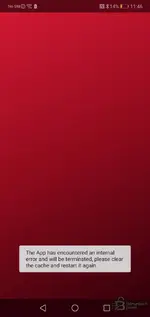
The app is installed, but when launched, it gives an error and crashes.

  • Phone with 32-bit support (huawei p20 lite)
  • Android 9
  • Completely formatted the phone
  • Changed the system language from Russian to English
  • Granted every possible permission, even more than required

What else can I try?

photo_2026-09-06_21-54-29.webp
 

Post #105

Doesn't it have any problems with the clothes?
The application is installed, but it launches, gives an error, and crashes.

  • Phone with 32-bit support (Huawei P20 Lite)
  • Android 9
  • Recently formatted phone
  • I set the system language to English instead of Russian
  • I granted every possible permission, even more than required

What can be done?

[ADJUNTO]7887[/ADJUNTO]
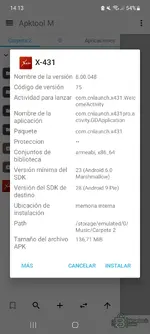
Data from version 0.0.48. You may need to start installing from that version because the latest ones are test versions for dbscar7. It works fine up to version vv8.00.51, and I have tested it.
 

Attachments

  • Screenshot_20260906_141315_Apktool M.webp
    Screenshot_20260906_141315_Apktool M.webp
    64.9 KB · Views: 60

Post #106

Doesn't it have any problems with the clothes?
The application is installed, but it launches, gives an error, and crashes.

  • Phone with 32-bit support (Huawei P20 Lite)
  • Android 9
  • Recently formatted phone
  • I set the system language to English instead of Russian
  • I granted every possible permission, even more than required

What can be done?

View attachment 7887
Screenshot_20260906_143419_Chrome.webp
 

Post #107

Is there really no one else with the same problem?
The app is installed, but when launched, it gives an error and crashes.

  • Phone with 32-bit support (huawei p20 lite)
  • Android 9
  • Completely formatted the phone
  • Changed the system language from Russian to English
  • Granted every possible permission, even more than required

What else can I try?

View attachment 7887
Send me the log file from: cnlaunch/X431/Log/
 

Post #108

Send me the log file from: cnlaunch/X431/Log/
Here you go. I put it in an archive because I couldn't attach it in .cr format.
 

Attachments

  • crash_2026-09-06 11-14-40

Post #109

You're welcome. I put it in an archive because it couldn't be attached in .cr format.
For some reason, it crashes when trying to read the SIM number because Android doesn’t allow it. I’m going to strip all of that out of the APK now. The Chinese developers really overdid it — I don’t know how I didn’t notice this earlier.
 

Post #110

Data from version 0.0.48. It may be worth starting the installation with that version because the latest versions are test versions for dbscar7. Version vv8.00.51 is not working properly yet, and I have already tested it.
Both 51 and 53 work without any issues on Realme 55 with Android 15. The only thing missing is the option to install on an SD card.
 

Post #111

Is there really no one else with the same problem?
The application is installed, but when launched, it gives an error and crashes.

  • Phone with 32-bit support (Huawei P20 Lite)
  • Android 9
  • Completely formatted the phone
  • Set the system language to English instead of Russian
  • Granted every possible permission, even more than required

What else can I try?

View attachment 7887
Please download the latest version from your account dashboard: https://binunlock.com/account/x431.

I released a fix about 10 hours ago, along with fixes addressing the other issues you reported via private messages.
 

Post #112

Yes, latest version updating everything ok. Favorites are still disabled, it would be good if they were enabled. HynesPro only cars still no trucks, but whatever, after the test period I will buy a one-year subscription.
 

Post #113

Please download the latest version from your account dashboard: https://binunlock.com/account/x431.

I released a fix about 10 hours ago, along with fixes addressing the other issues you reported via private messages.
Thank you, I installed the updated version and it launched successfully.
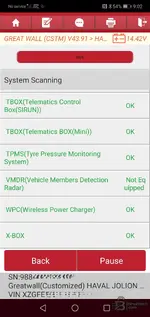
I tested it on a 2024 Haval Jolion, selected all GWM makes, and got the following results:

1) When searching for makes by name, the keyboard immediately disappears unless landscape orientation is used, meaning it is impossible to enter any text. However, as I understand it, this is a feature of the app since it is designed for tablets.
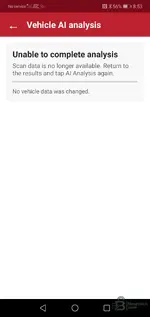
2) If I simply select the changcheng make, there is no option to display errors after the modules have been scanned. The only available button is AI analysis, which results in an error:

Screenshot_20260907_205359_com.cnlaunch.x431.webp

3) If I select the changchengzy make, the scan freezes at 100% and the buttons stop responding. The only option is to exit the app:

Screenshot_20260907_210231_com.cnlaunch.x431.webp

4) If I access the modules manually step by step, I can read errors and so on. The TPMS module reads current data without any issues, and through the IP module (instrument cluster), I can access the service mileage reset function, which changes the value correctly.
However, for example, I could not find the function for retracting the rear brake pads for replacement in the ESP module (but I will also look under the Haval F7 model).

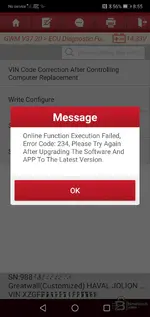
5) When attempting to code modules or select certain functions, error 234 appears:

Screenshot_20260907_205523_com.cnlaunch.x431.webp
 

Post #114

1) When searching for brands by name, if you don't use landscape orientation, the keyboard immediately disappears, meaning it is impossible to enter text. But as I understand it, this is a feature of the app because it is designed for tablets.
I can confirm this, but it even happens on a tablet — 1920x1200 224dpi (hdpi).
 

Post #115

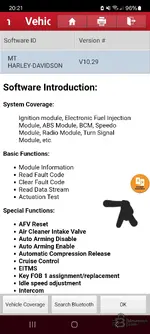
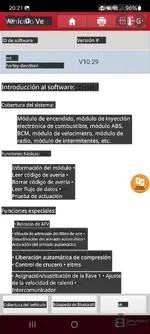
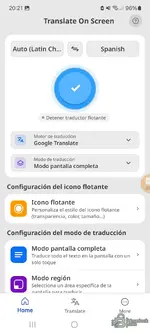
This is how I was able to translate the app from English to Spanish, in case anyone is interested. It's a very good way to translate directly on the screen in real time.
 

Attachments

  • Screenshot_20260907_202101_X-431.webp
    Screenshot_20260907_202101_X-431.webp
    96.3 KB · Views: 53
  • Screenshot_20260907_202114_X-431.webp
    Screenshot_20260907_202114_X-431.webp
    114.8 KB · Views: 60
  • Screenshot_20260907_202135_Translate On Screen.webp
    Screenshot_20260907_202135_Translate On Screen.webp
    71.1 KB · Views: 54

Post #116

thank i have activate my thinkdiag 2 with succes
 

Post #117

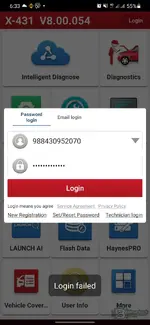
I try to reconnect today but failed. I was work on it normal for a few days
 

Post #118

Login failed
 

Attachments

  • Screenshot_20260909-063332_X-431.webp
    Screenshot_20260909-063332_X-431.webp
    58.9 KB · Views: 48

Post #119

Login failed for me too
 
Activity
So far there's no one here