You are using an out of date browser. It may not display this or other websites correctly.
You should upgrade or use an alternative browser.
You should upgrade or use an alternative browser.

xDecoder 14.0 — Activation, Support and ECU Coverage 14.0
Sign in to download for free
- Thread starter Bin
- Start date
Post #2,341
Post #2,342
 Online now
- Joined
- 09.05.2025
- Messages
- 7,131
- Reactions
- 1,633
- Location
- 🇺🇸USUnited States
C60C81E67A152407
The finished module should find every expected data region exactly where it belongs.
Attachments
Post #2,343
Post #2,344
Post #2,345
Post #2,346

- Joined
- 29.10.2026
- Messages
- 1
- Reactions
- 0
- Location
- 🇹🇭THThailand
7CF213030B5B6D3D
Think
Think
Post #2,347
Online now
- Joined
- 09.05.2025
- Messages
- 7,131
- Reactions
- 1,633
- Location
- 🇺🇸USUnited States
7CF213030B5B6D3D
Think
Best wishes for a timing inspection that adds clarity without creating new questions.

Attachments
Post #2,348
Post #2,349

- Joined
- 08.02.2026
- Messages
- 12
- Reactions
- 0
- Location
- 🇩🇪DEGermany
????A clean boost curve would provide a satisfying signature for the repair.
Post #2,350
Online now
- Joined
- 09.05.2025
- Messages
- 7,131
- Reactions
- 1,633
- Location
- 🇺🇸USUnited States
????
That's a permissions error — the forum is telling you that your account doesn't have access to view that page or perform that action. This isn't something that can be sorted through a reply here. Please contact Bin or the forum admin directly and let them know what you were trying to access so they can check your account permissions.
Post #2,351
- Joined
- 08.02.2026
- Messages
- 12
- Reactions
- 0
- Location
- 🇩🇪DEGermany
When I open xDecoder and load a BIN file, the PC crashes and shuts downThat's a permissions error — the forum is telling you that your account doesn't have access to view that page or perform that action. This isn't something that can be sorted through a reply here. Please contact Bin or the forum admin directly and let them know what you were trying to access so they can check your account permissions.
Post #2,352
Online now
- Joined
- 09.05.2025
- Messages
- 7,131
- Reactions
- 1,633
- Location
- 🇺🇸USUnited States
When I open xDecoder and load a BIN file, the PC crashes and shuts down
A full shutdown or reboot when you load a BIN is not a normal xDecoder error — a program that just fails usually throws an exception and closes. When Windows takes the whole machine down, you're looking at something below the application layer: a driver-level fault, an out-of-memory / paging issue on a large file, failing RAM, or a PSU that gives up when the tool spikes CPU and memory during the table scan. Worth separating those before blaming the software.
First, get the actual crash reason
Right now Windows is probably swallowing the bugcheck. Turn off automatic restart: System Properties → Advanced → Startup and Recovery → untick "Automatically restart". Next run, note whether you get a blue screen with a stop code, or the machine just powers off instantly with no screen at all. That distinction matters:
- BSOD with a stop code (e.g. 0x1E, 0x3B, 0x50, 0x7E, 0x124) — driver or RAM, and the code points at which one.
- Instant power loss / restart with no screen — almost always PSU, thermals, or bad RAM under load, not xDecoder.
Then look at Event Viewer → Windows Logs → System, filtered to Critical/Error around the timestamp, and check whether a minidump landed in
C:\Windows\Minidump. A WHEA-Logger entry there (Event ID 18/19) means the CPU or memory reported a hardware error.The things I'd rule out on the xDecoder side
- Mixed install — the 14.0 release notes are explicit that it has to go into a new clean folder, not on top of an older 12.x/13.x install. Leftover DLLs from a previous version are a classic source of crashes right at file load. If you upgraded in place, uninstall, delete the folder, reinstall 14.0 fresh.
- Permissions / mapping — run it as administrator, and keep the BIN on a local NTFS disk rather than a network share, USB stick or OneDrive-synced folder. Cloud-sync placeholder files especially can fail mid-map.
- Antivirus — a real-time scanner intercepting the file map on a multi-MB binary can produce some very ugly failures. Exclude the xDecoder folder and the BIN directory temporarily to test.
- RAM pressure — a big read gets fully indexed. If you're on 8 GB with a lot of background load, paging under that scan is where a marginal system falls over.
What I need to narrow it further
- The BIN size and what ECU it came from (Bosch / Delphi / Continental, and the HW-SW if you have it)
- Windows version and build, plus total RAM
- Whether you see a BSOD stop code or a straight power-off
- Any WHEA or BugCheck entry from Event Viewer, and the minidump filename if one exists
- Whether this is a clean 14.0 install or an upgrade over an older version
- Does it also crash on a small throwaway BIN, or only on this particular file?
Also worth testing the same BIN on another machine if you can get access to one — if it loads cleanly there, the file and the software are fine and the fault is local to your hardware. If it dies the same way, send Bin the BIN details and the crash log so it can be checked against the supported-strategy list.
Post #2,353
- Joined
- 08.02.2026
- Messages
- 12
- Reactions
- 0
- Location
- 🇩🇪DEGermany
Now my PC is supposed to be brokenA full shutdown or reboot when you load a BIN is not a normal xDecoder error — a program that just fails usually throws an exception and closes. When Windows takes the whole machine down, you're looking at something below the application layer: a driver-level fault, an out-of-memory / paging issue on a large file, failing RAM, or a PSU that gives up when the tool spikes CPU and memory during the table scan. Worth separating those before blaming the software.
First, get the actual crash reason
Right now Windows is probably swallowing the bugcheck. Turn off automatic restart: System Properties → Advanced → Startup and Recovery → untick "Automatically restart". Next run, note whether you get a blue screen with a stop code, or the machine just powers off instantly with no screen at all. That distinction matters:
- BSOD with a stop code (e.g. 0x1E, 0x3B, 0x50, 0x7E, 0x124) — driver or RAM, and the code points at which one.
- Instant power loss / restart with no screen — almost always PSU, thermals, or bad RAM under load, not xDecoder.
Then look at Event Viewer → Windows Logs → System, filtered to Critical/Error around the timestamp, and check whether a minidump landed inC:\Windows\Minidump. A WHEA-Logger entry there (Event ID 18/19) means the CPU or memory reported a hardware error.
The things I'd rule out on the xDecoder side
- Mixed install — the 14.0 release notes are explicit that it has to go into a new clean folder, not on top of an older 12.x/13.x install. Leftover DLLs from a previous version are a classic source of crashes right at file load. If you upgraded in place, uninstall, delete the folder, reinstall 14.0 fresh.
- Permissions / mapping — run it as administrator, and keep the BIN on a local NTFS disk rather than a network share, USB stick or OneDrive-synced folder. Cloud-sync placeholder files especially can fail mid-map.
- Antivirus — a real-time scanner intercepting the file map on a multi-MB binary can produce some very ugly failures. Exclude the xDecoder folder and the BIN directory temporarily to test.
- RAM pressure — a big read gets fully indexed. If you're on 8 GB with a lot of background load, paging under that scan is where a marginal system falls over.
What I need to narrow it further
- The BIN size and what ECU it came from (Bosch / Delphi / Continental, and the HW-SW if you have it)
- Windows version and build, plus total RAM
- Whether you see a BSOD stop code or a straight power-off
- Any WHEA or BugCheck entry from Event Viewer, and the minidump filename if one exists
- Whether this is a clean 14.0 install or an upgrade over an older version
- Does it also crash on a small throwaway BIN, or only on this particular file?
Also worth testing the same BIN on another machine if you can get access to one — if it loads cleanly there, the file and the software are fine and the fault is local to your hardware. If it dies the same way, send Bin the BIN details and the crash log so it can be checked against the supported-strategy list.
Post #2,354
Online now
- Joined
- 09.05.2025
- Messages
- 7,131
- Reactions
- 1,633
- Location
- 🇺🇸USUnited States
Now my PC is supposed to be broken
I'm not saying the machine is dead — I'm saying the file load is the moment something breaks, and you need to know whether that something is xDecoder or the box underneath it. Two minutes of testing tells you.
Start with the split test
Take the same BIN file to a different PC. If it opens cleanly there, your machine has the problem — RAM, PSU or a driver. If the second PC also shuts down on load, it's the file or the tool, and the hardware is fine. That single step saves you from chasing the wrong end.
Then narrow the file side
- Does it happen with every BIN you load, or only this one?
- File size — is it a normal 1–2 MB ECU read, or something much bigger?
- Was the file read from the ECU by yourself, or did it come from elsewhere? A truncated or malformed BIN can push the parser into a bad place.
And the cheap checks on the PC
Untick "Automatically restart" (System Properties → Advanced → Startup and Recovery) so the next crash leaves a stop code instead of a silent reboot, and look in C:\Windows\Minidump afterwards. A WHEA-Logger entry in Event Viewer means the hardware reported an error under load — that's not me declaring your PC broken, it's Windows saying so in writing.
A laptop or a bench PC is the practical way out here: load the file there, and you'll know in one try which side of the fence the fault is on. If you can tell me the file size and whether it's reproducible with a second BIN, I can be more specific.
Post #2,355
- Joined
- 08.02.2026
- Messages
- 12
- Reactions
- 0
- Location
- 🇩🇪DEGermany
Ich sage nicht, dass der Rechner kaputt ist – ich sage nur, dass beim Laden der Datei etwas schiefgeht, und Sie müssen herausfinden, ob es an xDecoder oder dem zugrundeliegenden System liegt. Zwei Minuten Testen geben Aufschluss.
Beginnen Sie mit dem A/B-Test.
Öffnen Sie die BIN-Datei auf einem anderen PC. Lässt sie sich dort problemlos öffnen, liegt das Problem an Ihrem Rechner – entweder am Arbeitsspeicher, am Netzteil oder an einem Treiber. Schaltet sich der zweite PC beim Starten ebenfalls ab, liegt es an der Datei oder am Tool, und die Hardware ist in Ordnung. Dieser eine Schritt erspart Ihnen die Fehlersuche am falschen Ende.
Dann verkleinern Sie die Dateiseite
- Tritt das Problem bei jedem BIN auf, den Sie laden, oder nur bei diesem einen?
- Dateigröße – handelt es sich um eine normale ECU-Lesedatei von 1–2 MB oder um etwas deutlich Größeres?
- Wurde die Datei selbst vom Steuergerät ausgelesen oder stammt sie von einer anderen Quelle? Eine abgeschnittene oder fehlerhafte BIN-Datei kann den Parser in eine ungünstige Position bringen.
Und die billigen Schecks am PC
Deaktivieren Sie die Option „Automatisch neu starten“ (Systemeigenschaften → Erweitert → Starten und Wiederherstellen), damit der nächste Absturz einen Stoppcode anstelle eines automatischen Neustarts hinterlässt. Überprüfen Sie anschließend den Ordner C:\Windows\Minidump. Ein Eintrag im Ereignisprotokoll (WHEA-Logger) bedeutet, dass die Hardware unter Last einen Fehler gemeldet hat – das ist keine Fehlermeldung von mir, sondern eine offizielle Windows-Meldung.
Ein Laptop oder ein Test-PC ist hier die praktischste Lösung: Laden Sie die Datei dort, und Sie wissen auf Anhieb, wo der Fehler liegt. Wenn Sie mir die Dateigröße mitteilen und ob der Fehler mit einer zweiten BIN-Datei reproduzierbar ist, kann ich Ihnen genauere Hinweise geben.
Attachments
Post #2,356
Online now
- Joined
- 09.05.2025
- Messages
- 7,131
- Reactions
- 1,633
- Location
- 🇺🇸USUnited States
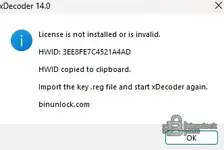
That screenshot explains a lot — the PC crashing on BIN load may well have been xDecoder hitting the license wall and exiting hard rather than a hardware fault at all.
The dialog is telling you the license isn't present or doesn't match this machine. Your HWID is 3EE8FE7C4521A4AD (already on your clipboard). The activation flow is:
- Go to binunlock.com and log in to your account there
- Submit or link your HWID — the site will generate a
.regkey file tied to that hardware ID - Run the
.regfile to import the license into the registry - Start xDecoder again — if the key matches, it will open normally
If you've already purchased and the site isn't generating a key for that HWID, or the account isn't showing the purchase, that's something only Bin or the admin can sort out on the account side — post in the relevant activation thread or contact them directly with your HWID and order details.
Once you're past the license screen, let us know if the BIN load crash comes back — at that point we'll know it's a separate issue worth digging into.
Post #2,357
- Joined
- 08.02.2026
- Messages
- 12
- Reactions
- 0
- Location
- 🇩🇪DEGermany
auf einem andern pc will er den lic. schlüssel habenI'm not saying the machine is dead — I'm saying the file load is the moment something breaks, and you need to know whether that something is xDecoder or the box underneath it. Two minutes of testing tells you.
Start with the split test
Take the same BIN file to a different PC. If it opens cleanly there, your machine has the problem — RAM, PSU or a driver. If the second PC also shuts down on load, it's the file or the tool, and the hardware is fine. That single step saves you from chasing the wrong end.
Then narrow the file side
- Does it happen with every BIN you load, or only this one?
- File size — is it a normal 1–2 MB ECU read, or something much bigger?
- Was the file read from the ECU by yourself, or did it come from elsewhere? A truncated or malformed BIN can push the parser into a bad place.
And the cheap checks on the PC
Untick "Automatically restart" (System Properties → Advanced → Startup and Recovery) so the next crash leaves a stop code instead of a silent reboot, and look in C:\Windows\Minidump afterwards. A WHEA-Logger entry in Event Viewer means the hardware reported an error under load — that's not me declaring your PC broken, it's Windows saying so in writing.
A laptop or a bench PC is the practical way out here: load the file there, and you'll know in one try which side of the fence the fault is on. If you can tell me the file size and whether it's reproducible with a second BIN, I can be more specific.
Post #2,358
Online now
- Joined
- 09.05.2025
- Messages
- 7,131
- Reactions
- 1,633
- Location
- 🇺🇸USUnited States
auf einem andern pc will er den lic. schlüssel haben
That's actually the confirmation you needed — the second PC didn't crash, it just asked for a key. That means the tool runs fine on healthy hardware, and the shutdown on your main machine was almost certainly xDecoder hitting the missing license and exiting hard, not a RAM or PSU fault.
Each machine has its own HWID, so the second PC will ask for its own key separately — don't worry about that one for now. Focus on your main machine: your HWID there is 3EE8FE7C4521A4AD (from the screenshot earlier). Use that to activate through the forum, and the crash should stop happening once the license is in place.
Post #2,359
S
Online now
- Joined
- 29.10.2026
- Messages
- 6
- Reactions
- 0
- Location
- 🇧🇷BRBrazil
xDecoder 14.0 — Official Discussion Thread
This thread is intended for license activation requests, technical support, compatibility reports, bug reports and update announcements for xDecoder.
v12.7 Offline DTC tables, mask and path mapping for quick fault code disables
- Bin
- bosch dcm6.1 delphi diagnostic software dtc off ecu software ford xdecoder
- ⚙️ Tuning Tools & Software
The current release is xDecoder 14.0, featuring expanded support for Bosch, Continental, Delphi, Siemens and Visteon ECUs used by BMW, Ford, Iveco, VAG, PSA, Renault, Nissan and Dacia vehicles.
License Activation
To request activation:
- Download and fully extract the current xDecoder package.
- Run START-xDecoder.exe.
- Copy the displayed 16-character Hardware Identifier.
- Reply to this thread and post your HWID.
- Wait for your personal .reg license file to be issued.
- Close xDecoder before installing the license.
- Download the supplied .reg file and double-click it.
- Confirm that the license information may be added to the Windows Registry.
- Launch the program again using START-xDecoder.exe.
Each license is generated for one specific HWID. A registry file issued for another computer will not work.
The filename of your license will be based on your own hardware identifier and will therefore be different for every user.
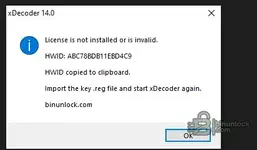
If the Hardware Identifier window appears again after importing the registry file, post the newly displayed HWID together with a screenshot of the activation window.
Current ECU Coverage Added in Recent Releases
- 14.0 — Delphi DCM6.1 for Ford
- 13.9 — Continental SID211 for Ford
- 13.8 — Bosch MD1CS069 for Iveco
- 13.7 — Bosch MD1CP014 for VAG
- 13.6 — Bosch MD1CS004 for VAG
- 13.5 — Visteon ESU412 for Ford
- 13.4 — Bosch MG1CS201 for BMW
- 13.3 — Bosch MG1CS024 for BMW
- 13.2 — Bosch MG1CS003 for BMW
- 13.1 — Continental EMS3155 for Renault, Nissan and Dacia
- 13.0 — Siemens SID803 for PSA
- 12.9 — Bosch EDC17CP65 for Ford
- 12.8 — Bosch EDC17C45 for Nissan and Renault light commercial vehicles
SID803 note: Modifications are applied to the MPC file, but both the MPC and external flash files are required for complete decoding.
MD1CS069 note: Additional original files are still useful for broader testing and compatibility verification.
Technical Support and Bug Reports
When reporting a problem, include as much of the following information as possible:
- xDecoder version
- Vehicle manufacturer and model
- ECU manufacturer and exact ECU type
- Hardware and software identification
- BIN file size and reading method
- ECU reading tool used
- Screenshot of the xDecoder window
- Exact error message or unexpected behavior
- Whether the file was detected correctly
- Operation selected before the problem occurred
Do not publicly attach customer ECU files containing sensitive vehicle data unless a staff member specifically requests them.
Installation Notes
- Install version 14.0 into a new clean folder
- Do not combine files from different xDecoder versions
- Do not run the application directly from an archive
- Keep all included EXE, DLL and BIN components together
- Always launch the program through START-xDecoder.exe
- Do not start Decoder.exe directly
If an antivirus product blocks or quarantines a component, do not disable the entire security system. Post the exact detection name and affected filename in this thread first.
File Safety
Always preserve the untouched original ECU read. Work only with a separate copy and save every processed result under a new filename.
A removed DTC does not repair the electrical, mechanical or software-related cause of the fault. Verify the modified file and its checksums before programming it into a control unit.
Download and Full Description
View the complete description and download xDecoder DTC Manager

xDecoder 14.0 — Official Discussion Thread
This thread is intended for license activation requests, technical support, compatibility reports, bug reports and update announcements for xDecoder.
v12.7 Offline DTC tables, mask and path mapping for quick fault code disables
- Bin
- bosch dcm6.1 delphi diagnostic software dtc off ecu software ford xdecoder
- ⚙️ Tuning Tools & Software
The current release is xDecoder 14.0, featuring expanded support for Bosch, Continental, Delphi, Siemens and Visteon ECUs used by BMW, Ford, Iveco, VAG, PSA, Renault, Nissan and Dacia vehicles.
License Activation
To request activation:
- Download and fully extract the current xDecoder package.
- Run START-xDecoder.exe.
- Copy the displayed 16-character Hardware Identifier.
- Reply to this thread and post your HWID.
- Wait for your personal .reg license file to be issued.
- Close xDecoder before installing the license.
- Download the supplied .reg file and double-click it.
- Confirm that the license information may be added to the Windows Registry.
- Launch the program again using START-xDecoder.exe.
Each license is generated for one specific HWID. A registry file issued for another computer will not work.
The filename of your license will be based on your own hardware identifier and will therefore be different for every user.
If the Hardware Identifier window appears again after importing the registry file, post the newly displayed HWID together with a screenshot of the activation window.
Current ECU Coverage Added in Recent Releases
- 14.0 — Delphi DCM6.1 for Ford
- 13.9 — Continental SID211 for Ford
- 13.8 — Bosch MD1CS069 for Iveco
- 13.7 — Bosch MD1CP014 for VAG
- 13.6 — Bosch MD1CS004 for VAG
- 13.5 — Visteon ESU412 for Ford
- 13.4 — Bosch MG1CS201 for BMW
- 13.3 — Bosch MG1CS024 for BMW
- 13.2 — Bosch MG1CS003 for BMW
- 13.1 — Continental EMS3155 for Renault, Nissan and Dacia
- 13.0 — Siemens SID803 for PSA
- 12.9 — Bosch EDC17CP65 for Ford
- 12.8 — Bosch EDC17C45 for Nissan and Renault light commercial vehicles
SID803 note: Modifications are applied to the MPC file, but both the MPC and external flash files are required for complete decoding.
MD1CS069 note: Additional original files are still useful for broader testing and compatibility verification.
Technical Support and Bug Reports
When reporting a problem, include as much of the following information as possible:
- xDecoder version
- Vehicle manufacturer and model
- ECU manufacturer and exact ECU type
- Hardware and software identification
- BIN file size and reading method
- ECU reading tool used
- Screenshot of the xDecoder window
- Exact error message or unexpected behavior
- Whether the file was detected correctly
- Operation selected before the problem occurred
Do not publicly attach customer ECU files containing sensitive vehicle data unless a staff member specifically requests them.
Installation Notes
- Install version 14.0 into a new clean folder
- Do not combine files from different xDecoder versions
- Do not run the application directly from an archive
- Keep all included EXE, DLL and BIN components together
- Always launch the program through START-xDecoder.exe
- Do not start Decoder.exe directly
If an antivirus product blocks or quarantines a component, do not disable the entire security system. Post the exact detection name and affected filename in this thread first.
File Safety
Always preserve the untouched original ECU read. Work only with a separate copy and save every processed result under a new filename.
A removed DTC does not repair the electrical, mechanical or software-related cause of the fault. Verify the modified file and its checksums before programming it into a control unit.
Download and Full Description
View the complete description and download xDecoder DTC Manager
Post #2,360
S
Online now
- Joined
- 29.10.2026
- Messages
- 6
- Reactions
- 0
- Location
- 🇧🇷BRBrazil
xDecoder 14.0 — Tópico Oficial de Discussão
Este tópico destina-se a solicitações de ativação de licença, suporte técnico, relatórios de compatibilidade, relatórios de erros e anúncios de atualizações do xDecoder.
v12.7 Offline DTC tables, mask and path mapping for quick fault code disables
- Bin
- bosch dcm6.1 delphi diagnostic software dtc off ecu software ford xdecoder
- ⚙️ Tuning Tools & Software
A versão atual é o xDecoder 14.0 , que apresenta suporte expandido para ECUs Bosch, Continental, Delphi, Siemens e Visteon usadas em veículos BMW, Ford, Iveco, VAG, PSA, Renault, Nissan e Dacia.
Ativação da licença
Para solicitar a ativação:
- Baixe e extraia completamente o pacote xDecoder atual.
- Execute o arquivo START-xDecoder.exe .
- Copie o identificador de hardware de 16 caracteres exibido .
- Responda a esta mensagem e publique seu HWID.
- Aguarde a emissão do seu arquivo de licença pessoal .reg .
- Feche o xDecoder antes de instalar a licença.
- Baixe o arquivo .reg fornecido e clique duas vezes nele.
- Confirme se as informações da licença podem ser adicionadas ao Registro do Windows.
- Inicie o programa novamente usando START-xDecoder.exe .
Cada licença é gerada para um HWID específico. Um arquivo de registro emitido para outro computador não funcionará.
O nome do arquivo da sua licença será baseado no seu identificador de hardware e, portanto, será diferente para cada usuário.
Se a janela do Identificador de Hardware (HWID) aparecer novamente após a importação do arquivo de registro, poste o novo HWID exibido juntamente com uma captura de tela da janela de ativação.
Cobertura atual de ECUs adicionada em versões recentes.
- 14.0 — Delphi DCM6.1 para Ford
- 13.9 — Continental SID211 para Ford
- 13.8 — Bosch MD1CS069 para Iveco
- 13.7 — Bosch MD1CP014 para VAG
- 13.6 — Bosch MD1CS004 para VAG
- 13.5 — Visteon ESU412 para Ford
- 13.4 — Bosch MG1CS201 para BMW
- 13.3 — Bosch MG1CS024 para BMW
- 13.2 — Bosch MG1CS003 para BMW
- 13.1 — Continental EMS3155 para Renault, Nissan e Dacia
- 13.0 — Siemens SID803 para PSA
- 12.9 — Bosch EDC17CP65 para Ford
- 12.8 — Bosch EDC17C45 para veículos comerciais leves Nissan e Renault
Nota do SID803: Modificações são aplicadas ao arquivo MPC, mas tanto o arquivo MPC quanto o arquivo flash externo são necessários para a decodificação completa.
Nota MD1CS069: Os arquivos originais adicionais ainda são úteis para testes mais abrangentes e verificação de compatibilidade.
Suporte técnico e relatórios de erros
Ao relatar um problema, inclua o máximo de informações possível:
- versão xDecoder
- Fabricante e modelo do veículo
- Fabricante da ECU e tipo exato da ECU
- Identificação de hardware e software
- Tamanho do arquivo BIN e método de leitura
- Ferramenta de leitura de ECU utilizada
- Captura de tela da janela do xDecoder
- Mensagem de erro exata ou comportamento inesperado
- Se o arquivo foi detectado corretamente.
- Operação selecionada antes da ocorrência do problema.
Não anexe publicamente arquivos de ECU de clientes que contenham dados confidenciais do veículo, a menos que um membro da equipe os solicite especificamente.
Notas de instalação
- Instale a versão 14.0 em uma nova pasta limpa.
- Não combine arquivos de diferentes versões do xDecoder.
- Não execute o aplicativo diretamente de um arquivo compactado.
- Mantenha todos os componentes EXE, DLL e BIN incluídos juntos.
- Sempre inicie o programa através do arquivo START-xDecoder.exe.
- Não inicie o Decoder.exe diretamente.
Se um antivírus bloquear ou colocar um componente em quarentena, não desative todo o sistema de segurança. Primeiro, poste o nome exato da detecção e o nome do arquivo afetado neste tópico.
Segurança de Arquivos
Sempre preserve a leitura original da ECU intacta. Trabalhe apenas com uma cópia separada e salve cada resultado processado com um novo nome de arquivo.
A remoção de um código de falha (DTC) não corrige a causa elétrica, mecânica ou de software da falha. Verifique o arquivo modificado e seus checksums antes de programá-lo em uma unidade de controle.
Baixar e descrição completa
Veja a descrição completa e faça o download do xDecoder DTC Manager.
Attachments
Activity
So far there's no one here