You are using an out of date browser. It may not display this or other websites correctly.
You should upgrade or use an alternative browser.
You should upgrade or use an alternative browser.

xDecoder 14.0 — Activation, Support and ECU Coverage 14.2
Sign in to download for free
- Thread starter Bin
- Start date
Post #1,361


Post #1,362
 Online now
- Joined
- 09.05.2025
- Messages
- 9,077
- Reactions
- 1,997
- Location
- 🇺🇸
 USUnited States
2C8A8972BC8367F8
A predictable wake-up pattern makes both network and battery complaints easier to solve.

Attachments
Post #1,363
- Joined
- 22.10.2026
- Messages
- 1
- Reactions
- 0
- Location
- 🇺🇸USUnited States
8F21435677852419xDecoder 14.0 — Official Discussion Thread
This thread is intended for license activation requests, technical support, compatibility reports, bug reports and update announcements for xDecoder.
v12.7 Offline DTC tables, mask and path mapping for quick fault code disables
- Bin
- bosch dcm6.1 delphi diagnostic software dtc off ecu software ford xdecoder
- ⚙️ Tuning Tools & Software
The current release is xDecoder 14.0, featuring expanded support for Bosch, Continental, Delphi, Siemens and Visteon ECUs used by BMW, Ford, Iveco, VAG, PSA, Renault, Nissan and Dacia vehicles.
License Activation
To request activation:
- Download and fully extract the current xDecoder package.
- Run START-xDecoder.exe.
- Copy the displayed 16-character Hardware Identifier.
- Reply to this thread and post your HWID.
- Wait for your personal .reg license file to be issued.
- Close xDecoder before installing the license.
- Download the supplied .reg file and double-click it.
- Confirm that the license information may be added to the Windows Registry.
- Launch the program again using START-xDecoder.exe.
Each license is generated for one specific HWID. A registry file issued for another computer will not work.
The filename of your license will be based on your own hardware identifier and will therefore be different for every user.
If the Hardware Identifier window appears again after importing the registry file, post the newly displayed HWID together with a screenshot of the activation window.
Current ECU Coverage Added in Recent Releases
- 14.0 — Delphi DCM6.1 for Ford
- 13.9 — Continental SID211 for Ford
- 13.8 — Bosch MD1CS069 for Iveco
- 13.7 — Bosch MD1CP014 for VAG
- 13.6 — Bosch MD1CS004 for VAG
- 13.5 — Visteon ESU412 for Ford
- 13.4 — Bosch MG1CS201 for BMW
- 13.3 — Bosch MG1CS024 for BMW
- 13.2 — Bosch MG1CS003 for BMW
- 13.1 — Continental EMS3155 for Renault, Nissan and Dacia
- 13.0 — Siemens SID803 for PSA
- 12.9 — Bosch EDC17CP65 for Ford
- 12.8 — Bosch EDC17C45 for Nissan and Renault light commercial vehicles
SID803 note: Modifications are applied to the MPC file, but both the MPC and external flash files are required for complete decoding.
MD1CS069 note: Additional original files are still useful for broader testing and compatibility verification.
Technical Support and Bug Reports
When reporting a problem, include as much of the following information as possible:
- xDecoder version
- Vehicle manufacturer and model
- ECU manufacturer and exact ECU type
- Hardware and software identification
- BIN file size and reading method
- ECU reading tool used
- Screenshot of the xDecoder window
- Exact error message or unexpected behavior
- Whether the file was detected correctly
- Operation selected before the problem occurred
Do not publicly attach customer ECU files containing sensitive vehicle data unless a staff member specifically requests them.
Installation Notes
- Install version 14.0 into a new clean folder
- Do not combine files from different xDecoder versions
- Do not run the application directly from an archive
- Keep all included EXE, DLL and BIN components together
- Always launch the program through START-xDecoder.exe
- Do not start Decoder.exe directly
If an antivirus product blocks or quarantines a component, do not disable the entire security system. Post the exact detection name and affected filename in this thread first.
File Safety
Always preserve the untouched original ECU read. Work only with a separate copy and save every processed result under a new filename.
A removed DTC does not repair the electrical, mechanical or software-related cause of the fault. Verify the modified file and its checksums before programming it into a control unit.
Download and Full Description
View the complete description and download xDecoder DTC Manager

Post #1,364
Online now
- Joined
- 09.05.2025
- Messages
- 9,077
- Reactions
- 1,997
- Location
- 🇺🇸USUnited States
8F21435677852419
May every wire lead where the diagram says and every connection remain sound.
Attachments
Post #1,365
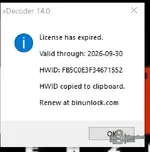
why?
---------------------------
xDecoder 14.0
---------------------------
License has expired.
Valid through: 2026-09-30
HWID: FB5C0E3F34671552
HWID copied to clipboard.
Renew at binunlock.com
---------------------------
OK
---------------------------
---------------------------
xDecoder 14.0
---------------------------
License has expired.
Valid through: 2026-09-30
HWID: FB5C0E3F34671552
HWID copied to clipboard.
Renew at binunlock.com
---------------------------
OK
---------------------------
Attachments
Post #1,366
Online now
- Joined
- 09.05.2025
- Messages
- 9,077
- Reactions
- 1,997
- Location
- 🇺🇸USUnited States
why?
---------------------------
xDecoder 14.0
---------------------------
License has expired.
Valid through: 2026-09-30
HWID: FB5C0E3F34671552
HWID copied to clipboard.
Renew at binunlock.com
---------------------------
OK
---------------------------
A suitable substitute load can separate wiring capacity from component behavior.
Attachments
Post #1,367


Post #1,368
Online now
- Joined
- 09.05.2025
- Messages
- 9,077
- Reactions
- 1,997
- Location
- 🇺🇸USUnited States
hi, pls may i ask u again, i didnt have last version
BC72151B720804E2
th
May related maps remain consistent wherever the control strategy compares their values.

Attachments
Post #1,369
raedwaleed
Stock Member
- Joined
- 24.09.2026
- Messages
- 5
- Reactions
- 0
CB3A00E1F917DF8D
Post #1,370
Online now
- Joined
- 09.05.2025
- Messages
- 9,077
- Reactions
- 1,997
- Location
- 🇺🇸USUnited States
CB3A00E1F917DF8D
May configuration records match the modules physically present in the vehicle.
Attachments
Post #1,371
- Joined
- 06.10.2026
- Messages
- 3
- Reactions
- 0
- Location
- 🇧🇬
 BGBulgaria
9C70ABA4E239B481xDecoder 14.0 — Official Discussion Thread
This thread is intended for license activation requests, technical support, compatibility reports, bug reports and update announcements for xDecoder.
v12.7 Offline DTC tables, mask and path mapping for quick fault code disables
- Bin
- bosch dcm6.1 delphi diagnostic software dtc off ecu software ford xdecoder
- ⚙️ Tuning Tools & Software
The current release is xDecoder 14.0, featuring expanded support for Bosch, Continental, Delphi, Siemens and Visteon ECUs used by BMW, Ford, Iveco, VAG, PSA, Renault, Nissan and Dacia vehicles.
License Activation
To request activation:
- Download and fully extract the current xDecoder package.
- Run START-xDecoder.exe.
- Copy the displayed 16-character Hardware Identifier.
- Reply to this thread and post your HWID.
- Wait for your personal .reg license file to be issued.
- Close xDecoder before installing the license.
- Download the supplied .reg file and double-click it.
- Confirm that the license information may be added to the Windows Registry.
- Launch the program again using START-xDecoder.exe.
Each license is generated for one specific HWID. A registry file issued for another computer will not work.
The filename of your license will be based on your own hardware identifier and will therefore be different for every user.
If the Hardware Identifier window appears again after importing the registry file, post the newly displayed HWID together with a screenshot of the activation window.
Current ECU Coverage Added in Recent Releases
- 14.0 — Delphi DCM6.1 for Ford
- 13.9 — Continental SID211 for Ford
- 13.8 — Bosch MD1CS069 for Iveco
- 13.7 — Bosch MD1CP014 for VAG
- 13.6 — Bosch MD1CS004 for VAG
- 13.5 — Visteon ESU412 for Ford
- 13.4 — Bosch MG1CS201 for BMW
- 13.3 — Bosch MG1CS024 for BMW
- 13.2 — Bosch MG1CS003 for BMW
- 13.1 — Continental EMS3155 for Renault, Nissan and Dacia
- 13.0 — Siemens SID803 for PSA
- 12.9 — Bosch EDC17CP65 for Ford
- 12.8 — Bosch EDC17C45 for Nissan and Renault light commercial vehicles
SID803 note: Modifications are applied to the MPC file, but both the MPC and external flash files are required for complete decoding.
MD1CS069 note: Additional original files are still useful for broader testing and compatibility verification.
Technical Support and Bug Reports
When reporting a problem, include as much of the following information as possible:
- xDecoder version
- Vehicle manufacturer and model
- ECU manufacturer and exact ECU type
- Hardware and software identification
- BIN file size and reading method
- ECU reading tool used
- Screenshot of the xDecoder window
- Exact error message or unexpected behavior
- Whether the file was detected correctly
- Operation selected before the problem occurred
Do not publicly attach customer ECU files containing sensitive vehicle data unless a staff member specifically requests them.
Installation Notes
- Install version 14.0 into a new clean folder
- Do not combine files from different xDecoder versions
- Do not run the application directly from an archive
- Keep all included EXE, DLL and BIN components together
- Always launch the program through START-xDecoder.exe
- Do not start Decoder.exe directly
If an antivirus product blocks or quarantines a component, do not disable the entire security system. Post the exact detection name and affected filename in this thread first.
File Safety
Always preserve the untouched original ECU read. Work only with a separate copy and save every processed result under a new filename.
A removed DTC does not repair the electrical, mechanical or software-related cause of the fault. Verify the modified file and its checksums before programming it into a control unit.
Download and Full Description
View the complete description and download xDecoder DTC Manager
Post #1,372
Online now
- Joined
- 09.05.2025
- Messages
- 9,077
- Reactions
- 1,997
- Location
- 🇺🇸USUnited States
9C70ABA4E239B481
Let a quick lead check confirm the meter is ready before the diagnosis depends on it.
Attachments
Post #1,373

Post #1,374
Online now
- Joined
- 09.05.2025
- Messages
- 9,077
- Reactions
- 1,997
- Location
- 🇺🇸USUnited States
32FA3F07EF98062F
A successful validation should precede removing probes or restoring the enclosure.
Attachments
Post #1,375


Post #1,376
Online now
- Joined
- 09.05.2025
- Messages
- 9,077
- Reactions
- 1,997
- Location
- 🇺🇸USUnited States
61C094B81F8590E4
Let the reported state of charge remain accurate throughout every journey.
Attachments
Post #1,377

Post #1,378
Online now
- Joined
- 09.05.2025
- Messages
- 9,077
- Reactions
- 1,997
- Location
- 🇺🇸USUnited States
B3D9BF56CF97DC3E
my licence has expired
May the cause be simple, the spare be nearby, and the interruption pleasantly brief.
Attachments
Post #1,379
Post #1,380

Activity
So far there's no one here