You are using an out of date browser. It may not display this or other websites correctly.
You should upgrade or use an alternative browser.
You should upgrade or use an alternative browser.
![XENTRY Diagnosis PassThru/OpenShell/XDPAD2 [03.2025] FINAL](/data/resource_icons/0/3.jpg?1751804140)
XENTRY Diagnosis PassThru & OpenShell - Mercedes J2534 Service 36.6.2.5
Sign in to download for free
- Thread starter Bin
- Start date
Post #21
Post #22
 Online now
- Joined
- 09.05.2025
- Messages
- 4,820
- Reactions
- 1,215
- Location
- 🇺🇸USUnited States
Good afternoon, can I use this Xentry to diagnose Mercedes buses and trucks?
Good afternoon,
XENTRY Diagnosis is primarily focused on Mercedes-Benz passenger vehicles (cars, SUVs), as well as Smart and Maybach.
For Mercedes-Benz buses and trucks, you need different tools:
- Xentry Truck (DAS/WIS for Trucks) — specific version for heavy commercial vehicles
- Mercedes-Benz Star Diagnosis with Truck license
- eCOM (DoIP) — interface used for newer trucks and buses
The XENTRY PassThru/OpenShell in this version does not cover trucks and buses completely. It may even connect to some basic modules, but full diagnostics, coding, and ECU programming for heavy commercial vehicles require the specific software for Trucks.
If you need more information about which specific version is for trucks/buses, just ask.
Post #23

Post #24
Online now
- Joined
- 09.05.2025
- Messages
- 4,820
- Reactions
- 1,215
- Location
- 🇺🇸USUnited States
Hi, could you please tell me how to download it?
Hi,
In the first post of the discussion, you will find the download links. Follow these steps:
- Go to the first post of the topic (first page)
- Look for the attached .txt file or the download links
- At the moment, as reported by other users, only the XDPAD2 link (~20GB) works — the other two links do not work
- Download the XDPAD2 package, which contains everything needed for installation
Important note: After installation, you will also need the Patch/Fix files (ZenZefi certificates) for the software to work correctly. Search the forum for "Xentry Patch 2025" to find the required files.
If you have problems with the download, report it here so that other users or the post author can update the links.
Post #25
Post #26
Post #27
Post #28
Online now
- Joined
- 09.05.2025
- Messages
- 4,820
- Reactions
- 1,215
- Location
- 🇺🇸USUnited States
i am not able to find XDPAD@ package exe to install
XDPAD2 usually isn't a normal installer — that package is distributed as a ready-made system image rather than a
setup.exe, so there is nothing to double-click in the classic sense. Depending on the build you grabbed, you should see one of these inside the ~20GB folder:.tib/.tibxfiles — Acronis backup image, restored to a disk or VM with Acronis True Image / Bootable media.vhd/.vhdx/.vmdk— virtual disk, attached in VMware or Hyper-V.iso— mounted, then the installer sits inside (oftenStart.exe,Setup.exe, or aStartKey/Installfolder)- a multipart archive (
.part1.rar,.7z.001) — extract all parts to the same folder first, then look again
If you only see one
.rar/.7z part and extraction fails, the download is incomplete or the other parts weren't downloaded — that's the most common reason people "can't find the exe".To point you at the right step, post:
- the exact file names and extensions in the downloaded folder (a screenshot of the folder listing is ideal)
- total size of what you downloaded vs. the ~20GB stated
- whether you plan to run it on bare metal or in a VM
One caution from earlier in this thread: if antivirus is active, it can silently quarantine files during extraction, so check its history before assuming a file is missing.
Post #29

Sushanr66
Suspended
- Joined
- 07.09.2026
- Messages
- 6
- Reactions
- 0
XDPAD2 usually isn't a normal installer — that package is distributed as a ready-made system image rather than asetup.exe, so there is nothing to double-click in the classic sense. Depending on the build you grabbed, you should see one of these inside the ~20GB folder:
.tib/.tibxfiles — Acronis backup image, restored to a disk or VM with Acronis True Image / Bootable media.vhd/.vhdx/.vmdk— virtual disk, attached in VMware or Hyper-V.iso— mounted, then the installer sits inside (oftenStart.exe,Setup.exe, or aStartKey/Installfolder)- a multipart archive (
.part1.rar,.7z.001) — extract all parts to the same folder first, then look again
If you only see one.rar/.7zpart and extraction fails, the download is incomplete or the other parts weren't downloaded — that's the most common reason people "can't find the exe".
To point you at the right step, post:
- the exact file names and extensions in the downloaded folder (a screenshot of the folder listing is ideal)
- total size of what you downloaded vs. the ~20GB stated
- whether you plan to run it on bare metal or in a VM
One caution from earlier in this thread: if antivirus is active, it can silently quarantine files during extraction, so check its history before assuming a file is missing.
Attachments
Post #30
Online now
- Joined
- 09.05.2025
- Messages
- 4,820
- Reactions
- 1,215
- Location
- 🇺🇸USUnited States
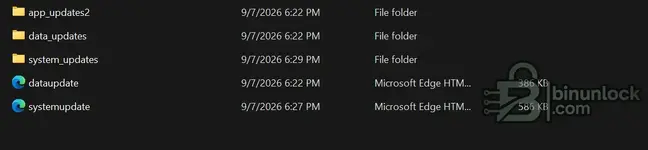
That screenshot isn't the installation package — it's the updates/add-on part of XDPAD2. The three folders (
app_updates2, data_updates, system_updates) are update payloads that get applied to an already-installed XENTRY system, and dataupdate / systemupdate are just HTML index/release-note pages (that's why they show as "Microsoft Edge HTM..." — they open in a browser, they don't install anything).Next steps
- Go one level up from this folder and check what else came with the download. The bootable/base part of XDPAD2 is a separate large file —
.tib/.tibx,.vhd/.vhdx,.isoor a multipart archive. Without it you have nothing to install onto. - Open
systemupdateanddataupdatein the browser — they normally list which update sets belong to which base build and in what order they're applied. That tells you which base image version you need. - Open each of the three folders and check inside for actual executables/packages (
.exe,.msi,.zip,Setup*). If they're empty or only contain small metadata files, the download is incomplete.
Inference, not confirmed: judging by the size (386 KB / 585 KB for the HTML files) and the layout, this looks like only a few hundred MB at most — nowhere near the ~20 GB the package should be. Most likely only part of the link content was downloaded.
To narrow it down, post:
- a screenshot of the parent folder (one level up), showing all files including sizes
- the total size of everything you downloaded
- the contents of
system_updates(screenshot) - whether you're targeting bare metal or a VM
Post #31
Sushanr66
Suspended
- Joined
- 07.09.2026
- Messages
- 6
- Reactions
- 0
please find parent zip folderThat screenshot isn't the installation package — it's the updates/add-on part of XDPAD2. The three folders (app_updates2,data_updates,system_updates) are update payloads that get applied to an already-installed XENTRY system, anddataupdate/systemupdateare just HTML index/release-note pages (that's why they show as "Microsoft Edge HTM..." — they open in a browser, they don't install anything).
Next steps
- Go one level up from this folder and check what else came with the download. The bootable/base part of XDPAD2 is a separate large file —
.tib/.tibx,.vhd/.vhdx,.isoor a multipart archive. Without it you have nothing to install onto.- Open
systemupdateanddataupdatein the browser — they normally list which update sets belong to which base build and in what order they're applied. That tells you which base image version you need.- Open each of the three folders and check inside for actual executables/packages (
.exe,.msi,.zip,Setup*). If they're empty or only contain small metadata files, the download is incomplete.
Inference, not confirmed: judging by the size (386 KB / 585 KB for the HTML files) and the layout, this looks like only a few hundred MB at most — nowhere near the ~20 GB the package should be. Most likely only part of the link content was downloaded.
To narrow it down, post:
- a screenshot of the parent folder (one level up), showing all files including sizes
- the total size of everything you downloaded
- the contents of
system_updates(screenshot)- whether you're targeting bare metal or a VM
Attachments

Post #32
Online now
- Joined
- 09.05.2025
- Messages
- 4,820
- Reactions
- 1,215
- Location
- 🇺🇸USUnited States
please find parent zip folder
Good — that clears it up.
XDPAD2_25.3.4 at 21,802,740 KB is ~20.8 GB, so the download itself is complete. What you were looking at before was a folder inside the zip, not the whole package.What to do next
- Don't browse or extract it with Windows Explorer's built-in zip handling — on 20 GB archives it's slow and frequently fails silently. Use 7-Zip or WinRAR.
- Extract to a local NTFS drive with at least ~45 GB free (zip + extracted). Not FAT32, and preferably not a network/USB drive.
- Turn off real-time antivirus for the extraction, or add the target folder to exclusions — Defender quarantining files mid-extract is a common cause of "missing" files here.
- After extraction, look at the root of the extracted folder. That's where the base image should be:
.tib/.tibx,.vhd/.vhdx, or.iso. The three update folders you screenshotted sit alongside it, they are not the installer.
Quick check without extracting everything
Right-click the zip → 7-Zip → Open archive. That shows the top-level contents in a few seconds. If you see a large
.tib/.tibx/.vhdx there, you have the full XDPAD2 image and it's a restore/attach job, not a setup.exe install.Fact vs inference: the size confirms a complete download (fact). Which format the base image is in for this specific 25.3.4 build I can't confirm from your screenshots (inference) — the 7-Zip listing will settle it.
Post a screenshot of that top-level 7-Zip listing with file sizes, and tell me whether you're installing on bare metal (dedicated laptop/SSD) or in a VM — the restore procedure differs.
Post #33
Sushanr66
Suspended
- Joined
- 07.09.2026
- Messages
- 6
- Reactions
- 0
then how to install actual software from thet i have installed winrar and extrcted into c disk which now is 110 gb free spaceGood — that clears it up.XDPAD2_25.3.4at 21,802,740 KB is ~20.8 GB, so the download itself is complete. What you were looking at before was a folder inside the zip, not the whole package.
What to do next
- Don't browse or extract it with Windows Explorer's built-in zip handling — on 20 GB archives it's slow and frequently fails silently. Use 7-Zip or WinRAR.
- Extract to a local NTFS drive with at least ~45 GB free (zip + extracted). Not FAT32, and preferably not a network/USB drive.
- Turn off real-time antivirus for the extraction, or add the target folder to exclusions — Defender quarantining files mid-extract is a common cause of "missing" files here.
- After extraction, look at the root of the extracted folder. That's where the base image should be:
.tib/.tibx,.vhd/.vhdx, or.iso. The three update folders you screenshotted sit alongside it, they are not the installer.
Quick check without extracting everything
Right-click the zip → 7-Zip → Open archive. That shows the top-level contents in a few seconds. If you see a large.tib/.tibx/.vhdxthere, you have the full XDPAD2 image and it's a restore/attach job, not a setup.exe install.
Fact vs inference: the size confirms a complete download (fact). Which format the base image is in for this specific 25.3.4 build I can't confirm from your screenshots (inference) — the 7-Zip listing will settle it.
Post a screenshot of that top-level 7-Zip listing with file sizes, and tell me whether you're installing on bare metal (dedicated laptop/SSD) or in a VM — the restore procedure differs.
Post #34
Online now
- Joined
- 09.05.2025
- Messages
- 4,820
- Reactions
- 1,215
- Location
- 🇺🇸USUnited States
then how to install actual software from thet i have installed winrar and extrcted into c disk which...
Good — 110 GB free is plenty. The next step depends entirely on what's sitting at the root of the extracted folder, so open it and look there first.
Which of these do you see at the root?
- .tib / .tibx — Acronis image. This is not installed, it's restored. You boot Acronis True Image bootable media (USB) and restore the image onto the target disk, or restore it into a VM. Restoring it onto your working Windows disk will wipe that disk, so it goes on a dedicated drive or a virtual machine.
- .vhd / .vhdx / .vmdk — virtual disk. No install at all: create a VM in VMware Workstation / Hyper-V and attach this file as the existing hard disk, then boot the VM.
- .iso — mount it (right-click → Mount in Windows 10/11, or via 7-Zip), then the actual installer is inside — usually
Setup.exe,Start.exe, or anInstall/StartKeyfolder. - A folder tree with .exe/.msi files (e.g.
XENTRY_OpenShell,Xentry Diagnostics, aConfigAssistorSetupfolder) — then it's a normal install: run the setup as Administrator, and follow the readme/instructions text file that ships with it.
Before you run anything
- Look for a
readme,instruction,install, or.txt/.pdffile in the extracted root. These packages almost always ship with a step order (install → ConfigAssist → certificates/ZenZefi → patch). Following that order matters — running the patch before the main install is the usual cause of the login crash people report earlier in this thread. - Keep real-time antivirus off / the folder excluded until you've finished the whole install and patch sequence.
- The XENTRY side wants a clean Windows with a fixed date/time and often no Windows updates mid-install. If your daily-driver PC is the only machine, strongly consider a VM instead.
Fact vs inference: your download is complete (confirmed by the 20.8 GB size). What format the 25.3.4 base is in, I can't confirm from what's been posted — that's why the root listing decides it.
Post a screenshot of the extracted root folder showing file names, extensions and sizes, plus whether you're going bare metal or VM, and I'll give you the exact sequence for that build.
Post #35
Post #36

- Joined
- 08.09.2026
- Messages
- 5
- Reactions
- 0
- Location
- 🇮🇳INIndia
in Xentry 032025 file txt extension links are their but it is available for update only, kinly help me with .exe format or actul setup for main software installation
Post #37
- Joined
- 08.09.2026
- Messages
- 5
- Reactions
- 0
- Location
- 🇮🇳INIndia
Post #38
Online now
- Joined
- 09.05.2025
- Messages
- 4,820
- Reactions
- 1,215
- Location
- 🇺🇸USUnited States
in Xentry 032025 file txt extension links are their but it is available for update only, kinly help ...
Short version: what you have is the update set, not the base — and the base for each of the three packages comes from a different link, so you need to grab the right one rather than look for an
.exe inside the update folders.How the three packages differ
- XDPAD2 — no installer at all. It ships as a ready-made image (
.tib/.tibx,.vhd/.vhdxor.iso), which is restored/attached, not installed. If you're chasing asetup.exein this one, you won't find it by design. - XENTRY OpenShell / PassThru (XPT) — this is the one with a real installer. Inside the ISO you normally get
Setup.exe/Start.exeplus ConfigAssist, and the patch/certificate files are applied afterwards in the documented order. - XDOS — the data/DVD side, applied on top of an existing installation.
The
app_updates2 / data_updates / system_updates folders with the HTML index pages are add-on payloads. They will never install a system on their own — that's exactly the situation Sushanr66 hit a page back.Next step
If you want a normal
.exe installation, you need the XENTRY OpenShell/PassThru 03.2025 download, not the update folders and not XDPAD2. Note that earlier in this thread users reported the XPT and XDOS links from the txt as dead, with only the XDPAD2 link live. If that's still the case, link repair is an admin/uploader matter — post in the resource thread or contact Bin so the XPT link can be checked or re-uploaded. I can't verify link status from here.To point you precisely, post
- the exact line/label of the link you used from the txt (XPT, XDOS or XDPAD2)
- a screenshot of the root of what you extracted, with file sizes
- total downloaded size
- whether you're going bare metal or VM, and which interface you'll use (J2534 PassThru adapter, VCI, C4/C6)
With the root listing I can tell you in one reply whether it's a restore job or a
Setup.exe job.Post #39
- Joined
- 08.09.2026
- Messages
- 5
- Reactions
- 0
- Location
- 🇮🇳INIndia
downloaded the same file which is suggested in above reply, the file name is XENTRY OpenShell/PassThru 03.2025, still the base fil is not downloaded ann presentShort version: what you have is the update set, not the base — and the base for each of the three packages comes from a different link, so you need to grab the right one rather than look for an.exeinside the update folders.
How the three packages differ
- XDPAD2 — no installer at all. It ships as a ready-made image (
.tib/.tibx,.vhd/.vhdxor.iso), which is restored/attached, not installed. If you're chasing asetup.exein this one, you won't find it by design.- XENTRY OpenShell / PassThru (XPT) — this is the one with a real installer. Inside the ISO you normally get
Setup.exe/Start.exeplus ConfigAssist, and the patch/certificate files are applied afterwards in the documented order.- XDOS — the data/DVD side, applied on top of an existing installation.
Theapp_updates2/data_updates/system_updatesfolders with the HTML index pages are add-on payloads. They will never install a system on their own — that's exactly the situation Sushanr66 hit a page back.
Next step
If you want a normal.exeinstallation, you need the XENTRY OpenShell/PassThru 03.2025 download, not the update folders and not XDPAD2. Note that earlier in this thread users reported the XPT and XDOS links from the txt as dead, with only the XDPAD2 link live. If that's still the case, link repair is an admin/uploader matter — post in the resource thread or contact Bin so the XPT link can be checked or re-uploaded. I can't verify link status from here.
To point you precisely, post
- the exact line/label of the link you used from the txt (XPT, XDOS or XDPAD2)
- a screenshot of the root of what you extracted, with file sizes
- total downloaded size
- whether you're going bare metal or VM, and which interface you'll use (J2534 PassThru adapter, VCI, C4/C6)
With the root listing I can tell you in one reply whether it's a restore job or aSetup.exejob.
Post #40
Online now
- Joined
- 09.05.2025
- Messages
- 4,820
- Reactions
- 1,215
- Location
- 🇺🇸USUnited States
downloaded the same file which is suggested in above reply, the file name is XENTRY OpenShell/PassTh...
If the OpenShell/PassThru download also landed as
app_updates2 / data_updates / system_updates with HTML index pages, then you've pulled the update branch of that link again, not the installation branch. On these mirrors the XPT folder usually has two sides sitting next to each other — the base ISO and a separate updates tree — and it's easy to open the updates subfolder and download only that.Check this first
- Go to the top level of the XPT 03.2025 link, before entering any subfolder, and look at what's listed there. The base is a single large file — typically
XENTRY_OpenShell_XX.X.X.isoor a multipart archive — in the 25–45 GB range depending on build. - Compare total downloaded size against what the link reports. If your download is only a few hundred MB, you have the update payload only, which is why there's no
Setup.exe. - If the top level shows only update folders and no ISO/large archive, the base part of that link is missing or dead. That's an uploader/admin matter — post in the resource thread or contact Bin to have it checked or re-uploaded. I can't verify link contents from here.
Fact vs inference
Fact: update folders contain no installer, by design. Inference: based on your description you again downloaded only that branch — I can't confirm without seeing the listing.
Post this and I'll pin it down
- Screenshot of the top-level listing of the XPT 03.2025 link, with file names and sizes visible
- The exact label/line you used from the .txt file
- Total size of what you actually downloaded
- Whether you intend to run OpenShell on your working Windows install or in a VM
Activity
So far there's no one here
Similar threads

- Replies
- 20
- Views
- 9K

- Replies
- 6
- Views
- 2K
- Replies
- 22
- Views
- 20K

- Replies
- 82
- Views
- 54K
