ISTA+ STANDALONE (Activated) - Free Download for BMW / MINI Diagnostics

ISTA+ STANDALONE BMW Diagnostic & Coding - Workshop Solution 4.62.11

Sign in to download for free

Post #421

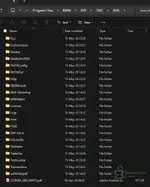
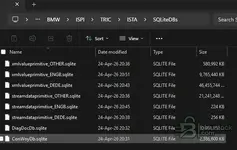
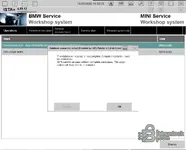
Hello, I tried to install Ista+ the latest version (BMW ISTA Standalone 4.59.12). However I tried everything but after start up it keeps showing: Database connection errorr! As shown below. I also added the folder structure. Hope someone can help me.

Thanks a lot!
 

Attachments

  • 1778935586114.webp
    1778935586114.webp
    31.9 KB · Views: 106
  • 1778935612217.webp
    1778935612217.webp
    21.7 KB · Views: 109
  • 1778935635724.webp
    1778935635724.webp
    21.7 KB · Views: 108
  • 1778935990284.webp
    1778935990284.webp
    33.6 KB · Views: 110

Post #422

I downloaded everything for BMW ISTA Standalone 4.59.12 and followed the installation instructions, when I try to open it via the shortcut created, it begins to load and then closes.

Help would be appreciated.
 

Post #423

I downloaded everything for BMW ISTA Standalone 4.59.12 and followed the installation instructions, when I try to open it via the shortcut created, it begins to load and then closes.

Help would be appreciated.
I have tried a few more things - updating runtimes, java, framework etc. When I restart my laptop and open it, an error pops up.

"Failed to start ISTA. Please make sure your ISTA configuration is valid"
 

Post #424

I have tried a few more things - updating runtimes, java, framework etc. When I restart my laptop and open it, an error pops up.

"Failed to start ISTA. Please make sure your ISTA configuration is valid"
IM getting the same where, it gets to about half way and then just closes randomly.
 

Post #425

Appreciate the hard work that has gone into this. Well done(y):)
 

Post #426

Bin updated ISTA+ STANDALONE (Activated) - Free Download for BMW / MINI Diagnostics with a new update entry:

BMW ISTA+ Standalone 4.59.40 — ENET / ICOM / D-CAN & Programming Data Refresh

This release updates the ISTA standalone diagnostic environment for BMW, MINI and Rolls-Royce with refreshed programming data, interface compatibility improvements and clean standalone configuration.

View attachment 4794

What’s included:

  • ISTA build updated to 4.59.40
  • Programming data / I-Level updated to 4.59.40
  • ENET programming enabled for supported workflows
  • ICOM A1 / A2 / NEXT support included
  • D-CAN support included for legacy diagnostic workflows...

Read the rest of this update entry...
 

Post #427

New version titled Free Download of ISTA+ STANDALONE (Active) for BMW / MINI Diagnostics: discuss it, share feedback, and get help.


Free Download of ISTA+ STANDALONE (Active) - BMW / MINI Diagnostic Software​

Complete dealer diagnostic software, ready to use. Full version; no license or activation required.


Frequently Asked Questions​

Which version of Windows is recommended?
A clean installation of Windows 10 (64-bit) is recommended for maximum stability during ECU flashing and diagnostic procedures.
Is it compatible with J2534 PassThru?
Most modern software versions support standard J2534 interfaces such as Scanmatik 2 Pro, OpenPort 2.0, and certain VCI adapters.

Contents:
  • Overview and Screenshots
  • Version history and compatibility
  • Download link and installation notes

👉 View and download all details — Free Download of ISTA+ STANDALONE (Active) for BMW / MINI Diagnostics
Where can I find the setup password?
To view this content we will need your consent to set third party cookies.
For more detailed information, see our cookies page.
 

Post #428

Hi
Is this ISTA 4.59.40 version compatible with ICOM A3 pro clone?
 

Post #429

what is the installer passwordddd
 

Post #431

@KronoS, @miireal, @Juhnu, @q21m340, @11ck11, @dermanbey2, @jkaalt, @DB85, @tough081, @aryter, @math6500, @moony, @dody, @indiedan83, @CosminDRG, @AlexeyKg, @andr.leon, @Ghassan

Guys, I sincerely apologize. I forgot to include one small archive that is required by the BMW_ISTA+4.59.40_Standalone.exe extractor.
The password you entered was correct — the error is occurring because this small archive is missing:
https://bnu.to/drive/s/14lUE7nImUhG94Vpm3uvrdIS5GR0u5

Please download it and place it in the same folder as the installer.
The installer password can be found in the file Installation_Pass.txt on line 5.
My apologies to everyone for the inconvenience.
 

Post #434

binunlock.com
I copied the two files I downloaded from the link you just sent to the correct location, but when I try to open the setup and install it, the “binunlock.com” and “netmanbmw” passwords don't work.


To view this content we will need your consent to set third party cookies.
For more detailed information, see our cookies page.
 

Post #438

Nvm figured it out for now
 

Post #440

1781918446996.webp


Why? How to install to a drive of my choosing.
 
Activity
So far there's no one here