ISTA+ STANDALONE (Activated) - Free Download for BMW / MINI Diagnostics

ISTA+ STANDALONE BMW Diagnostic & Coding - Workshop Solution 4.60.13

Sign in to download for free

Post #421

JanIan234

Watchlisted
Netherlands
Joined
14.05.2026
Messages
1
Reaction score
0
Location
Netherlands
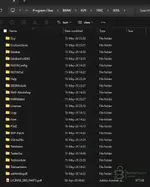
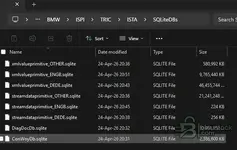
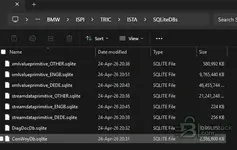
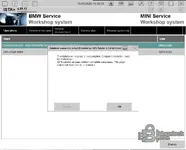
Hello, I tried to install Ista+ the latest version (BMW ISTA Standalone 4.59.12). However I tried everything but after start up it keeps showing: Database connection errorr! As shown below. I also added the folder structure. Hope someone can help me.

Thanks a lot!
 

Attachments

  • 1778935586114.webp
    1778935586114.webp
    31.9 KB · Views: 77
  • 1778935612217.webp
    1778935612217.webp
    21.7 KB · Views: 76
  • 1778935635724.webp
    1778935635724.webp
    21.7 KB · Views: 73
  • 1778935990284.webp
    1778935990284.webp
    33.6 KB · Views: 84

Post #422

doooom3d

Watchlisted
United Kingdom
Joined
12.05.2026
Messages
2
Reaction score
0
Location
United Kingdom
I downloaded everything for BMW ISTA Standalone 4.59.12 and followed the installation instructions, when I try to open it via the shortcut created, it begins to load and then closes.

Help would be appreciated.
 

Post #423

doooom3d

Watchlisted
United Kingdom
Joined
12.05.2026
Messages
2
Reaction score
0
Location
United Kingdom
I downloaded everything for BMW ISTA Standalone 4.59.12 and followed the installation instructions, when I try to open it via the shortcut created, it begins to load and then closes.

Help would be appreciated.
I have tried a few more things - updating runtimes, java, framework etc. When I restart my laptop and open it, an error pops up.

"Failed to start ISTA. Please make sure your ISTA configuration is valid"
 

Post #424

Raz

Watchlisted
United Kingdom
Joined
11.05.2026
Messages
1
Reaction score
0
Location
United Kingdom
I have tried a few more things - updating runtimes, java, framework etc. When I restart my laptop and open it, an error pops up.

"Failed to start ISTA. Please make sure your ISTA configuration is valid"
IM getting the same where, it gets to about half way and then just closes randomly.
 

Post #425

en_wall

Watchlisted
Australia
Joined
11.05.2026
Messages
2
Reaction score
0
Location
Australia
Appreciate the hard work that has gone into this. Well done(y):)
 

Post #426

Bin Online now

Bin

Administrator
Antarctica
Joined
03.05.2025
Messages
2,165
Reaction score
72,747
Location
Antarctica
Bin updated ISTA+ STANDALONE (Activated) - Free Download for BMW / MINI Diagnostics with a new update entry:

BMW ISTA+ Standalone 4.59.40 — ENET / ICOM / D-CAN & Programming Data Refresh

This release updates the ISTA standalone diagnostic environment for BMW, MINI and Rolls-Royce with refreshed programming data, interface compatibility improvements and clean standalone configuration.

View attachment 4794

What’s included:

  • ISTA build updated to 4.59.40
  • Programming data / I-Level updated to 4.59.40
  • ENET programming enabled for supported workflows
  • ICOM A1 / A2 / NEXT support included
  • D-CAN support included for legacy diagnostic workflows...

Read the rest of this update entry...
 

Post #427

KronoS

Stock Member
Turkey
Joined
19.02.2026
Messages
5
Reaction score
1
Location
Turkey
ISTA+ STANDALONE (Aktif) - BMW / MINI Diagnostik için Ücretsiz İndirme adlı yeni sürüm başlığı: tartışın, geri bildirim paylaşın ve yardım alın.


ISTA+ STANDALONE (Aktif) - BMW / MINI Teşhis Yazılımı için Ücretsiz İndirme​

Kullanıma hazır, eksiksiz bayi teşhis yazılımı. Tam sürüm, lisans veya aktivasyon gerekmez.


Sıkça Sorulan Sorular​

Hangi Windows sürümü önerilir?
ECU flaşlama ve teşhis işlemleri sırasında maksimum kararlılık için Windows 10'un (64-bit) temiz bir kurulumu önerilir.
J2534 PassThru ile uyumlu mu?
Modern yazılım sürümlerinin çoğu, Scanmatik 2 Pro, OpenPort 2.0 ve belirli VCI adaptörleri gibi standart J2534 arayüzlerini destekler.

İçindekiler:
  • Genel Bakış ve Ekran Görüntüleri
  • Sürüm geçmişi ve uyumluluk
  • İndirme bağlantısı ve kurulum notları

👉 Tüm detayları görüntüleyin ve indirin — ISTA+ STANDALONE (Aktif) - BMW / MINI Diagnostik için Ücretsiz İndirme
Where can I find the setup password?
 

Post #428

Juhnu

Stock Member
Finland
Joined
19.04.2026
Messages
5
Reaction score
2
Location
Finland
Hi
Is this ISTA 4.59.40 version compatible with ICOM A3 pro clone?
 

Post #429

miireal

Watchlisted
Indonesia
Joined
05.06.2026
Messages
4
Reaction score
0
Location
Indonesia
what is the installer passwordddd
 

Post #431

Bin Online now

Bin

Administrator
Antarctica
Joined
03.05.2025
Messages
2,165
Reaction score
72,747
Location
Antarctica
@KronoS, @miireal, @Juhnu, @q21m340, @11ck11, @dermanbey2, @jkaalt, @DB85, @tough081, @aryter, @math6500, @moony, @dody, @indiedan83, @CosminDRG, @AlexeyKg, @andr.leon, @Ghassan

Guys, I sincerely apologize. I forgot to include one small archive that is required by the BMW_ISTA+4.59.40_Standalone.exe extractor.
The password you entered was correct — the error is occurring because this small archive is missing:
https://bnu.to/drive/s/14lUE7nImUhG94Vpm3uvrdIS5GR0u5

Please download it and place it in the same folder as the installer.
The installer password can be found in the file Installation_Pass.txt on line 5.
My apologies to everyone for the inconvenience.
 

Post #438

ghostlanz

Watchlisted
United States
Joined
13.06.2026
Messages
3
Reaction score
0
Location
United States
Nvm figured it out for now
 

Post #440

ghostlanz

Watchlisted
United States
Joined
13.06.2026
Messages
3
Reaction score
0
Location
United States
1781918446996.webp


Why? How to install to a drive of my choosing.
 
Activity
So far there's no one here