
Description
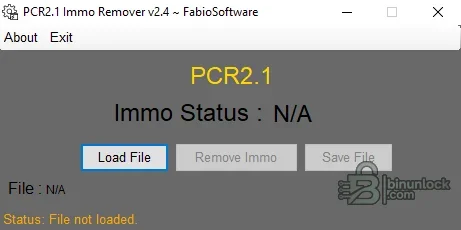
PCR2.1 Immo Remover is a compact offline Windows utility for applying an immobilizer-off modification to a supported Continental SIMOS PCR2.1 engine-control-unit flash file. It is intended for controlled ECU-file work after the controller identity and read method have been confirmed, not as a universal VAG immobilizer solution.
Supported vehicles, ECUs and files#
The target controller is the SIMOS PCR2.1 used mainly with Volkswagen Group 1.6 TDI applications across Volkswagen, Audi, SEAT and Skoda. Coverage must be decided from the ECU label, hardware and software identifiers and the actual flash layout; a matching vehicle badge or engine size alone is not sufficient. The utility processes a saved ECU dump and does not communicate with the car.- Continental SIMOS PCR2.1 flash files from supported VAG diesel applications.
- File-based workflow for reads obtained with a suitable bench, boot or programming tool.
- A correctly sized, complete flash read whose ECU identity has been verified before processing.
Functions#
- Open a supported PCR2.1 binary and create a modified file for an authorized immobilizer repair or test workflow.
- Keep the original read separate so the processed output can be compared byte-for-byte before programming.
- Run as a single portable executable; no vehicle driver, flasher or checksum module is bundled.
System and hardware requirements#
- Windows with Microsoft .NET Framework 4.6 or newer.
- A separate ECU programmer capable of producing and writing the correct PCR2.1 memory area.
- Checksum software appropriate to the exact ECU/software family, because checksum correction is not included.
- Stable bench or vehicle power and a tested recovery method for the writing stage.
Recommended workflow#
- Read and archive an untouched full backup, then record the ECU hardware and software identifiers.
- Run the tool only on a working copy and confirm that the input is accepted without truncation or size change.
- Compare original and modified files, correct and verify checksums with a compatible tool, then program using the correct bench or boot procedure.
- After writing, perform a diagnostic scan and retain the original file for recovery.


