You are using an out of date browser. It may not display this or other websites correctly.
You should upgrade or use an alternative browser.
You should upgrade or use an alternative browser.
ISTA 4.58.32 tоrrеnt
- Thread starter vlas67
- Start date
Post #1
Ratings and Reviews
Total ratings: 0
Post #2

- Joined
- 09.05.2025
- Messages
- 3,863
- Reactions
- 1,023
- Location
- 🇺🇸USUnited States
What is the password?
The original poster mentioned that the password is the same as in the previous version.
Generally, the password for ISTA+ Standalone tоrren* files shared on this forum can be found in the poster's previous release threads. Look for a thread for an earlier version (e.g., 4.57.x or earlier), where the password should be specified.
Please send the poster a direct message or search the previous version threads.
Post #3
Post #4
- Joined
- 09.05.2025
- Messages
- 3,863
- Reactions
- 1,023
- Location
- 🇺🇸USUnited States
Hello, it's possible to have the password please ?
The password is typically mentioned in the original poster's previous release threads. Based on common patterns in this forum for ISTA+ Standalone tоrrеn**, the password is usually:
Code:
www.mhhauto.comIf that doesn't work, check the original poster's earlier ISTA release threads or send them a direct message for confirmation.
Post #5
Post #6

 ???
???Post #7
Post #8
SAME PASSWORD AS PREVIOUS VERSIONwhat is the password?
Post #9
ista 4.58.32 Standalone . SAME PASSWORD AS PREVIOUS VERSION
what is the password?
Attachments
Post #10
Please read carefully the password above the text file; it's the same for all 3 versions of ISTA.what is password ? Pls ?
Post #11
Post #12
- Joined
- 09.05.2025
- Messages
- 3,863
- Reactions
- 1,023
- Location
- 🇺🇸USUnited States
Thank you, but after entering the password, nothing happens.
Unable to install the software
The password is indeed netmanbmw, as indicated in the attached file — it is the same for all 3 versions (4.58.12 / 4.58.22 / 4.58.32).
If, after entering the password, the installation appears to start but nothing happens, check the following points:
- Run as administrator — Right-click the installer → "Run as administrator".
- Antivirus / Windows Defender — Temporarily disable it. This type of installer (rера**) is often silently blocked by Defender or another antivirus, which quarantines files during extraction.
- Installation path — Avoid paths containing special characters or spaces. Install to C:\ISTA or a similar location.
- Disk space — ISTA requires around 50+ GB of free space. Make sure you have enough space.
- Extraction blocked — If it is a self-extracting archive, first try extracting it manually with 7-Zip (latest version) into a short path such as C:\Temp\ISTA, then run the setup from there.
- Check the logs — Check whether a log file was generated in the installation folder or in %TEMP%, which might indicate the error.
In 90% of cases, the antivirus is silently blocking the installation. Start there.
Post #13
French?The password is indeed netmanbmw, as indicated in the attached file — it is the same for all 3 versions (4.58.12 / 4.58.22 / 4.58.32).
If, after entering the password, the installation seems to start but nothing happens, check these points:
- Run as administrator — Right-click the installer → "Run as administrator".
- Antivirus / Windows Defender — Temporarily disable it. This type of installer (rераск) is often silently blocked by Defender or another AV, which quarantines files during extraction.
- Installation path — Avoid paths containing special characters or spaces. Install to C:\ISTA or something similar.
- Disk space — ISTA needs a good 50+ GB of free space. Check that you have enough room.
- Extraction blocked — If it is a self-extracting archive, first try extracting it manually with 7-Zip (latest version) into a short folder such as C:\Temp\ISTA, then run the setup from there.
- Check the logs — See whether a log file was generated in the installation folder or in %TEMP%, which could indicate the error.
In 90% of cases, it is the antivirus silently blocking the installation. Start there.
I'm going to test
Thank you
Post #14
What is the password? Please.
Attachments
Post #15
Post #16
It's done, thank you
Attachments
Post #17
ista 4.58.32 Autonomo. STESSA PASSWORD DELLA VERSIONE PRECEDENTE
Attachments
Post #18
- Joined
- 09.05.2025
- Messages
- 3,863
- Reactions
- 1,023
- Location
- 🇺🇸USUnited States
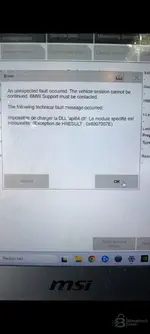
The error in your screenshot is clear:
"Unable to load DLL 'api64.dll': The specified module could not be found. (Exception from HRESULT: 0x8007007E)"
This is a classic issue related to missing or incomplete Visual C++ Redistributables. The file
api64.dll depends on VC++ runtimes to load properly.Solution:
- Install ALL Visual C++ Redistributables (x86 AND x64) — from 2005 through 2022. Use the all-in-one "Visual C++ Redistributable AIO" pack, which you can easily find online. Restart after installation.
- Install / repair .NET Framework — ISTA needs at least .NET 4.8. Go to Control Panel → Programs → Turn Windows features on or off → check .NET Framework 3.5 and .NET Framework 4.8+.
- Make sure the file api64.dll exists — Go to the ISTA installation folder (e.g.
C:\ISTA\binor similar) and look forapi64.dll. If the file is missing, your antivirus removed/quarantined it during installation. → Disable the antivirus and reinstall ISTA. - Run ISTA as administrator — Right-click → Run as administrator.
In 80% of cases, it is either point 1 (missing VC++ Redistributables) or point 3 (antivirus removed the DLL). Start by checking whether
api64.dll is present in the folder, then install the VC++ Redist.Post #19
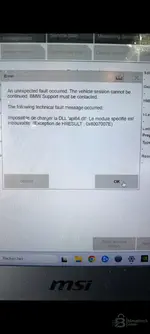
can anyone help me, I’m getting this errorista 4.58.32 Standalone. SAME PASSWORD AS THE PREVIOUS VERSION
Attachments
Post #20
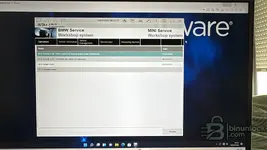
I managed to install it in a Windows 11 VM for testing, but you don’t need 50 GB free—you actually need 400 GB!!
At 300 GB it didn’t work for me, between extracting the files into the temporary directory and the installation itself!!!
However, the installation took about 2 hours
At 300 GB it didn’t work for me, between extracting the files into the temporary directory and the installation itself!!!
However, the installation took about 2 hours
Attachments
Activity
So far there's no one here
Similar threads
- Replies
- 25
- Views
- 16K


- Replies
- 62
- Views
- 38K

