ISTA 4.59.30 Full programming

  • Thread starter Thread starter roman66
  • Start date Start date
  • Tagged users Tagged users None

Post #21

我看你说“能正常识别车辆”,那通常不是什么缺少MINI/劳斯莱斯支持,而是ISTA在客户端的“品牌选择”里不一定会把MINI/RR做成单独选项——更常见是靠你接到车后自动识别并映射到对应车型/编程数据(PSdZData)。

但要把问题定位清楚,我需要你从截图里确认两点(因为你现在只说“PSdZData版本和接口在下面图片里”,我还不知道具体数值):

  • 你识别到的具体车型/年款是什么?(给品牌+车型+年款,或直接VIN后6-8位也行)
  • 你现在遇到的“没有MINI/RR选项”是在什么界面/步骤?是“品牌列表”看不到,还是进入“编程/Full programming”后点不进去/提示缺数据?
  • 请把你截图里PSdZData build/版本号那一行的文字打出来(或再截一张包含清晰版本号的),以及你无线ENET这边在ISTA里显示的接口配置名称/版本。
  • 无线ENET你确认是直连ENET(以太网网关)那种吗?还是某种“转接后以太网/诊断共用”的适配器?

你把这几项回我后,我才能判断是纯UI显示差异,还是编程权限/车型数据覆盖或接口链路问题。
Thank you very much for your reply. I currently do not have the corresponding model. If I encounter the same problem again, I will consult you. Thank you very much for your answer!
 

Post #22

ISTA 4.59.30
Full version of BMW ISTA-PLUS with programming
Deutsch English Russian

Works with D-CAN ENET ICOM A1 A2 NEXT

⚠️Uninstall the previous version of ISTA before installation!
✅ Ideally, install on a clean system.
BEFORE INSTALLING, MANDATORY:
Run the uninstaller for the previous version, if available.
Delete all possible ISTA folders:
"C:\Program Files\BMW"
"C:\ProgramData\BMW"
"C:\EC-APPS\ISTA"
"C:\ISTA"
"C:\Users\Username\AppData\Roaming\ISTA"
Delete the following branches Registry key:
"\HKEY_LOCAL_MACHINE\SOFTWARE\WOW6432Node\BMW"
"\HKEY_LOCAL_MACHINE\SOFTWARE\WOW6432Node\BMWGroup"
"\HKEY_LOCAL_MACHINE\SOFTWARE\BMW"
"\HKEY_LOCAL_MACHINE\SOFTWARE\BMWGroup"

INSTALLATION:
‣1. Disable Windows Defender and other antivirus programs during installation.
‣2. Install 7ZIP (if not already installed).
‣4. Install all add-ons from the Windows folder.
‣5. Run the "BMW ISTA+ Standalone.exe" file.
(Installation may take up to 3 hours, but it's easier to leave it overnight ⏳).
‣6. Add the "C:\Program Files\BMW" folder to Windows Defender exceptions.
(At this point, ISTA is ready for use in In diagnostic mode, you don't need to download and paste "PSDZ Lite."
‣7. Full version with programming: activate the "full-with-programming" registry file, download and unzip "PSdZData 4.59.21 full" to "C:\Program Files\BMW\ISPI\TRIC\ISTA\PSdZ\data_swi"
OR create a symbolic link if you need the full "PSDZ" database to be located elsewhere. To do this, open "CMD" as administrator and enter the command (example):
mklink /D "C:\Program Files\BMW\ISPI\TRIC\ISTA\PSdZ\data_swi" "C:\EC-APPS\PSDZ\data" —
where the first quotation marks indicate the desired path to "PSDZ" in "ISTA," and the second quotation marks indicate the actual path to "PSDZ."
‣8. Russification: Unzip the "RU SQLiteDBs" archive to "C:\Program Files\BMW\ISPI\TRIC\ISTA\SQLiteDBs" and change the language in the settings.

For "DCAN" users:
Before launching "ISTA," launch "ICOM-ENET or DCAN Switch" and change the settings to "DCAN."
After connecting the DCAN adapter, change the settings in the Device Manager properties to "Port number COM3, timeout 1 ms."
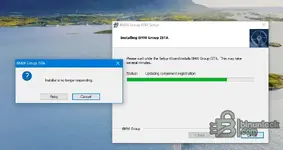
Bonjour, j'ai installer 2 fois ne fonctionne pas chez moi =>
 

Attachments

  • Capture.webp
    Capture.webp
    26.4 KB · Views: 1

Post #23

L'erreur "Installer is no longer responding" pendant l'étape "Updating component registration" est assez courante. Voici les points à vérifier :

1. Ne pas cliquer trop vite
Cette étape peut prendre très longtemps (parfois 20-30 minutes ou plus) et Windows affiche "ne répond plus" alors que l'installeur travaille encore en arrière-plan. Avant de cliquer "Retry" ou "Cancel", ouvre le Gestionnaire des tâches et vérifie si le processus utilise encore du CPU ou du disque. Si oui, laisse-le tourner.

2. Vérifications avant de réinstaller
  • Antivirus / Windows Defender — Désactive-le complètement pendant l'installation. C'est la cause n°1 de ce blocage. Ajoute au minimum une exclusion pour tout le dossier d'installation.
  • Espace disque — Assure-toi d'avoir au moins 50-60 Go libres sur C:.
  • Exécuter en administrateur — Clic droit sur BMW ISTA+ Standalone.exe → Exécuter en tant qu'administrateur.
  • Nettoyage complet — Avant de réessayer, supprime bien tous les restes comme indiqué dans le premier post (dossiers BMW + clés registre).
  • UAC — Baisse le contrôle de compte utilisateur au minimum temporairement.

3. Astuce supplémentaire
Lance l'installation avec la connexion Internet débranchée/désactivée. Certains composants essaient de vérifier des certificats en ligne et ça peut provoquer un timeout qui bloque l'installeur.

Réessaie avec ces précautions et dis-nous si ça passe.
 
Activity
So far there's no one here
Back