ISTA 4.59.30
Full version of BMW ISTA-PLUS with programming
German English Russian
Works with D-CAN, ENET, ICOM A1, A2, and NEXT

Uninstall the previous version of ISTA before installation!

Ideally, install on a clean system.
BEFORE INSTALLING, YOU MUST:
Run the uninstaller for the previous version, if available.
Delete all possible ISTA folders:
"C:\Program Files\BMW"
"C:\ProgramData\BMW"
"C:\EC-APPS\ISTA"
"C:\ISTA"
"C:\Users\Username\AppData\Roaming\ISTA"
Delete the following Registry key branches:
"\HKEY_LOCAL_MACHINE\SOFTWARE\WOW6432Node\BMW"
"\HKEY_LOCAL_MACHINE\SOFTWARE\WOW6432Node\BMWGroup"
"\HKEY_LOCAL_MACHINE\SOFTWARE\BMW"
"\HKEY_LOCAL_MACHINE\SOFTWARE\BMWGroup"
INSTALLATION:
‣1. Disable Windows Defender and other antivirus programs during installation.
‣2. Install 7ZIP (if it is not already installed).
‣4. Install all add-ons from the Windows folder.
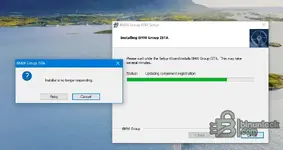
‣5. Run the "BMW ISTA+ Standalone.exe" file.
(The installation may take up to 3 hours, but it is easier to leave it overnight

).
‣6. Add the "C:\Program Files\BMW" folder to Windows Defender exceptions.
(At this point, ISTA is ready for use in diagnostic mode; you do not need to download and paste "PSDZ Lite.")
‣7. Full version with programming: activate the "full-with-programming" registry file, download and unzip "PSdZData 4.59.21 full" to "C:\Program Files\BMW\ISPI\TRIC\ISTA\PSdZ\data_swi"
OR create a symbolic link if you need the full "PSDZ" database to be located elsewhere. To do this, open "CMD" as administrator and enter the command (example):
mklink /D "C:\Program Files\BMW\ISPI\TRIC\ISTA\PSdZ\data_swi" "C:\EC-APPS\PSDZ\data" —
where the first quotation marks indicate the desired path to "PSDZ" in "ISTA," and the second quotation marks indicate the actual path to "PSDZ."
‣8. Russian language support: Unzip the "RU SQLiteDBs" archive to "C:\Program Files\BMW\ISPI\TRIC\ISTA\SQLiteDBs" and change the language in the settings.
For "DCAN" users:
Before launching "ISTA," launch "ICOM-ENET or DCAN Switch" and change the settings to "DCAN."
After connecting the DCAN adapter, change the settings in the Device Manager properties to "Port number COM3, timeout 1 ms."