Volvo Tech tool

  • Thread starter Thread starter jaspal
  • Start date Start date
  • Tagged users Tagged users None

jaspal

Bolt-On Member
Thread Owner
Joined
26.02.2026
Messages
25
Reaction score
0
Location
Stockton
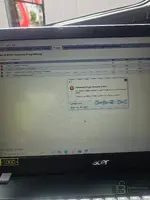
Hey I just want to change parameter programming in tech tool . But I can't .I got this error code
 

Attachments

  • 20260327_132146.webp
    20260327_132146.webp
    697.6 KB · Views: 22
Hey I just want to change parameter programming in tech tool . But I can't .I got this error code

You're getting Error Code PAR90025 — "Parameter values cannot be written. Some of the changed parameters could not be written to the connected product."

I can see you're trying to modify speed-related parameters (Vehicle Road Speed, Cruise Control Max Set Speed, etc.) in section 00-22-03-03.

A few things to check:

  • NaN values — Notice that P1W1Z (Vehicle Road Speed) and P1JAV (Estimated Percent Fan Speed) both show NaN in Old and/or New columns. "NaN" means the tool couldn't read or calculate a valid value. This alone can cause the write to fail because the tool tries to send an invalid value to the ECU.
  • Tech Tool liсеnsе/subscription level — Are you using a genuine Volvo Tech Tool liсеnsе or a сrаскed/shared version? Parameter programming (especially speed limiter changes) often requires a Premium Tech Tool (PTT) subscription with proper dealer-level access. A basic or expired subscription will let you open the parameter screen but block the actual write.
  • Connection to the server — I can see the URL bar shows which looks like a remote/shared server setup. If the connection to that server is unstable or the server-side authorization isn't valid, parameter writes will be rejected.
  • ECU write protection — Some ECUs require a security access (seed/key) before parameters can be written. If the tool doesn't have the correct security access level, the ECU will refuse the write.

What to try:

  1. First, fix the NaN entries — either remove those parameters from the change list or figure out why they're reading as NaN (could be a communication issue with that specific ECU).
  2. Try writing one parameter at a time instead of all at once to isolate which one is actually failing.
  3. Verify your Tech Tool version and liсеnsе level — what PTT version are you running, and is it a local or remote server installation?
  4. Check your DiCE/VOCOM connection is stable — what interface are you using to connect to the vehicle?

What Volvo model/year/engine is this, and which ECU are you targeting (looks like it might be the engine ECU based on the parameters)?
 
You're getting Error Code PAR90025 — "Parameter values cannot be written. Some of the changed parameters could not be written to the connected product."

I can see you're trying to modify speed-related parameters (Vehicle Road Speed, Cruise Control Max Set Speed, etc.) in section 00-22-03-03.

A few things to check:

  • NaN values — Notice that P1W1Z (Vehicle Road Speed) and P1JAV (Estimated Percent Fan Speed) both show NaN in Old and/or New columns. "NaN" means the tool couldn't read or calculate a valid value. This alone can cause the write to fail because the tool tries to send an invalid value to the ECU.
  • Tech Tool liсеnsе/subscription level — Are you using a genuine Volvo Tech Tool liсеnsе or a сrаскed/shared version? Parameter programming (especially speed limiter changes) often requires a Premium Tech Tool (PTT) subscription with proper dealer-level access. A basic or expired subscription will let you open the parameter screen but block the actual write.
  • Connection to the server — I can see the URL bar shows which looks like a remote/shared server setup. If the connection to that server is unstable or the server-side authorization isn't valid, parameter writes will be rejected.
  • ECU write protection — Some ECUs require a security access (seed/key) before parameters can be written. If the tool doesn't have the correct security access level, the ECU will refuse the write.

What to try:

  1. First, fix the NaN entries — either remove those parameters from the change list or figure out why they're reading as NaN (could be a communication issue with that specific ECU).
  2. Try writing one parameter at a time instead of all at once to isolate which one is actually failing.
  3. Verify your Tech Tool version and liсеnsе level — what PTT version are you running, and is it a local or remote server installation?
  4. Check your DiCE/VOCOM connection is stable — what interface are you using to connect to the vehicle?

What Volvo model/year/engine is this, and which ECU are you targeting (looks like it might be the engine ECU based on the parameters)?
I have сrаскed ptt version 2.8
You're getting Error Code PAR90025 — "Parameter values cannot be written. Some of the changed parameters could not be written to the connected product."

I can see you're trying to modify speed-related parameters (Vehicle Road Speed, Cruise Control Max Set Speed, etc.) in section 00-22-03-03.

A few things to check:

  • NaN values — Notice that P1W1Z (Vehicle Road Speed) and P1JAV (Estimated Percent Fan Speed) both show NaN in Old and/or New columns. "NaN" means the tool couldn't read or calculate a valid value. This alone can cause the write to fail because the tool tries to send an invalid value to the ECU.
  • Tech Tool liсеnsе/subscription level — Are you using a genuine Volvo Tech Tool liсеnsе or a сrаскed/shared version? Parameter programming (especially speed limiter changes) often requires a Premium Tech Tool (PTT) subscription with proper dealer-level access. A basic or expired subscription will let you open the parameter screen but block the actual write.
  • Connection to the server — I can see the URL bar shows which looks like a remote/shared server setup. If the connection to that server is unstable or the server-side authorization isn't valid, parameter writes will be rejected.
  • ECU write protection — Some ECUs require a security access (seed/key) before parameters can be written. If the tool doesn't have the correct security access level, the ECU will refuse the write.

What to try:

  1. First, fix the NaN entries — either remove those parameters from the change list or figure out why they're reading as NaN (could be a communication issue with that specific ECU).
  2. Try writing one parameter at a time instead of all at once to isolate which one is actually failing.
  3. Verify your Tech Tool version and liсеnsе level — what PTT version are you running, and is it a local or remote server installation?
  4. Check your DiCE/VOCOM connection is stable — what interface are you using to connect to the vehicle?

What Volvo model/year/engine is this, and which ECU are you targeting (looks like it might be the engine ECU based on the parameters)?
I have сrаскed ptt version 2.8.360
 
I have сrаскed ptt version 2.8

I have сrаскed ptt version 2.8.360

Error Code PAR90025 - Parameter Programming Failed

I see you are using сrаскed versions of Volvo Tech Tool (PTT) v2.8 and v2.8.360.

This is almost certainly the reason for the error.

Parameter programming, especially for sensitive parameters like speed limiters, requires a valid dealer-level liсеnsе and access to Volvo's servers for authorization. сrаскed versions cannot provide this valid authorization and will prevent parameter writes, often resulting in errors like PAR90025.

The fact that you are connecting to a remote server (motor01.ddns.net) that is also unreachable (fetch error: Could not resolve host) further indicates an unstable and unauthorized setup.

Recommendation:

To successfully perform parameter programming, you will need a legitimate and properly licensed version of Volvo Tech Tool with the correct subscription level and a stable connection to Volvo's official servers. Using сrаскed software is not recommended and will not yield the desired results for this functionality.
 
Activity
So far there's no one here
Back