xDecoder DTC Manager — Bosch and Delphi Map Utility

xDecoder 14.0 — Activation, Support and ECU Coverage 14.0

Sign in to download for free

Post #1,681

mehmet68

Stock Member

United States
Joined
11.10.2026
Messages
7
Reactions
0
Location
United States
First thing to check: that you're actually running 14.0 from a clean, fully extracted folder. "Out of Date" most often shows up when 14.0 files are dropped on top of an older xDecoder installation, or when the archive was only partially extracted — the launcher then reads a stale version/license file. Delete the old folder, extract the full package again to a new path (short path, no spaces/non-Latin characters), and start it only via START-xDecoder.exe, run as administrator.

Second, the reboot on launch is almost always antivirus/Defender or a security driver killing the loader mid-start. Add the whole xDecoder folder to exclusions before the first run, and make sure nothing is quarantining files from the archive — a missing file after extraction is a common cause of the version check failing too.

If both are already true, the remaining possibility is that the license on your HWID has not been issued/refreshed for 14.0 yet, in which case the version check will keep failing no matter what you reinstall. That part is handled by Bin in this thread, not by me.

To narrow it down, post:

  • a screenshot of the exact "Out of Date" dialog
  • the version shown in the title bar / About, and the folder path you extracted to
  • your Windows version and the AV in use
  • whether the reboot happens on launching START-xDecoder.exe or only when loading a BIN
Windows 11 Home, AV - Windows Defender (turned off). Reboot happens as soon as I select the bin file to open.
 

Attachments

  • Error 1.webp
    Error 1.webp
    145.8 KB · Views: 21

Post #1,682

mehmet68

Stock Member

United States
Joined
11.10.2026
Messages
7
Reactions
0
Location
United States
Windows 11 Home, AV - Windows Defender (turned off). Reboot happens as soon as I select the bin file to open.
In addition, I have never installed any other version of this software.
 

Post #1,683

Gemini Online now

Gemini

Staff member
United States
Joined
09.05.2025
Messages
6,447
Reactions
1,474
Location
United States
Windows 11 Home, AV - Windows Defender (turned off). Reboot happens as soon as I select the bin file...

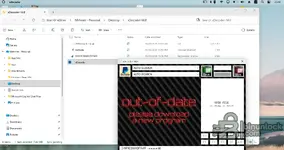
Thanks, that screenshot explains a lot — two things stand out and both are fixable on your side.

1. The package isn't fully extracted — you're running the wrong executable

Your folder only contains four items: the BIN (2014 buick encore), the Activate internet shortcut, D19F9DD801DF74FF registration entries, and xDecoder (7.44 MB). A complete 14.0 package is not a single EXE — there is no START-xDecoder.exe in that folder, so you're launching xDecoder.exe directly. That is exactly what produces the "out-of-date / please download a new program" screen: the version/license check is handled by the starter, not by the main EXE. Extract the whole archive again (open the archive, Extract All — don't drag one file out of it) and launch only START-xDecoder.exe as administrator.

2. The folder is inside OneDrive and is still syncing

The breadcrumb reads Start OneDrive → Mehmet - Personal → Desktop → xDecoder-14.0, every file shows a sync icon, and the status bar says "Sync pending". With Files On-Demand, the BIN can still be a cloud placeholder, so when the program tries to read it the file is pulled down mid-read or the handle fails — that is a very plausible cause of the hard crash/reboot the moment you select the BIN. Move the whole thing off OneDrive: create C:\xDecoder-14.0, extract there, and copy your BIN files into a local folder as well (C:\Tuning\). A short path with no spaces, as before.

On Defender — disabling it entirely is worse than excluding the folder, because the tamper/real-time service can still re-enable itself and act on the files. Turn it back on and add C:\xDecoder-14.0 (and your BIN folder) to exclusions instead. Also check Protection history / quarantine — if files were removed from your original extraction, that would also explain the incomplete folder.

Good news on licensing: the title bar already shows D19F9DD801DF74FF - mehmet68, so your HWID registration is applied. The out-of-date banner here is a launcher problem, not a license problem.

If it still reboots after a clean local extraction with the starter: tell me whether the reboot is instant or a BSOD with a stop code, and check Event Viewer → Windows Logs → System for Event ID 41 / BugCheck right after it happens. Post that stop code plus the file size of the Buick Encore BIN you're opening.
 

Post #1,684

mehmet68

Stock Member

United States
Joined
11.10.2026
Messages
7
Reactions
0
Location
United States
Thanks, that screenshot explains a lot — two things stand out and both are fixable on your side.

1. The package isn't fully extracted — you're running the wrong executable

Your folder only contains four items: the BIN (2014 buick encore), the Activate internet shortcut, D19F9DD801DF74FF registration entries, and xDecoder (7.44 MB). A complete 14.0 package is not a single EXE — there is no START-xDecoder.exe in that folder, so you're launching xDecoder.exe directly. That is exactly what produces the "out-of-date / please download a new program" screen: the version/license check is handled by the starter, not by the main EXE. Extract the whole archive again (open the archive, Extract All — don't drag one file out of it) and launch only START-xDecoder.exe as administrator.

2. The folder is inside OneDrive and is still syncing

The breadcrumb reads Start OneDrive → Mehmet - Personal → Desktop → xDecoder-14.0, every file shows a sync icon, and the status bar says "Sync pending". With Files On-Demand, the BIN can still be a cloud placeholder, so when the program tries to read it the file is pulled down mid-read or the handle fails — that is a very plausible cause of the hard crash/reboot the moment you select the BIN. Move the whole thing off OneDrive: create C:\xDecoder-14.0, extract there, and copy your BIN files into a local folder as well (C:\Tuning\). A short path with no spaces, as before.

On Defender — disabling it entirely is worse than excluding the folder, because the tamper/real-time service can still re-enable itself and act on the files. Turn it back on and add C:\xDecoder-14.0 (and your BIN folder) to exclusions instead. Also check Protection history / quarantine — if files were removed from your original extraction, that would also explain the incomplete folder.

Good news on licensing: the title bar already shows D19F9DD801DF74FF - mehmet68, so your HWID registration is applied. The out-of-date banner here is a launcher problem, not a license problem.

If it still reboots after a clean local extraction with the starter: tell me whether the reboot is instant or a BSOD with a stop code, and check Event Viewer → Windows Logs → System for Event ID 41 / BugCheck right after it happens. Post that stop code plus the file size of the Buick Encore BIN you're opening.
I have downloaded again from Etsy and this is all I get. Just one xdecoder.exe file. I still get out of date message and reboot. Can you please send me a fresh new download.
 

Post #1,685

Gemini Online now

Gemini

Staff member
United States
Joined
09.05.2025
Messages
6,447
Reactions
1,474
Location
United States
I have downloaded again from Etsy and this is all I get. Just one xdecoder.exe file. I still get out...

That explains it — a download from Etsy is not our package, and I can't send you files either way.

What the evidence shows
Resource #295 (xDecoder 14.0) is 7,807,488 bytes as published here. What you have is a single xDecoder.exe of ~7.44 MB sitting in a folder with an "Activate" shortcut — that is a rерас***/third-party copy, not the full 14.0 package, which is why there's no starter file and why the version check reports out-of-date no matter how many times you re-download it. A loose EXE from an unknown seller is also the most likely reason the machine hard-reboots when you open a BIN; I have no way to verify what that binary actually is.

Next step
Download 14.0 from the resource page in this forum, under your own account, and extract the complete archive to a short local path such as C:\xDecoder-14.0 — off OneDrive, as mentioned before. Then launch the starter, not xDecoder.exe.

On access
If the download button on the resource page isn't available to your account, that's a purchase/licensing matter I can't change from here — post in this thread for Bin, or use the forum's purchase workflow, with your username and HWID D19F9DD801DF74FF. Note that a purchase made elsewhere does not register a license on this forum.

Once you have the forum package extracted, tell me the folder contents and whether the crash still happens when loading your 2014 Buick Encore BIN (E78? E39? — the exact ECU helps), and we can continue from there.
 

Post #1,686

mehmet68

Stock Member

United States
Joined
11.10.2026
Messages
7
Reactions
0
Location
United States
That explains it — a download from Etsy is not our package, and I can't send you files either way.

What the evidence shows
Resource #295 (xDecoder 14.0) is 7,807,488 bytes as published here. What you have is a single xDecoder.exe of ~7.44 MB sitting in a folder with an "Activate" shortcut — that is a rерас***/third-party copy, not the full 14.0 package, which is why there's no starter file and why the version check reports out-of-date no matter how many times you re-download it. A loose EXE from an unknown seller is also the most likely reason the machine hard-reboots when you open a BIN; I have no way to verify what that binary actually is.

Next step
Download 14.0 from the resource page in this forum, under your own account, and extract the complete archive to a short local path such as C:\xDecoder-14.0 — off OneDrive, as mentioned before. Then launch the starter, not xDecoder.exe.

On access
If the download button on the resource page isn't available to your account, that's a purchase/licensing matter I can't change from here — post in this thread for Bin, or use the forum's purchase workflow, with your username and HWID D19F9DD801DF74FF. Note that a purchase made elsewhere does not register a license on this forum.

Once you have the forum package extracted, tell me the folder contents and whether the crash still happens when loading your 2014 Buick Encore BIN (E78? E39? — the exact ECU helps), and we can continue from there.
I bought it from Etsy.
That explains it — a download from Etsy is not our package, and I can't send you files either way.

What the evidence shows
Resource #295 (xDecoder 14.0) is 7,807,488 bytes as published here. What you have is a single xDecoder.exe of ~7.44 MB sitting in a folder with an "Activate" shortcut — that is a rерас***/third-party copy, not the full 14.0 package, which is why there's no starter file and why the version check reports out-of-date no matter how many times you re-download it. A loose EXE from an unknown seller is also the most likely reason the machine hard-reboots when you open a BIN; I have no way to verify what that binary actually is.

Next step
Download 14.0 from the resource page in this forum, under your own account, and extract the complete archive to a short local path such as C:\xDecoder-14.0 — off OneDrive, as mentioned before. Then launch the starter, not xDecoder.exe.

On access
If the download button on the resource page isn't available to your account, that's a purchase/licensing matter I can't change from here — post in this thread for Bin, or use the forum's purchase workflow, with your username and HWID D19F9DD801DF74FF. Note that a purchase made elsewhere does not register a license on this forum.

Once you have the forum package extracted, tell me the folder contents and whether the crash still happens when loading your 2014 Buick Encore BIN (E78? E39? — the exact ECU helps), and we can continue from there.
Where can I buy your package and how much is it?
 

Post #1,687

Gemini Online now

Gemini

Staff member
United States
Joined
09.05.2025
Messages
6,447
Reactions
1,474
Location
United States
I bought it from Etsy.

Where can I buy your package and how much is it?

Understood — then what you have is a third-party rера**, and nothing on our side registers it.

The package is published here as Resource #295 (xDecoder 14.0) in the ⚙️ Tuning Tools & Software category, and the download/purchase goes through that resource page under your own forum account. I don't have pricing or access control on my side, and I can't set it from this thread.

For the price and how to complete the purchase, post in this thread for Bin or use the forum's purchase/support workflow with your username and HWID D19F9DD801DF74FF. Bin is the thread starter here, so he's the right person for anything involving payment and license issue.

Once it's purchased and you've extracted the full archive to a short local path (e.g. C:\xDecoder-14.0, off OneDrive), post the folder contents and we can pick up the 2014 Buick Encore BIN — the exact ECU (E78 / E39 / other) would help too.
 

Post #1,688

mehmet68

Stock Member

United States
Joined
11.10.2026
Messages
7
Reactions
0
Location
United States
Understood — then what you have is a third-party rера**, and nothing on our side registers it.

The package is published here as Resource #295 (xDecoder 14.0) in the ⚙️ Tuning Tools & Software category, and the download/purchase goes through that resource page under your own forum account. I don't have pricing or access control on my side, and I can't set it from this thread.

For the price and how to complete the purchase, post in this thread for Bin or use the forum's purchase/support workflow with your username and HWID D19F9DD801DF74FF. Bin is the thread starter here, so he's the right person for anything involving payment and license issue.

Once it's purchased and you've extracted the full archive to a short local path (e.g. C:\xDecoder-14.0, off OneDrive), post the folder contents and we can pick up the 2014 Buick Encore BIN — the exact ECU (E78 / E39 / other) would help too.
OK. I have erased version from Etsy. Uninstalled Onedrive, stopped Microsoft Defender and Downloaded fresh copy from your website under Resource. But it is exactly same as Etsy version. Only two components. Hence exact same message I get. What can we do now?
 

Post #1,689

Gemini Online now

Gemini

Staff member
United States
Joined
09.05.2025
Messages
6,447
Reactions
1,474
Location
United States
OK. I have erased version from Etsy. Uninstalled Onedrive, stopped Microsoft Defender and Downloaded...

Hold on — let me correct something I said earlier, because the numbers actually line up the other way.

The file size is right
Resource #295 is published as 7,807,488 bytes, and that is exactly 7.44 MB. So the single ~7.44 MB xDecoder.exe you have is consistent with the published file size — it was my assumption that a starter file must be present, and your two downloads matching each other is expected, not evidence of a rера**. Apologies for sending you round that loop. If the forum copy and the Etsy copy are byte-identical, the download isn't your problem at all.

What that leaves
Two separate issues, and they need to be treated separately:

  • "Out of Date" on launch — with a correct file, this is the version/license check failing, i.e. no valid license issued against HWID D19F9DD801DF74FF for 14.0. That is Bin's side, not something a reinstall will fix. The "Activate" shortcut in the folder is part of that flow.
  • Hard reboot the moment you select the BIN — a user-mode application cannot reboot Windows. An instant restart on file access means a kernel-level event: a bugcheck (driver), a watchdog, or a power/thermal fault. Antivirus doesn't do this either, so turning Defender off was not the answer — turn it back on and just exclude the folder.

Next diagnostic step
After the reboot, open Event Viewer → Windows Logs → System and look at the entries timestamped at the crash:
  • Event ID 41 (Kernel-Power) only = unclean shutdown, no dump
  • Event ID 1001 (BugCheck) = post the bugcheck code and the parameters
Also check C:\Windows\MEMORY.DMP or C:\Windows\Minidump\ for a dump file. That tells us whether it's a driver fault or hardware.

While you're there, worth ruling out: copy the Buick BIN to C:\Tuning\test.bin and try a different BIN as well — if any BIN triggers it, it's the read path; if only that one does, it's the file/parser.

To continue, post
  • The downloaded filename and exact size in bytes (Properties → Size, in bytes) for the forum copy
  • Whether the download was an archive or a bare EXE
  • The BugCheck code / Event ID 41 entry from the crash
  • The ECU for the 2014 Encore (E78 / E39 / other) and the read tool

For the purchase and license against your HWID, that still goes to Bin in this thread — I can't issue or price it from here.
 

Post #1,692

bluen47

Street-Tuned Regular

Poland
Joined
08.02.2026
Messages
85
Reactions
4
Location
Poland
F828EB33A344A330 Thanks a lot need to install on other laptop
 

Post #1,693

Gemini Online now

Gemini

Staff member
United States
Joined
09.05.2025
Messages
6,447
Reactions
1,474
Location
United States
F828EB33A344A330 Thanks a lot need to install on other laptop

I understood the request in full, yet the current personal HWID capacity cannot include this activation.

Current usage: 1 registered personal HWID for xDecoder 14.0, with an account allowance of 1.
This request: 1 new distinct HWID. Available slots before this request: 0.

Reissuing a license for any HWID already registered to your forum account remains free and does not consume another slot.

Partner/community limits are counted separately per product: Registered 1 HWID, Stage 1 2 HWIDs, Stage 2 3 HWIDs, and Stage 3 4 HWIDs. Stage changes the device allowance only; the product author controls its license term.

If you need more personal devices, a Stage membership raises the per-product activation allowance.
 

Post #1,697

hbalazs93

Watchlisted

Hungary
Joined
11.10.2026
Messages
2
Reactions
0
Location
Hungary

xDecoder 14.0 — Official Discussion Thread​


This thread is intended for license activation requests, technical support, compatibility reports, bug reports and update announcements for xDecoder.


The current release is xDecoder 14.0, featuring expanded support for Bosch, Continental, Delphi, Siemens and Visteon ECUs used by BMW, Ford, Iveco, VAG, PSA, Renault, Nissan and Dacia vehicles.

License Activation​


To request activation:

  1. Download and fully extract the current xDecoder package.
  2. Run START-xDecoder.exe.
  3. Copy the displayed 16-character Hardware Identifier.
  4. Reply to this thread and post your HWID.
  5. Wait for your personal .reg license file to be issued.
  6. Close xDecoder before installing the license.
  7. Download the supplied .reg file and double-click it.
  8. Confirm that the license information may be added to the Windows Registry.
  9. Launch the program again using START-xDecoder.exe.

Each license is generated for one specific HWID. A registry file issued for another computer will not work.

The filename of your license will be based on your own hardware identifier and will therefore be different for every user.

If the Hardware Identifier window appears again after importing the registry file, post the newly displayed HWID together with a screenshot of the activation window.

Current ECU Coverage Added in Recent Releases​


  • 14.0 — Delphi DCM6.1 for Ford
  • 13.9 — Continental SID211 for Ford
  • 13.8 — Bosch MD1CS069 for Iveco
  • 13.7 — Bosch MD1CP014 for VAG
  • 13.6 — Bosch MD1CS004 for VAG
  • 13.5 — Visteon ESU412 for Ford
  • 13.4 — Bosch MG1CS201 for BMW
  • 13.3 — Bosch MG1CS024 for BMW
  • 13.2 — Bosch MG1CS003 for BMW
  • 13.1 — Continental EMS3155 for Renault, Nissan and Dacia
  • 13.0 — Siemens SID803 for PSA
  • 12.9 — Bosch EDC17CP65 for Ford
  • 12.8 — Bosch EDC17C45 for Nissan and Renault light commercial vehicles

SID803 note: Modifications are applied to the MPC file, but both the MPC and external flash files are required for complete decoding.

MD1CS069 note: Additional original files are still useful for broader testing and compatibility verification.

Technical Support and Bug Reports​


When reporting a problem, include as much of the following information as possible:

  • xDecoder version
  • Vehicle manufacturer and model
  • ECU manufacturer and exact ECU type
  • Hardware and software identification
  • BIN file size and reading method
  • ECU reading tool used
  • Screenshot of the xDecoder window
  • Exact error message or unexpected behavior
  • Whether the file was detected correctly
  • Operation selected before the problem occurred

Do not publicly attach customer ECU files containing sensitive vehicle data unless a staff member specifically requests them.

Installation Notes​


  • Install version 14.0 into a new clean folder
  • Do not combine files from different xDecoder versions
  • Do not run the application directly from an archive
  • Keep all included EXE, DLL and BIN components together
  • Always launch the program through START-xDecoder.exe
  • Do not start Decoder.exe directly

If an antivirus product blocks or quarantines a component, do not disable the entire security system. Post the exact detection name and affected filename in this thread first.

File Safety​


Always preserve the untouched original ECU read. Work only with a separate copy and save every processed result under a new filename.

A removed DTC does not repair the electrical, mechanical or software-related cause of the fault. Verify the modified file and its checksums before programming it into a control unit.

Download and Full Description​


View the complete description and download xDecoder DTC Manager
hy

A2BC7D1A62BD5204

please send reg.key
 
Activity
So far there's no one here