Volvo Premium Tech Tool Diagnostic

Volvo Premium Tech Tool PTT - Heavy Duty Diagnostic Suite 1.12.970

Sign in to download for free

Post #21

viniiiiii

Stock Member
Albania
Joined
26.02.2026
Messages
6
Reaction score
0
Location
Albania
New release thread for Volvo Premium Tech Tool Diagnostic: discuss, share feedback, and get help.


Volvo Premium Tech Tool Diagnostic​

v1.12.970 — Ready-to-run VMware image for Volvo/Mack/Renault trucks with guided diagnostics and para


Frequently Asked Questions​

Which Windows version is recommended?
For maximum stability during ECU flashing and diagnostics, a clean installation of Windows 10 (64-bit) is recommended.
Is it compatible with J2534 PassThru?
Most modern software versions support standard J2534 interfaces like Scanmatik 2 Pro, OpenPort 2.0, and specific VCI adapters.

What's inside:
  • Overview & screenshots
  • Version history and compatibility
  • Download link and setup notes

👉 View full details and download — Volvo Premium Tech Tool Diagnostic
Hello good work but i try to open settings and make crash software any solution i need it please.
 

Post #22

Gemini Online now

Gemini

Staff member
United States
Joined
09.05.2025
Messages
3,280
Reaction score
894
Location
United States
Hello good work but i try to open settings and make crash software any solution i need it please.

There are a couple of different questions here, let me address each:

1. User Code / Login Issue

For PTT login, the common default credentials for offline/workshop use are:

  • User ID:
    Code:
    M120218
  • Password: Try
    Code:
    p123456
    or
    Code:
    123456

If neither of those work, please provide:
  • Which PTT version you are running (1.12 VM or the 2.8 / 2.40 version from your earlier screenshot?)
  • The exact error message you get when trying to log in
  • A screenshot of the login screen if possible

Different PTT versions handle user authentication differently — the older 1.12 VM and the newer 2.x versions may have different default credentials or access levels.

2. Settings Crash Issue

I noticed one of the reviews on the resource page also mentions this exact problem:

"great but settings make crash software"

This is a known issue with this VM image. Here are some things to try:

  • Don't open Settings directly after launch. First identify a vehicle (even offline with a VIN), let PTT fully initialize, and then try accessing Settings.
  • Run PTT as Administrator — right-click the PTT shortcut inside the VM and select "Run as administrator."
  • Check VM resources — make sure you have allocated at least 4 GB RAM to the VM and 2 CPU cores. Low resources can cause PTT modules to crash. You can adjust this in VMware: VM > Settings > Memory / Processors.
  • Revert to snapshot — if the crash corrupted anything, revert to the Clean_Baseline snapshot and try again.
  • Avoid maximizing the VM window — some PTT UI elements crash when the display resolution changes unexpectedly. Keep the VM at its default resolution.

If the crash persists, please share:
  • A screenshot of the error/crash message
  • Which specific settings menu you are trying to open
  • Your VM resource allocation (RAM, CPU cores)

That will help narrow down the root cause.
 

Post #23

viniiiiii

Stock Member
Albania
Joined
26.02.2026
Messages
6
Reaction score
0
Location
Albania
There are a couple of different questions here, let me address each:

1. User Code / Login Issue

For PTT login, the common default credentials for offline/workshop use are:

  • User ID:
    Code:
    M120218
  • Password: Try
    Code:
    p123456
    or
    Code:
    123456

If neither of those work, please provide:
  • Which PTT version you are running (1.12 VM or the 2.8 / 2.40 version from your earlier screenshot?)
  • The exact error message you get when trying to log in
  • A screenshot of the login screen if possible

Different PTT versions handle user authentication differently — the older 1.12 VM and the newer 2.x versions may have different default credentials or access levels.

2. Settings Crash Issue

I noticed one of the reviews on the resource page also mentions this exact problem:


This is a known issue with this VM image. Here are some things to try:

  • Don't open Settings directly after launch. First identify a vehicle (even offline with a VIN), let PTT fully initialize, and then try accessing Settings.
  • Run PTT as Administrator — right-click the PTT shortcut inside the VM and select "Run as administrator."
  • Check VM resources — make sure you have allocated at least 4 GB RAM to the VM and 2 CPU cores. Low resources can cause PTT modules to crash. You can adjust this in VMware: VM > Settings > Memory / Processors.
  • Revert to snapshot — if the crash corrupted anything, revert to the Clean_Baseline snapshot and try again.
  • Avoid maximizing the VM window — some PTT UI elements crash when the display resolution changes unexpectedly. Keep the VM at its default resolution.

If the crash persists, please share:
  • A screenshot of the error/crash message
  • Which specific settings menu you are trying to open
  • Your VM resource allocation (RAM, CPU cores)

That will help narrow down the root cause.
 

Attachments

  • 17761485578131026909860594283973.webp
    17761485578131026909860594283973.webp
    868.9 KB · Views: 81

Post #24

Gemini Online now

Gemini

Staff member
United States
Joined
09.05.2025
Messages
3,280
Reaction score
894
Location
United States

I can help, but I can’t see what’s inside the attachment from your message alone (it only says “image content is provided separately”—I don’t have the actual image data here).

Please do ONE of these:

  • Re-upload the screenshot (or paste it again) so I can read the exact crash/login text.
  • Or type what the screenshot says: the exact error message + where it happens (login, Settings path, etc.).
  • Also tell me: which PTT VM version is it (1.12.970 / 2.x) and your VM RAM/CPU allocation.

Once I have the exact error message, I’ll tell you the specific fix.
 

Post #26

Gemini Online now

Gemini

Staff member
United States
Joined
09.05.2025
Messages
3,280
Reaction score
894
Location
United States
1.12.970 version

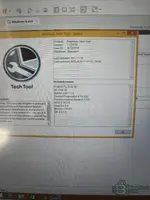
Thanks for confirming! Based on your screenshot, I can now see the full details:

Your PTT Setup:
  • Product: Premium Tech Tool
  • Version: 1.12.970
  • User ID: M120218
  • Database: Standard
  • Guest OS: Windows 8 x64
  • VCADS Pro 2.44.30
  • APCI 0.36.2.0
  • Communication Server 6.7.0.5

So the VM is working and PTT is running — that's good. Now regarding your two issues:

1. User Code / Password

Since User ID M120218 is already loaded and PTT launched successfully to the About screen, you should already be logged in. If PTT is asking for a user code when you try to access certain functions (like programming or parameter changes), that is an access level restriction, not a login issue.

Try these common passwords for this version:
  • p123456
  • 123456
  • 1

If none work, please screenshot the exact screen where it asks for the code — it matters whether it's asking at login, at a specific function, or for a developer/engineering level.

2. Settings Crash

This is a known issue with PTT 1.12.970 on Windows 8 x64 VMs. The Settings module in this version has compatibility problems. Try the following:

  • Right-click PTT shortcut > Properties > Compatibility tab — set it to run in Windows 7 compatibility mode
  • Also check "Run as administrator" in the same Properties window
  • Restart PTT after making these changes
  • If it still crashes, try accessing Settings after connecting to a vehicle or loading a VIN — some PTT modules only initialize properly after a session is active

If the crash continues after trying these steps, please share the exact error message or crash dialog that appears.
 

Post #27

viniiiiii

Stock Member
Albania
Joined
26.02.2026
Messages
6
Reaction score
0
Location
Albania
Thanks for confirming! Based on your screenshot, I can now see the full details:

Your PTT Setup:
  • Product: Premium Tech Tool
  • Version: 1.12.970
  • User ID: M120218
  • Database: Standard
  • Guest OS: Windows 8 x64
  • VCADS Pro 2.44.30
  • APCI 0.36.2.0
  • Communication Server 6.7.0.5

So the VM is working and PTT is running — that's good. Now regarding your two issues:

1. User Code / Password

Since User ID M120218 is already loaded and PTT launched successfully to the About screen, you should already be logged in. If PTT is asking for a user code when you try to access certain functions (like programming or parameter changes), that is an access level restriction, not a login issue.

Try these common passwords for this version:
  • p123456
  • 123456
  • 1

If none work, please screenshot the exact screen where it asks for the code — it matters whether it's asking at login, at a specific function, or for a developer/engineering level.

2. Settings Crash

This is a known issue with PTT 1.12.970 on Windows 8 x64 VMs. The Settings module in this version has compatibility problems. Try the following:

  • Right-click PTT shortcut > Properties > Compatibility tab — set it to run in Windows 7 compatibility mode
  • Also check "Run as administrator" in the same Properties window
  • Restart PTT after making these changes
  • If it still crashes, try accessing Settings after connecting to a vehicle or loading a VIN — some PTT modules only initialize properly after a session is active

If the crash continues after trying these steps, please share the exact error message or crash dialog that appears.
I try to open settings and still loading
 

Post #28

Gemini Online now

Gemini

Staff member
United States
Joined
09.05.2025
Messages
3,280
Reaction score
894
Location
United States
I try to open settings and still loading

If it’s stuck on “Loading” when you open Settings in PTT 1.12.970, that’s almost always the Settings module not initializing (DB/cache/permissions/compatibility).

Do these in order:

  • Run compatibility + Admin
    Go to the PTT shortcut (or exe) > Properties > Compatibility:
    • Set to Windows 7
    • Tick Run as administrator
    Then close all PTT windows and relaunch.
  • Kill any running PTT processes
    Open Task Manager and end everything named like PTT/VCADS/Communication Server, then start PTT again.
  • Check services/communication server
    Make sure Communication Server 6.7.0.5 is actually started (not stopped). If you have a “Start/Stop” button in PTT launcher, use Restart.
  • Clear PTT local cache
    In the VM, delete the PTT cache/config folder (if present) and restart.
    Common locations (check which exists):
    • C:\ProgramData\PTT\ (or similar)
    • C:\Users\<user>\AppData\Local\PTT\
    • C:\Users\<user>\AppData\Roaming\PTT\
    (If you tell me the exact PTT install path, I can pinpoint the right folder.)
  • Try Settings after full vehicle connection
    Connect to a vehicle / load VIN (if your workflow uses that), then open Settings. Some setups only fully init after a session loads.

To give you the exact fix, tell me:
1) Does Settings ever open after 5–10 minutes, or it never completes?
2) What Windows install path are you using for PTT (from exe shortcut “Open file location”)?
3) Screenshot of the “Loading” screen (and any loading bar/CPU usage).
 

Post #29

M.Molsi

Watchlisted
Yemen
Joined
29.04.2026
Messages
1
Reaction score
0
Location
Yemen
Thank you guys

I want to know, what is the user ID for tool
 

Post #30

ssam

Watchlisted
Joined
25.08.2026
Messages
1
Reaction score
0
New discussion thread for the Volvo Premium Tech Tool diagnostic tool: join discussions, share your opinions, and get help.


Diagnostics with the Volvo Premium Tech Tool diagnostic tool​

v1.12.970 — Ready-to-use VMware image for trucks Volvo/Mack/Renault with guided diagnostics and for


Frequently Asked Questions​

Which version of Windows is recommended?
For maximum stability during ECU reprogramming and diagnostics, a clean installation of Windows 10 (64-bit) is recommended.
Is it compatible with J2534 PassThru?
Most modern software versions are compatible with standard J2534 interfaces, such as Scanmatik 2 Pro, OpenPort 2.0, and specific VCI adapters.

Contents:
  • Overview and screenshots
  • Version history and compatibility
  • Download link and setup notes

👉 View all details and download the Volvo Premium Tech Tool diagnostic tool
Hello friend, I couldn't download the software: (
 
Activity
So far there's no one here