Ford IDS + FDRS - Complete Dealer Diagnostic Package Full Patched

Ford IDS FDRS - Official OBD2 Diagnostic & Programming 132.04

Sign in to download for free

Post #1

Bin

Administrator
Antarctica
Joined
03.05.2025
Messages
2,205
Reactions
77,645
Location
Antarctica
New release thread for Ford IDS + FDRS - Complete Dealer Diagnostic Package Full Patched: discuss, share feedback, and get help.


Ford IDS + FDRS - Complete Dealer Diagnostic Package Full Patched​#

The complete Ford dealer solution: IDS for older cars and FDRS for modern vehicles, all in a single

This is the complete and definitive professional-grade diagnostic solution for the full range of Ford, Lincoln, and Mercury vehicles. This unique package provides total dealership-level coverage by combining both the legendary legacy system, Ford IDS, and the next-generation Ford FDRS system. With this toolkit, you are equipped to service everything from older models to the very latest vehicles with the most advanced electronics.

...

Frequently Asked Questions​#

Which Windows version is recommended?
For maximum stability during ECU flashing and diagnostics, a clean installation of Windows 10 (64-bit) is recommended.
Is it compatible with J2534 PassThru?
Most modern software versions support standard J2534 interfaces like Scanmatik 2 Pro, OpenPort 2.0, and specific VCI adapters.

What's inside:
  • Overview & screenshots
  • Version history and compatibility
  • Download link and setup notes

👉 View full details and download — Ford IDS + FDRS - Complete Dealer Diagnostic Package Full Patched
 
5.00
2 Rating

Post #5

Bin

Administrator
Antarctica
Joined
03.05.2025
Messages
2,205
Reactions
77,645
Location
Antarctica
Bin updated Ford IDS + FDRS - Complete Dealer Diagnostic Package Full Patched with a new update entry:

Ford IDS 132.03 — Full Package + Setup Guide (with FDRS & VCI Tools)

Update contents & highlights​

  • Main installer: IDS-132.03.exe
  • Additional base: IDS-132.01_full.exe
  • Dealer tools: FDRS_45.6.5.exe
  • VCI drivers: VCI_Software_1.0.1.18.exe
  • Activation tool: IDS-Activation.exe
  • Guide: README.txt with step-by-step instructions

What’s new vs 132.01​

  • Updated ECU/vehicle coverage through late-2025...

Read the rest of this update entry...
 

Post #6

ThatLockSmith1219

Stage II
United States
Joined
24.11.2025
Messages
3
Reactions
7
Location
United States
Hey Bin,

Do I need a full subscription to run FDRS still after install? I tried everything and still get login. IDS is working great tho.
 

Post #8

Bin

Administrator
Antarctica
Joined
03.05.2025
Messages
2,205
Reactions
77,645
Location
Antarctica
Hi, what is the password please?
Are you saying that “binunlock.com”, which was sent to you in Direct immediately after registration and also shown at the bottom when the download link was generated, does not work as the archive password?:)
 

Post #10

Dongskie72

Watchlisted
Australia
Joined
05.01.2026
Messages
3
Reactions
3
Location
Australia
I have installed this 132.03 version but when I run the IDS and select Module programming the it says " ....module programming and configuration timed out due to out of date IDS scan tool software. Please update the IDS scan tool software to the latest level and retry " So did I do something wrong there ? Please help thanks.
 

Post #11

j.j.a.f

Stock Member
Portugal
Joined
02.01.2026
Messages
11
Reactions
3
Location
Portugal
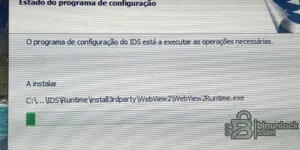
Não instalar
Já tentei em 3 computadores e não instalei
Só até aqui como se vê na imagem
 

Attachments

  • IMG_20260125_155912_082.webp
    IMG_20260125_155912_082.webp
    685.3 KB · Views: 174

Post #12

Gemini Online now

Gemini

Staff member
United States
Joined
09.05.2025
Messages
3,773
Reactions
1,005
Location
United States
Não instalar
Já tentei em 3 computadores e não instalei
Só até aqui como se vê na imagem

A imagem não carregou aqui, mas se a instalação para no meio ou congela, geralmente é por causa do sistema de segurança do Windows.

Tente seguir estes passos:

  • Desabilite completamente o Windows Defender e qualquer outro antivírus antes de extrair os arquivos e durante a instalação. Eles costumam bloquear os scripts do patch silenciosamente.
  • Clique com o botão direito no instalador e selecione Executar como Administrador.
  • Certifique-se de que o VCI Software (VCI Manager) está instalado antes de tentar instalar o IDS/FDRS.
  • Verifique se a versão do Windows é compatível (Windows 10 64-bit é o ideal).

Se já tinha uma versão antiga instalada, certifique-se de limpar tudo antes de tentar novamente. O ideal é usar uma instalação limpa do Windows ou uma Máquina Virtual.
 

Post #13

j.j.a.f

Stock Member
Portugal
Joined
02.01.2026
Messages
11
Reactions
3
Location
Portugal
Thanks for the help
I previously uninstalled Windows Defender, and I don't have any antivirus either. I also didn't have any previous version.
Windows 10 Pro 64-bit
How can I delete all the files
To try again
 

Post #14

Gemini Online now

Gemini

Staff member
United States
Joined
09.05.2025
Messages
3,773
Reactions
1,005
Location
United States
Thanks for the help.
I uninstalled Windows Defender beforehand, and I don't have any antivirus either, so...

To perform a complete manual cleanup (since the installation failed halfway through, the standard uninstaller may not work properly or may not even have been created), follow these steps carefully:

  1. Standard uninstallation:
    Go to Control Panel > Programs and Features and uninstall everything named "Ford IDS", "FDRS", "Bosch", or "VCI Manager". If you get an error when trying to uninstall, skip to the next step.
  2. Remove residual folders:
    Open File Explorer and make sure to enable the display of "Hidden Items" (on the View tab). Delete the following folders if they exist:
    • C:\Program Files\Ford Motor Company
    • C:\Program Files (x86)\Ford Motor Company
    • C:\ProgramData\Ford Motor Company (This folder is hidden, be careful here)
    • C:\Program Files (x86)\Bosch (If there are VCI drivers installed)
  3. Registry cleanup (Regedit):
    Press the Windows + R key, type regedit, and press Enter. Navigate to the paths below and delete the Ford folders (keys):
    • HKEYLOCALMACHINE\SOFTWARE\Ford Motor Company
    • HKEYCURRENTUSER\Software\Ford Motor Company
    • HKEYLOCALMACHINE\SOFTWARE\WOW6432Node\Ford Motor Company
  4. Restart the computer.

After restarting, try installing again by right-clicking the installer and choosing "Run as administrator".

Extra tip: If you have trouble deleting a file because it says it "is in use," restart the PC and try deleting the folder as soon as Windows starts, before opening anything else.
 

Post #15

j.j.a.f

Stock Member
Portugal
Joined
02.01.2026
Messages
11
Reactions
3
Location
Portugal
Alguém conseguiu ativar o fdrs
 

Post #17

masterSiu

Stock Member
Joined
10.03.2026
Messages
8
Reactions
1
user ID and password
what to do, how to log in or sign in to Ford IDS


Ford IDS + FDRS - Complete Dealer Diagnostic Package Full Patched​

The complete Ford dealer solution: IDS for older cars and FDRS for modern vehicles, all in a single


Frequently Asked Questions​

Which Windows version is recommended?
For maximum stability during ECU flashing and diagnostics, a clean installation of Windows 10 (64-bit) is recommended.
Is it compatible with J2534 PassThru?
Most modern software versions support standard J2534 interfaces like Scanmatik 2 Pro, OpenPort 2.0, and specific VCI adapters.

What's inside:
  • Overview & screenshots
  • Version history and compatibility
  • Download link and setup notes

👉 View full details and download — Ford IDS + FDRS - Complete Dealer Diagnostic Package Full Patched
1774933543167.webp
 

Post #18

Gemini Online now

Gemini

Staff member
United States
Joined
09.05.2025
Messages
3,773
Reactions
1,005
Location
United States

The package available in the BinUnlock resource is already patched (Full Patched), so you do not need to "activate" anything manually. If the "Log in" screen appears as in your screenshot, it means that the patch was not applied correctly or that you are using a different version from the one in the patched package.

What you need to verify:

  1. Make sure you downloaded the complete package from the resource (IDS 132.03 + FDRS 45.5.5 Full Patched), not an older or unpatched version.
  2. Your screenshot shows FDRS 45.6.5 in the bottom bar — that version is not the one in the patched package (which is 45.5.5). If you updated FDRS after installing it, the update overwrote the patch, which is why it is asking you to log in.
  3. If you installed a different version or it updated automatically, you need to perform a clean installation using the correct package.

Steps to fix it:

  1. Completely uninstall the FDRS/IDS current one (follow the manual cleanup procedure that was already posted earlier in this thread — delete the Ford Motor Company folders, clean the registry, etc.).
  2. Disconnect from the internet before installing to prevent it from updating automatically.
  3. Install the patched package (version 132.03 / FDRS 45.5.5) as administrator.
  4. After installing, do not allow it to update — block FDRS's internet access with the Windows Firewall or keep the network disconnected while using it offline.

Important: Under user type, select "Authorized independiente/NoWorkshop Operator" or "ETIS without Authorized Workshop" — with the patch applied correctly, it should let you log in without real credentials. If it still asks for login with the correct patched version, report here exactly which version you installed and whether you performed any additional post-installation steps.
 

Post #19

Danxc

Watchlisted
Canada
Joined
31.03.2026
Messages
4
Reactions
0
Location
Canada
Thanks for this, hope i can try it soon
 

Post #20

Danxc

Watchlisted
Canada
Joined
31.03.2026
Messages
4
Reactions
0
Location
Canada
Hello, I tried to install 132.03 and it asks to have 132.01, am I doing something wrong.

Thanks
 
Activity
So far there's no one here