
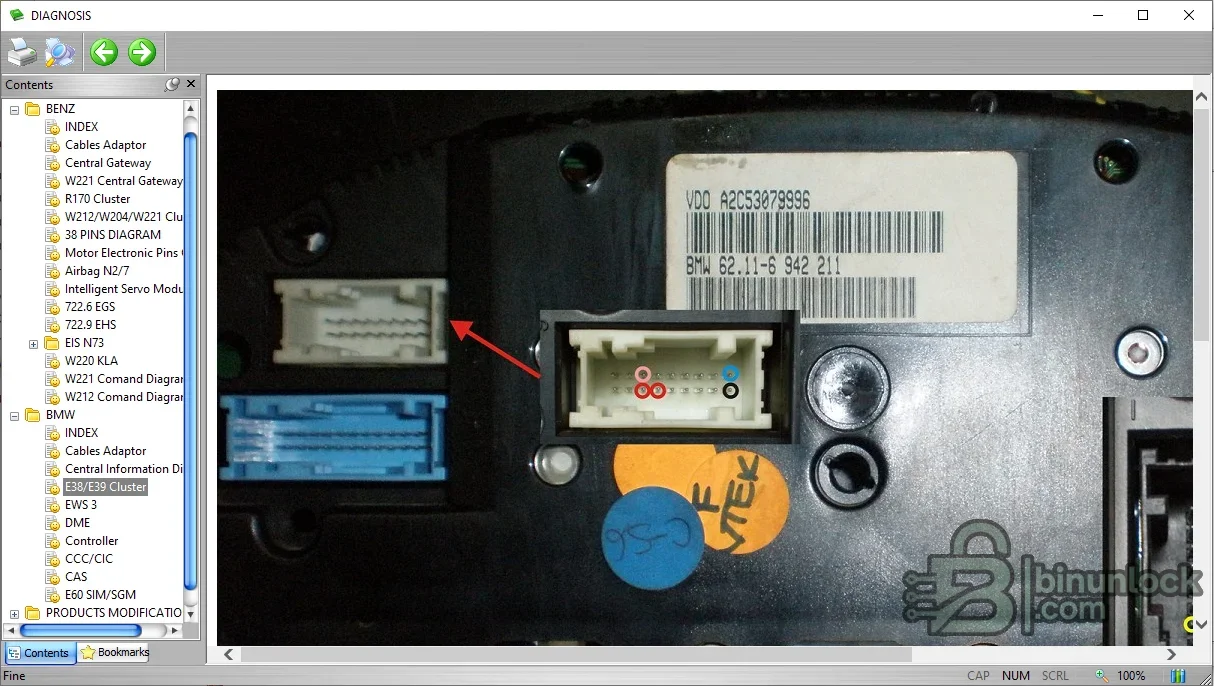
BB On-Board Diagnosis is an interactive e-book focused on the architecture and service context of BMW and Mercedes-Benz electronic systems. Its navigation tree groups diagnostic connectors, gateway concepts and representative control units, giving technicians a visual orientation before they move to model-specific wiring or live diagnosis.
The content is a training reference rather than a communication program: it does not connect to a vehicle, read codes or program modules. Use it to understand terminology and control-unit relationships, then verify pinouts, test values and procedures in the current factory documentation for the exact chassis.
The package contains one compiled CyberArticle e-book executable. Its embedded reader build identifies the e-book engine, not the publication revision of the automotive content. The file is a native unsigned Windows executable and was inspected statically without launching it during package preparation.
The named chassis and module examples are evidence of topics in the manual, not a claim of complete BMW or Mercedes coverage. Later Ethernet-based platforms, secure gateways and newer diagnostic architectures require current tools and data. Even within the same chassis, production date and option equipment can change connector and module assignments.
Do not probe airbag, gateway or transmission circuits from a generic diagram. Follow manufacturer isolation procedures, use appropriate breakout equipment and keep diagnostic logs free of customer identifiers before sharing. The manual is best used for orientation and terminology.
The content is a training reference rather than a communication program: it does not connect to a vehicle, read codes or program modules. Use it to understand terminology and control-unit relationships, then verify pinouts, test values and procedures in the current factory documentation for the exact chassis.
Mercedes-Benz topics visible in the manual#
- Diagnostic cables and adapter overview
- Central gateway role in vehicle communication
- W221 and R170 instrument-cluster examples
- Thirty-eight-pin diagnostic connector diagram
- Airbag control-unit example identified as N2/7
- Intelligent Servo Module overview
- Electronic transmission control and EHS context
BMW topics visible in the manual#
- Diagnostic cables and adapter overview
- Central information display architecture
- E38 and E39 instrument-cluster examples
- EWS immobilizer generation overview
- Digital Motor Electronics and electronic control concepts
- CCC and CIC infotainment architecture
- Car Access System context
- E60 safety and gateway modules including SIM and SGM
What the package contains#
The package contains one compiled CyberArticle e-book executable. Its embedded reader build identifies the e-book engine, not the publication revision of the automotive content. The file is a native unsigned Windows executable and was inspected statically without launching it during package preparation.
System requirements#
- Isolated Windows environment capable of running a legacy 32-bit e-book reader
- Display scaling that preserves the navigation tree and embedded diagrams
- Current BMW or Mercedes factory service information for the exact chassis
- A separate diagnostic application and compatible interface for live vehicle work
- No internet connection is required for the packaged reference
Recommended learning and diagnostic workflow#
- Choose the manufacturer and relevant chassis or module family in the contents tree.
- Study the connector, gateway and module relationship before attaching diagnostic equipment.
- Identify the exact module designation and physical network used in the target vehicle.
- Open the matching factory wiring diagram and confirm power, ground and bus topology.
- Run live diagnosis with an approved interface and save the complete vehicle test.
- Use the training material to interpret relationships, not as a substitute for measured evidence.
Compatibility limits#
The named chassis and module examples are evidence of topics in the manual, not a claim of complete BMW or Mercedes coverage. Later Ethernet-based platforms, secure gateways and newer diagnostic architectures require current tools and data. Even within the same chassis, production date and option equipment can change connector and module assignments.
Troubleshooting the e-book#
- Blank or clipped page: adjust Windows display scaling and test a compatible legacy environment
- Navigation item does not open: extract the complete package to a local writable folder
- Reader blocked by security policy: do not bypass controls on a production machine; use an isolated lab system
- Diagram conflicts with vehicle: trust the factory document for the exact VIN and production date
- No vehicle communication: troubleshoot interface, ignition, power and network separately because the e-book is offline
Safe workshop use#
Do not probe airbag, gateway or transmission circuits from a generic diagram. Follow manufacturer isolation procedures, use appropriate breakout equipment and keep diagnostic logs free of customer identifiers before sharing. The manual is best used for orientation and terminology.


