
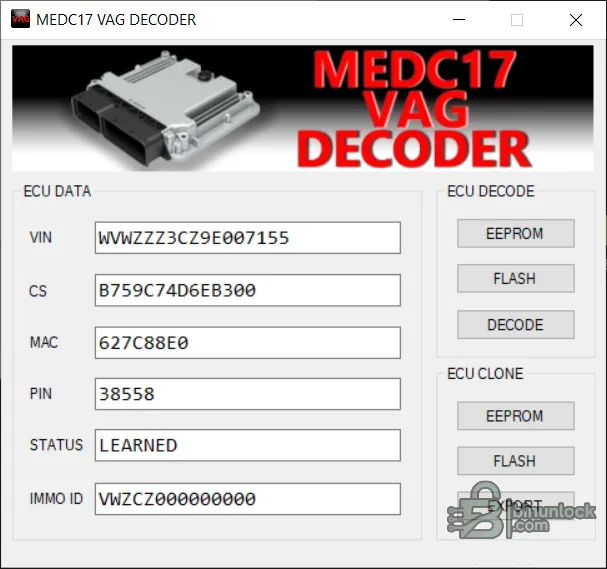
VAG MEDC17 Decoder is an offline utility for extracting and handling security-related data from supported Volkswagen Group EDC17 and MED17 ECU files. The interface presents VIN, component-security bytes, MAC, PIN, immobilizer status and IMMO ID fields, with separate EEPROM and flash input controls plus an export path for supported ECU-cloning work.
The decoder does not read an ECU, connect to the immobilizer network or authorize a replacement module. Correct results depend on the exact Bosch ECU family, matching EEPROM and flash data, complete programmer reads and a software layout recognized by this build.
The decoder does not read an ECU, connect to the immobilizer network or authorize a replacement module. Correct results depend on the exact Bosch ECU family, matching EEPROM and flash data, complete programmer reads and a software layout recognized by this build.
What this resource is for#
Use the tool during an authorized ECU repair or replacement when the technician needs to review security data from a known donor and original unit or prepare a supported cloning output. All decoded values must remain private and should be validated against the vehicle and source files before any write.Functions included#
- Load a supported EEPROM file for decoding
- Load a supported flash file where the selected workflow requires it
- Display VIN, component security, MAC, PIN, immobilizer status and IMMO ID
- Decode recognized VAG EDC17 or MED17 security structures
- Accept EEPROM and flash data for the supported ECU-clone workflow
- Export the resulting supported clone data to a separate file
Supported vehicles, controllers and file types#
- Selected Volkswagen Group Bosch EDC17 and MED17 software layouts
- Exact support depends on ECU part number, processor/memory configuration and software revision
- Some workflows require both EEPROM and flash from the same ECU
- Files from EDC16, ME7, SIMOS or unrelated MED/EDC families are not claimed
- Bench or boot reads must include the memory regions expected by the decoder
Package contents#
- Single self-contained Windows decoder application
- Original interface screenshot documenting decoded fields and clone controls
- No ECU programmer, pinout, stock firmware, dump library or online immobilizer access
- No sample customer security data
System, hardware and interface requirements#
- Isolated Windows PC
- Verified EEPROM and flash reads from the exact source ECU
- Professional bench/boot programmer supporting the Bosch controller
- Clear identification of original and donor units
- Binary comparison and secure storage for sensitive security data
- Stable power and a tested recovery path before writing
Recommended workshop workflow#
- Label original and donor reads unambiguously before opening the decoder
- Verify file sizes and ECU identifiers against the programmer report
- Decode the original data first and confirm VIN and status privately
- Load the matching donor data only in the documented clone workflow
- Export to a new file and compare it with both inputs
- Write only the memory region required by the programmer procedure
- Complete OEM adaptation or diagnostics and confirm that all security-related modules agree
Compatibility limits and responsible use#
- Decoded VIN, PIN, component-security, MAC and immobilizer identifiers are sensitive and must not be shared publicly
- A plausible decoded value does not prove that the file pair belongs to compatible hardware
- Mixing EEPROM and flash from different software families can produce an unusable clone
- The utility does not calculate online authorization or perform key learning
- Use only on a vehicle and modules the technician is authorized to service
Troubleshooting#
- Fields are blank or implausible: verify file type, byte length and whether EEPROM and flash were assigned correctly
- VIN is wrong: stop and confirm the dump belongs to the expected ECU
- Clone export is unavailable: the required matching input pair or supported structure may be missing
- Output will not write: verify programmer mode and target memory region rather than resizing the file
- Vehicle remains immobilized: restore the original and complete OEM diagnosis of ECU, cluster, gateway and key synchronization


