
VAG IMMO2/IMMO3 VDO Dashboard EEPROM Editors are two companion Windows applications for working with supported Volkswagen Group VDO instrument-cluster dumps. The supplied interface exposes immobilizer identity, key bytes and adapted-key count together with VIN, SKC, part number, ROM ID, odometer, coding, language, characteristic curves, illumination and service-interval data.
These are offline EEPROM editors, not OBD diagnostic or key-programming tools. A correct cluster dump must first be obtained with suitable hardware, and every field must be interpreted in the context of the exact VDO generation and memory layout. The Golf IV/Bora cluster shown in the original screenshot is an interface example rather than a guarantee for every dashboard.
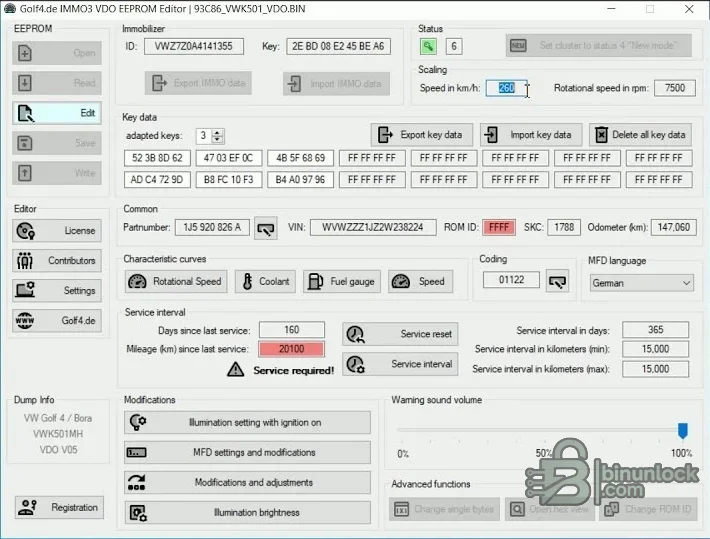
These are offline EEPROM editors, not OBD diagnostic or key-programming tools. A correct cluster dump must first be obtained with suitable hardware, and every field must be interpreted in the context of the exact VDO generation and memory layout. The Golf IV/Bora cluster shown in the original screenshot is an interface example rather than a guarantee for every dashboard.
What this resource is for#
Use the editors for authorized cluster repair, replacement-data transfer, configuration review and restoration of a known dump. Keeping separate IMMO2 and IMMO3 installers makes it possible to choose the generation deliberately instead of applying an IMMO3 layout to an older cluster.Functions included#
- Open and edit supported VDO EEPROM data
- Review immobilizer ID, key bytes and adapted-key count
- Import or export supported immobilizer and key-data blocks
- View and edit VIN, SKC, part number and coding fields where exposed
- Review odometer and service-interval data for legitimate repair
- Adjust supported MFD language, warning sound, illumination and characteristic-curve settings
- Keep separate tools for IMMO2 and IMMO3 dashboard generations
Supported vehicles, controllers and file types#
- Selected VAG VDO dashboards using recognized IMMO2 or IMMO3 EEPROM layouts
- The supplied screen identifies a Golf IV/Bora VDO cluster example
- Exact support depends on dashboard part number, VDO generation, memory device and dump size
- MotoMeter, Magneti Marelli and later virtual-cockpit layouts are not claimed
- Key adaptation and vehicle synchronization may still require VCDS, ODIS or another authorized diagnostic tool
Package contents#
- IMMO2 VDO Editor installer expanded from the nested source ZIP
- IMMO3 VDO Editor installer expanded from the nested source ZIP
- Original dashboard-editor screenshot
- No sample dumps, firmware collection, EEPROM programmer or diagnostic cable
System, hardware and interface requirements#
- Windows PC or isolated VM
- EEPROM programmer appropriate to the dashboard memory device
- Two verified reads of the original cluster EEPROM
- Exact cluster part number and vehicle platform information
- Binary comparison tool and a method to restore the original dump
- Authorized diagnostic equipment for coding or key adaptation after repair
Recommended workshop workflow#
- Identify the exact vehicle, ECU label, hardware number, software number and reading method before opening a file.
- Read the controller twice where practical, compare the two reads and keep one untouched original outside the working folder.
- Work on a copy with the same byte length and segment type expected by the selected function.
- Save the result under a new name and compare every changed region against the original before considering a write.
- Verify checksum handling with the programmer or an appropriate independent tool for the exact controller family.
- Use regulated power and a documented bench, boot or recovery route if the modified file is written to a module.
- After installation, complete identification, fault-code and functional checks before returning the vehicle to service.
Compatibility limits and responsible use#
- A file opening successfully does not prove that its software revision or internal layout is supported.
- A full read, calibration-only read, virtual read and reconstructed file are not interchangeable unless the workflow explicitly says so.
- The application does not identify unknown hardware, choose the correct programmer protocol or provide a recovery backup.
- Do not write output with unexplained size changes, unusually broad modifications or a failed checksum check.
- Immobilizer, identity, emissions and safety-related work must be authorized and lawful for the vehicle being serviced.
- Odometer and immobilizer changes must be documented and performed only where lawful.
Troubleshooting#
- File is rejected: verify controller family, software number, byte length and whether the tool expects EEPROM, flash or calibration data.
- No change is produced: the selected signature or table may not exist in that software revision; do not force a similar profile.
- Output differs in many unrelated areas: stop, restore the original working copy and confirm the input format.
- Program will not start: keep every supplied runtime and activation component together and try an isolated compatible Windows environment.
- Module does not communicate after writing: use the prepared recovery method and restore the exact original rather than making more edits.


