
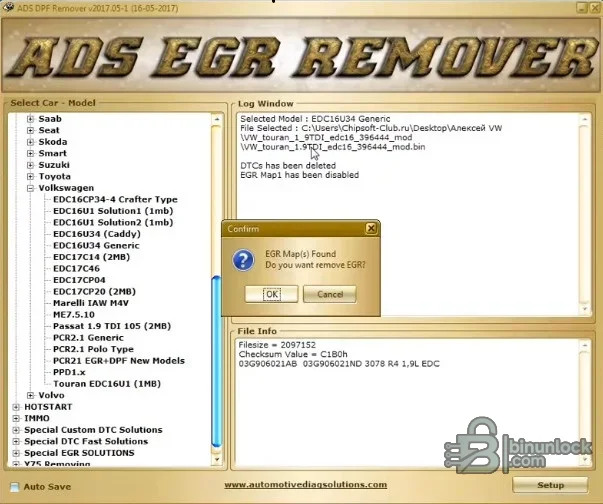
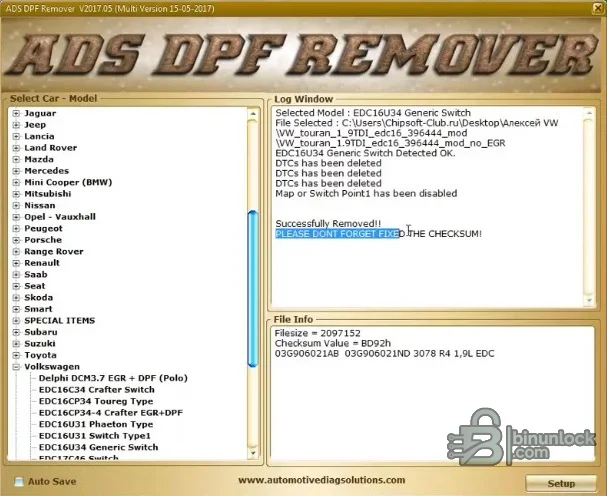
DPF, EGR & Lambda Remover is an offline ECU-file suite that applies predefined solutions to supported binary layouts. The interface organizes operations by vehicle make, model and ECU profile, records the selected file and action in a log, displays file size and checksum information, and can apply DPF, EGR, lambda and several special map or DTC solutions when the expected signature is found.
This kind of software is profile-driven rather than universal. Two vehicles with the same engine may use different ECU hardware or software, and two reads from the same controller can have different content depending on full, partial or virtual read method. The exact ECU ID and original binary must therefore be checked before selecting a solution.
This kind of software is profile-driven rather than universal. Two vehicles with the same engine may use different ECU hardware or software, and two reads from the same controller can have different content depending on full, partial or virtual read method. The exact ECU ID and original binary must therefore be checked before selecting a solution.
What this resource is for#
Use the suite to evaluate and process a known ECU working copy during lawful repair, development or off-road work. It does not read the controller, diagnose the root cause of a failed emissions system or decide whether a modification is legal; those tasks remain outside the file editor.Functions included#
- Browse vehicle and ECU profiles grouped by brand and solution
- Load a local ECU binary and display file information
- Apply recognized DPF map or switch solutions
- Apply recognized EGR map or switch solutions
- Process supported lambda and selected special DTC profiles
- Record the selected model, file and result in an operation log
- Show checksum information or warnings that must be completed before writing
Supported vehicles, controllers and file types#
- Published profile lists cover selected Bosch, Siemens/Continental, Delphi, Denso, Visteon, Marelli and Transtron controller families
- Visible VAG entries include EDC16, EDC17, PCR and PPD-related profiles
- Ford profiles include selected SID and Delphi applications
- Peugeot and Citroën profiles include selected EDC15, EDC16, EDC17, SID and DCM families
- BMW profiles include selected EDC16 and EDC17 applications
- Fiat-group coverage includes selected Marelli diesel ECU families
- These are profile families, not blanket support for every hardware or software revision
Package contents#
- Main Windows installer
- Companion activation/key-generation utility retained as part of the supplied functional package
- Short installation guide
- Two original interface screenshots documenting profile and log views
- No ECU programmer, checksum subscription, vehicle interface or stock firmware database
System, hardware and interface requirements#
- Windows workstation or isolated virtual machine
- Verified original ECU read and complete identification
- Programmer supporting the exact controller in an appropriate read/write mode
- Binary comparison and controller-specific checksum verification
- Stable power and a proven bench/boot recovery method
- Legal authority for the intended vehicle and operation
Recommended workshop workflow#
- Identify the exact vehicle, ECU label, hardware number, software number and reading method before opening a file.
- Read the controller twice where practical, compare the two reads and keep one untouched original outside the working folder.
- Work on a copy with the same byte length and segment type expected by the selected function.
- Save the result under a new name and compare every changed region against the original before considering a write.
- Verify checksum handling with the programmer or an appropriate independent tool for the exact controller family.
- Use regulated power and a documented bench, boot or recovery route if the modified file is written to a module.
- After installation, complete identification, fault-code and functional checks before returning the vehicle to service.
Compatibility limits and responsible use#
- A file opening successfully does not prove that its software revision or internal layout is supported.
- A full read, calibration-only read, virtual read and reconstructed file are not interchangeable unless the workflow explicitly says so.
- The application does not identify unknown hardware, choose the correct programmer protocol or provide a recovery backup.
- Do not write output with unexplained size changes, unusually broad modifications or a failed checksum check.
- Immobilizer, identity, emissions and safety-related work must be authorized and lawful for the vehicle being serviced.
- Emissions-control defeat on public-road vehicles is illegal in many jurisdictions; diagnose and repair the hardware unless a lawful exemption applies.
- A software switch does not repair blocked filters, leaking valves, wiring, sensors or incorrect engine combustion.
Troubleshooting#
- File is rejected: verify controller family, software number, byte length and whether the tool expects EEPROM, flash or calibration data.
- No change is produced: the selected signature or table may not exist in that software revision; do not force a similar profile.
- Output differs in many unrelated areas: stop, restore the original working copy and confirm the input format.
- Program will not start: keep every supplied runtime and activation component together and try an isolated compatible Windows environment.
- Module does not communicate after writing: use the prepared recovery method and restore the exact original rather than making more edits.


