
Description
CAT Flash Files — what they are and why you need them 
CAT Flash Files are the official calibration/software packages used to program Caterpillar ECMs. They’re applied with Caterpillar Electronic Technician (CAT ET) via the built-in WinFlash utility and a compatible CAT communication adapter. Typical use cases are ECM replacement, software updates, emissions/feature updates, and restoring correct horsepower/torque ratings on engines and machines.
Which software uses these files?
What’s included in this 4-DVD 2020 set
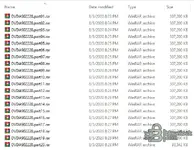
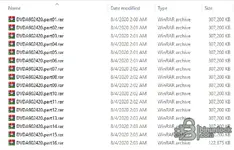
Your screenshots show a classic 2020 release split into multi-part archives:
Coverage overview
This generation of DVDs covers a wide range of Caterpillar on-highway and off-highway engines and machines. Examples include popular engine families (C7/C9/C13/C15/C18, 3406E, etc.) and machine ECMs used across construction, industrial and power systems. Availability of specific ratings is region/serial-number dependent.
How to pick the RIGHT file
Typical programming workflow (CAT ET + WinFlash)
Why these DVDs matter
System compatibility & footprint
Tested on Windows 10 LTSC (2019). Also works on Windows 7 / 8 / 10 / 11 (x86/x64).
Notes & good practice
Disclaimer
All details are summarized from public information and your screenshots for educational/archival purposes. Any files, if referenced, are stored on third-party cloud services by unknown users; our forum does not host or distribute software and is not responsible for external content. Follow all licensing and local regulations.


CAT Flash Files are the official calibration/software packages used to program Caterpillar ECMs. They’re applied with Caterpillar Electronic Technician (CAT ET) via the built-in WinFlash utility and a compatible CAT communication adapter. Typical use cases are ECM replacement, software updates, emissions/feature updates, and restoring correct horsepower/torque ratings on engines and machines.
Which software uses these files?
- CAT ET (Electronic Technician) for Windows — the service application that identifies the product, reads DTCs, and runs Utilities → WinFlash to load the proper Flash File to an ECM.
- WinFlash — the programming module inside CAT ET that erases the ECM flash and loads the selected file.
- SIS / FFS index — Service Information System and Flash File Search are typically used to locate the correct file by serial number, ECM part/test spec, and rating.
What’s included in this 4-DVD 2020 set
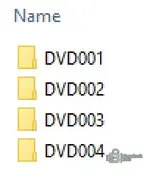
Your screenshots show a classic 2020 release split into multi-part archives:
- DVD001 — DVDA9022-20 (RAR parts: DVDA902220.part01…part20)
- DVD002 — DVDA9023-20 (RAR parts: DVDA902320.part01…part18)
- DVD003 — DVDA9024-20 (RAR parts: DVDA902420.part01…part16)
- DVD004 — DVDA9025-20 (RAR parts: DVDA902520.part01…part18)
Coverage overview
This generation of DVDs covers a wide range of Caterpillar on-highway and off-highway engines and machines. Examples include popular engine families (C7/C9/C13/C15/C18, 3406E, etc.) and machine ECMs used across construction, industrial and power systems. Availability of specific ratings is region/serial-number dependent.
How to pick the RIGHT file
- In SIS (or your catalog), search by machine/engine S/N and open Engine Performance Specifications / Flash Files.
- Match the ECM hardware PN/test spec and the desired rating/emissions family.
- Note the Flash File number and extract the corresponding file from the DVD set.
Typical programming workflow (CAT ET + WinFlash)
- Install CAT ET and your CAT Comm Adapter II/III drivers.
- Extract the four DVDs; mount the needed ISO or point ET to the folder.
- Connect to the product, back up current parameters, then open Utilities → WinFlash.
- Select the target ECM, choose the correct Flash File, and follow the prompts until ET reports success.
- Restore/adjust parameters (FLS/FTS, PTO, cruise, etc.) as required by policy.
Why these DVDs matter
- Factory calibrations — the authoritative files for ECM firmware/ratings.
- Broad compatibility — supports many model years across engines and machine controllers.
- Workshop friendly — offline access; no constant internet required once files are extracted.
System compatibility & footprint
Tested on Windows 10 LTSC (2019). Also works on Windows 7 / 8 / 10 / 11 (x86/x64).
- OS: Windows 7 or newer (32/64-bit)
- CPU: Dual-core 2.0 GHz or better
- RAM: 4 GB (8 GB recommended)
- Storage: ~30–40 GB free for all four DVDs after extraction
- Interface: CAT Communication Adapter (II/III or compatible)
Notes & good practice
- Always back up the ECM configuration before programming.
- Use stable power and a reliable data link — interrupted flashing can brick an ECM.
- After programming, verify product configuration, run self-checks, and print a service report.
Disclaimer
All details are summarized from public information and your screenshots for educational/archival purposes. Any files, if referenced, are stored on third-party cloud services by unknown users; our forum does not host or distribute software and is not responsible for external content. Follow all licensing and local regulations.


