
Description
BMW MSV80 / MSD8x IMMO Tool is a Windows ECU file utility for supported BMW Siemens / Continental DME families.
The program is designed for authorized engine-control-unit replacement, recovery and bench-repair work. It can process supported Flash and EEPROM dumps, apply an IMMO OFF modification, read or edit ISN and VIN data, recalculate the required checksums and save the result as a separate file.
Supported DME families:
The application accepts supported 2 MB full Flash dumps and supported EEPROM files.
Main Features
What Is the Tool Used For?
BMW DME and CAS modules use an ISN-based authorization relationship.
A used or replacement DME normally contains security data from the donor vehicle. If that data does not match the vehicle's CAS, the engine may crank without starting or store immobilizer-related faults.
For supported files, the tool provides several repair options:
The appropriate method depends on the vehicle, DME family and repair objective.
IMMO OFF should not automatically be considered the preferred repair method for every road vehicle.
Where possible, retaining the original BMW immobilizer relationship through correct ISN alignment may be more appropriate.
IMMO OFF Function
The Make IMMO OFF function applies the supported immobilizer modification to the loaded DME dump.
For a recognized file, the application:
This can simplify authorized replacement or test-bench workflows because the processed DME no longer depends on the original CAS authorization in the same way.
No manual HEX editing is required for supported software variants.
Exact compatibility still depends on the DME hardware, software version and dump structure.
Restore Original
The Restore original function reverses the IMMO OFF modification supported by the application.
It should be understood as:
It does not necessarily restore unrelated tuning changes or reconstruct arbitrary missing factory software.
Always keep the untouched original Flash and EEPROM backups.
ISN Reading and Editing
The ISN is the security identifier used in the authorization relationship between the BMW DME and CAS.
The application can display and edit the ISN in supported dump layouts.
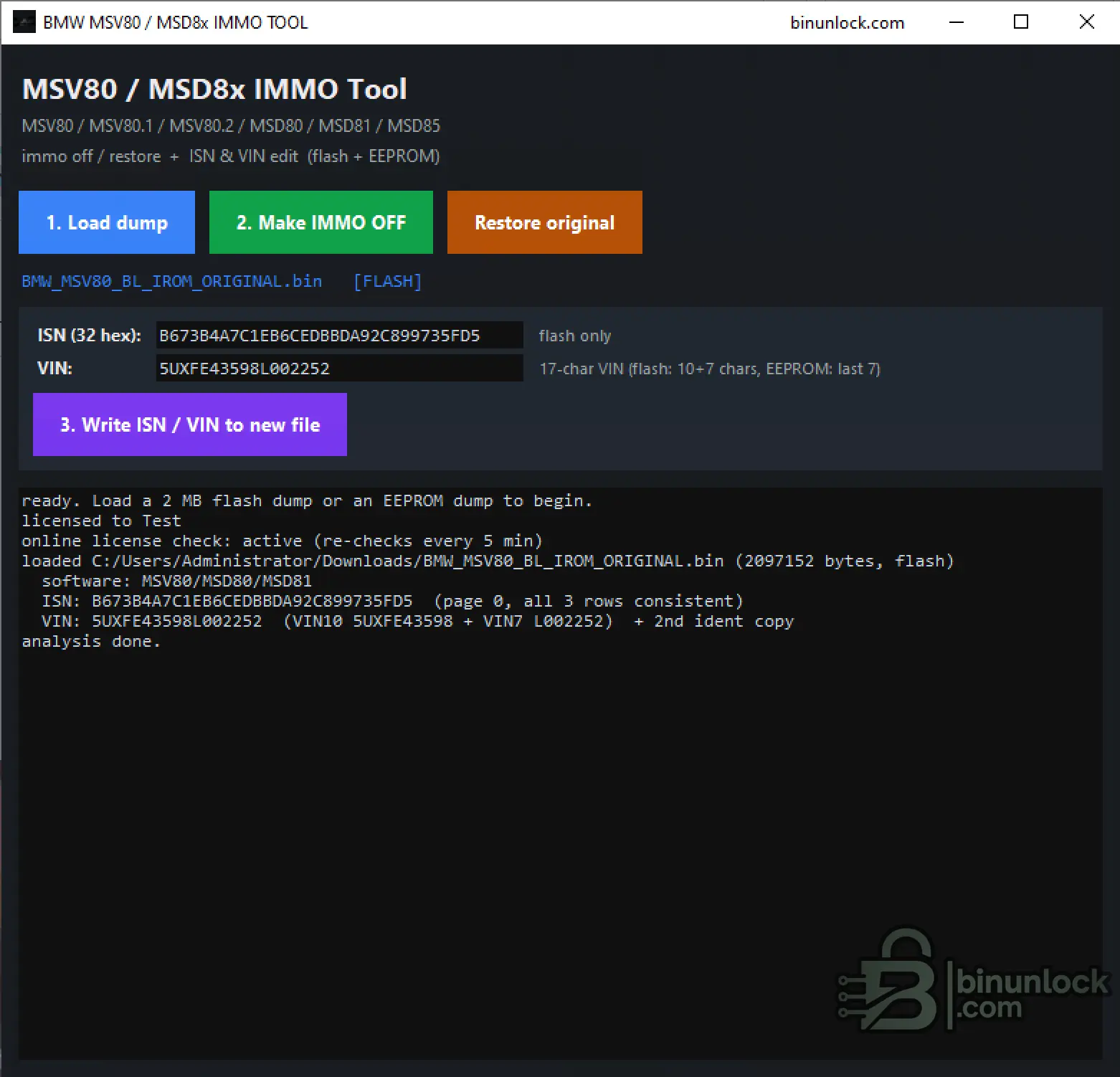
For a supported 2 MB Flash file, the interface can display the long ISN as:
The application also checks duplicated ISN records where the selected software stores more than one copy.
Depending on the detected DME and dump type, ISN data may be handled from the supported Flash or EEPROM structure.
Typical authorized uses include:
This program does not read the ISN directly from the vehicle. A compatible ECU programmer is required to obtain the dump first.
VIN Reading and Editing
The application reads the VIN records found in supported DME Flash and EEPROM layouts.
A complete BMW VIN contains 17 characters.
Depending on the dump type, the VIN may be stored across multiple records. The interface can reconstruct the complete value and check whether the available copies are consistent.
The screenshot shows a supported Flash structure where the VIN is assembled from:
and an additional identification copy.
For supported EEPROM layouts, the relevant VIN portion can also be read or edited.
The Write ISN / VIN to new file function creates a separate modified output rather than overwriting the loaded source dump.
Supported Input Types
2 MB Full Flash
A full Flash dump can be used for:
EEPROM Dump
A supported EEPROM dump can be used for the fields and functions available in its detected layout.
The exact ISN and VIN storage structure differs between DME variants, so not every field is necessarily present in every EEPROM file.
Flash and EEPROM should always come from the same DME when they are used together in a repair workflow.
Typical BMW Applications
The supported DME families are commonly associated with BMW E-series petrol engines and vehicles, including:
Possible vehicle families include selected versions of:
Vehicle model or engine alone is not sufficient to confirm compatibility.
Always verify:
Do not mix files between incompatible DME generations such as MSV80, MSD80, MSD81 and MSD85 merely because the connector or vehicle appears similar.
Typical Workflow
Checksums and Verification
For supported modifications, the application performs the required checksum correction automatically.
The processed file is then verified before saving.
This reduces the risk of creating a structurally invalid output file, but it does not protect against:
Automatic checksum correction should therefore not be described as a guarantee against ECU damage.
Requirements
The application interface shows an active online license check with periodic validation.
The software is therefore not advertised as a completely offline utility.
What This Tool Does Not Replace
The program modifies supported ECU dump files only.
Important Safety and Legal Information
BMW MSV80 / MSD8x IMMO Tool provides a focused file-based workflow for supported MSV80, MSD80, MSD81 and MSD85 DME replacement, ISN / VIN handling, IMMO OFF processing and restoration.
The program is designed for authorized engine-control-unit replacement, recovery and bench-repair work. It can process supported Flash and EEPROM dumps, apply an IMMO OFF modification, read or edit ISN and VIN data, recalculate the required checksums and save the result as a separate file.
Supported DME families:
- MSV80
- MSV80.1
- MSV80.2
- MSD80
- MSD81
- MSD85
The application accepts supported 2 MB full Flash dumps and supported EEPROM files.
Main Features
- One-click IMMO OFF for supported MSV80 / MSD8x firmware files.
- Automatic checksum correction after applying the supported modification.
- Automatic result verification before the modified file is saved.
- Restore original state — revert the IMMO OFF modification applied by the tool.
- ISN reading from supported Flash and EEPROM layouts.
- ISN editing and writing to a separate output file.
- VIN reading from supported DME records.
- VIN editing in supported Flash and EEPROM layouts.
- Automatic DME-family detection from the loaded dump.
- Consistency checking for duplicated ISN and VIN records.
- Separate output files — the source dump is not edited directly.
- Detailed operation log with detected software, ISN, VIN and file information.
What Is the Tool Used For?
BMW DME and CAS modules use an ISN-based authorization relationship.
A used or replacement DME normally contains security data from the donor vehicle. If that data does not match the vehicle's CAS, the engine may crank without starting or store immobilizer-related faults.
For supported files, the tool provides several repair options:
- Apply IMMO OFF to a supported replacement DME file.
- Read the original ISN for identification or repair work.
- Write the required ISN into a supported output file.
- Read and correct the VIN stored in the DME.
- Revert the tool's IMMO OFF modification when the original state is required.
The appropriate method depends on the vehicle, DME family and repair objective.
IMMO OFF should not automatically be considered the preferred repair method for every road vehicle.
Where possible, retaining the original BMW immobilizer relationship through correct ISN alignment may be more appropriate.
IMMO OFF Function
The Make IMMO OFF function applies the supported immobilizer modification to the loaded DME dump.
For a recognized file, the application:
- Detects the supported DME family and dump type.
- Locates the required software structures.
- Applies the supported IMMO OFF modification.
- Recalculates the required file checksums.
- Verifies the modified result.
- Creates a separate output file.
This can simplify authorized replacement or test-bench workflows because the processed DME no longer depends on the original CAS authorization in the same way.
No manual HEX editing is required for supported software variants.
Exact compatibility still depends on the DME hardware, software version and dump structure.
Restore Original
The Restore original function reverses the IMMO OFF modification supported by the application.
It should be understood as:
- Restoring the original immobilizer-related state changed by this tool.
- Recalculating the required checksum after the restoration.
- Saving a separate restored output file.
It does not necessarily restore unrelated tuning changes or reconstruct arbitrary missing factory software.
Always keep the untouched original Flash and EEPROM backups.
ISN Reading and Editing
The ISN is the security identifier used in the authorization relationship between the BMW DME and CAS.
The application can display and edit the ISN in supported dump layouts.
For a supported 2 MB Flash file, the interface can display the long ISN as:
Code:
32 hexadecimal characters
16 bytes
The application also checks duplicated ISN records where the selected software stores more than one copy.
Depending on the detected DME and dump type, ISN data may be handled from the supported Flash or EEPROM structure.
Typical authorized uses include:
- Preparing a compatible replacement DME.
- Repairing mismatched DME / CAS data.
- Verifying the ISN stored in an original or donor file.
- Creating a corrected output file for subsequent programming.
This program does not read the ISN directly from the vehicle. A compatible ECU programmer is required to obtain the dump first.
VIN Reading and Editing
The application reads the VIN records found in supported DME Flash and EEPROM layouts.
A complete BMW VIN contains 17 characters.
Depending on the dump type, the VIN may be stored across multiple records. The interface can reconstruct the complete value and check whether the available copies are consistent.
The screenshot shows a supported Flash structure where the VIN is assembled from:
Code:
VIN10 + VIN7and an additional identification copy.
For supported EEPROM layouts, the relevant VIN portion can also be read or edited.
The Write ISN / VIN to new file function creates a separate modified output rather than overwriting the loaded source dump.
Supported Input Types
2 MB Full Flash
A full Flash dump can be used for:
- DME-family detection
- IMMO OFF
- Original-state restoration
- ISN reading and editing
- VIN reading and editing
- Checksum correction
EEPROM Dump
A supported EEPROM dump can be used for the fields and functions available in its detected layout.
The exact ISN and VIN storage structure differs between DME variants, so not every field is necessarily present in every EEPROM file.
Flash and EEPROM should always come from the same DME when they are used together in a repair workflow.
Typical BMW Applications
The supported DME families are commonly associated with BMW E-series petrol engines and vehicles, including:
- MSV80 / MSV80.1 / MSV80.2 — commonly used with naturally aspirated N52 / N52KP applications.
- MSD80 / MSD81 — commonly used with N53 and N54 direct-injection engines.
- MSD85 — commonly used with early N63 twin-turbo V8 applications.
Possible vehicle families include selected versions of:
- BMW 1 Series
- BMW 3 Series
- BMW 5 Series
- BMW 6 Series
- BMW 7 Series
- BMW X1
- BMW X3
- BMW X5
- BMW X6
- BMW Z4
Vehicle model or engine alone is not sufficient to confirm compatibility.
Always verify:
- DME family
- BMW part number
- Siemens / Continental hardware number
- Software number
- Flash size
- EEPROM size
- Exact donor and target application
Do not mix files between incompatible DME generations such as MSV80, MSD80, MSD81 and MSD85 merely because the connector or vehicle appears similar.
Typical Workflow
- Read the original or replacement DME using a compatible Bench or Boot programmer.
- Save the complete Flash and EEPROM backups.
- Keep untouched copies of all original files.
- Launch BMW MSV80 / MSD8x IMMO Tool.
- Click Load dump.
- Select the supported 2 MB Flash or EEPROM file.
- Review the detected DME family, ISN, VIN and consistency information.
- Choose the required authorized repair function:
- Make IMMO OFF
- Restore original
- Edit ISN / VIN
- Save the generated output as a new file.
- Verify the output and program it using the correct ECU programmer and procedure.
Checksums and Verification
For supported modifications, the application performs the required checksum correction automatically.
The processed file is then verified before saving.
This reduces the risk of creating a structurally invalid output file, but it does not protect against:
- Selecting the wrong DME family.
- Using an incompatible donor ECU.
- Loading a damaged or incomplete source dump.
- Programming the wrong Flash or EEPROM file.
- Interrupting the ECU write operation.
- Unstable Bench or Boot power.
Automatic checksum correction should therefore not be described as a guarantee against ECU damage.
Requirements
- Windows computer
- Supported BMW MSV80 / MSD8x DME dump
- 2 MB full Flash or supported EEPROM file
- Compatible Bench / Boot ECU programmer
- Correct pinout or programming adapter
- Stable regulated ECU power supply
- Internet connection for online license validation
The application interface shows an active online license check with periodic validation.
The software is therefore not advertised as a completely offline utility.
What This Tool Does Not Replace
- It does not read the DME directly from the vehicle.
- It does not write the physical ECU.
- It does not replace a Bench or Boot programmer.
- It is not a CAS editor.
- It is not a key-learning application.
- It does not create vehicle keys.
- It does not replace ISTA, WinKFP or other BMW diagnostic software.
- It does not guarantee compatibility between an incorrect donor DME and the target vehicle.
The program modifies supported ECU dump files only.
Important Safety and Legal Information
- Use the software only on vehicles and ECU files you own or are authorized to repair.
- Always preserve the untouched original Flash and EEPROM.
- Confirm the exact DME hardware and software before processing.
- Do not program an output generated from an unrecognized file.
- Use a stable regulated power supply during ECU writing.
- Do not disconnect the programmer until writing and verification are complete.
- Observe all local vehicle-security, emissions and road-use regulations.
BMW MSV80 / MSD8x IMMO Tool provides a focused file-based workflow for supported MSV80, MSD80, MSD81 and MSD85 DME replacement, ISN / VIN handling, IMMO OFF processing and restoration.


