
BMW G30 emeOBD - EME ISN Reset, EEPROM, DTC & Diagnostic Service Tool
emeOBD is a Windows diagnostic and service workspace for BMW G30 EME systems.
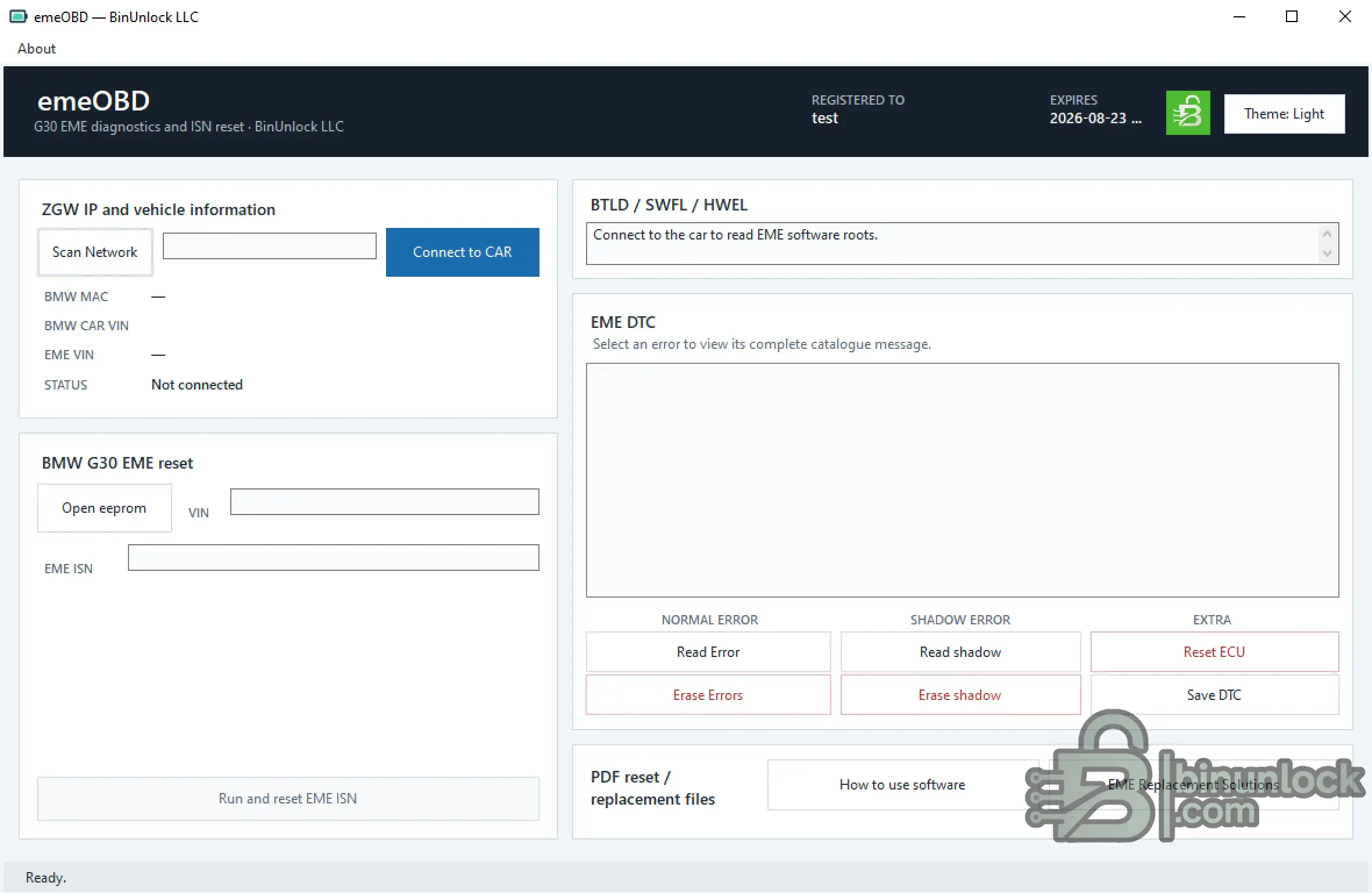
The application combines BMW gateway discovery, vehicle and EME identification, software-root reading, local EEPROM analysis, EME ISN extraction and reset, normal / shadow DTC functions and ECU reset in one interface.
The software can be used in local or remote service workflows, depending on the workshop connection setup.
Key Features
BMW G30 EME ISN Reset
The dedicated BMW G30 EME reset workspace uses an approved EEPROM image to identify the available VIN and supported EME ISN data.
Typical service workflow:
The software performs the reset using the EME ISN recovered from the supported EEPROM data.
EEPROM Support
The local EEPROM parser currently accepts the following exact file sizes:
The parser can:
EEPROM analysis is performed locally and does not require a vehicle connection.
Do not modify, pad or truncate an EEPROM dump simply to make its size accepted.
Vehicle Identification & Software Roots
After connection, emeOBD can display:
This information provides useful supporting evidence before EME replacement or reset work.
EME Diagnostics
The integrated EME diagnostic workspace provides:
Normal and shadow DTC should be recorded separately before performing any erase, reset or replacement operation.
Local & Remote Service Use
emeOBD can be integrated into both local workshop and remote-assisted service workflows.
The application communicates with the selected BMW ZGW / EME endpoint while EEPROM interpretation itself remains a local file operation.
For remote work, the technician at the vehicle remains responsible for correct vehicle identification, stable support power, network access and physical workshop safety.
Documentation
Two English PDF documents are supplied for the current emeOBD workflow:
How to use.pdf contains the control-by-control operating guide.
Document of EME.pdf provides the EME replacement, EEPROM interpretation, ISN-reset decision and validation guidance.
File Integrity
File: emeOBD.exe
SHA-256:
VirusTotal:
View VirusTotal report
The VirusTotal report above corresponds to the executable identified by the exact SHA-256 hash shown above.
Always compare the downloaded executable with this SHA-256 before running the application.
Important
emeOBD is a Windows diagnostic and service workspace for BMW G30 EME systems.
The application combines BMW gateway discovery, vehicle and EME identification, software-root reading, local EEPROM analysis, EME ISN extraction and reset, normal / shadow DTC functions and ECU reset in one interface.
The software can be used in local or remote service workflows, depending on the workshop connection setup.
Key Features
- BMW G30 EME diagnostic workspace
- BMW ZGW network discovery
- Manual ZGW IP connection
- BMW MAC and vehicle VIN reading
- EME VIN identification
- BTLD / SWFL / HWEL software-root information
- Local EEPROM file analysis
- EEPROM VIN extraction
- Supported EME ISN extraction
- BMW G30 EME ISN reset
- Normal EME DTC reading
- Shadow EME DTC reading
- Normal DTC erase
- Shadow DTC erase
- EME ECU reset
- Save DTC report to file
- Light / Dark interface themes
- HWID-based licensing
- Built-in PDF documentation export
BMW G30 EME ISN Reset
The dedicated BMW G30 EME reset workspace uses an approved EEPROM image to identify the available VIN and supported EME ISN data.
Typical service workflow:
- Obtain the authorized EEPROM image from the used / replacement unit
- Load the EEPROM file into emeOBD
- Verify the extracted VIN and EME ISN
- Connect to the correct BMW vehicle / ZGW
- Run the EME ISN reset only when required by the approved replacement procedure
The software performs the reset using the EME ISN recovered from the supported EEPROM data.
EEPROM Support
The local EEPROM parser currently accepts the following exact file sizes:
Code:
512 KiB - 0x80000 - 524,288 bytes
768 KiB - 0xC0000 - 786,432 bytes
848 KiB - 0xD4000 - 868,352 bytes
The parser can:
- Search for supported BMW VIN candidates
- Identify supported EME ISN signature branches
- Extract a 16-byte EME ISN where supported
- Display the ISN as 32 hexadecimal characters
EEPROM analysis is performed locally and does not require a vehicle connection.
Do not modify, pad or truncate an EEPROM dump simply to make its size accepted.
Vehicle Identification & Software Roots
After connection, emeOBD can display:
- BMW MAC
- BMW CAR VIN
- EME VIN
- Connection status
- BTLD
- SWFL
- HWEL
- Other recognized EME software-root records
This information provides useful supporting evidence before EME replacement or reset work.
EME Diagnostics
The integrated EME diagnostic workspace provides:
- Read Error - normal EME diagnostic memory
- Read shadow - shadow diagnostic memory
- Erase Errors - normal-memory erase
- Erase shadow - shadow-memory erase
- Reset ECU - EME control-unit reset
- Save DTC - save the current diagnostic report
Normal and shadow DTC should be recorded separately before performing any erase, reset or replacement operation.
Local & Remote Service Use
emeOBD can be integrated into both local workshop and remote-assisted service workflows.
The application communicates with the selected BMW ZGW / EME endpoint while EEPROM interpretation itself remains a local file operation.
For remote work, the technician at the vehicle remains responsible for correct vehicle identification, stable support power, network access and physical workshop safety.
Documentation
Two English PDF documents are supplied for the current emeOBD workflow:
Code:
How to use.pdf
Document of EME.pdf
How to use.pdf contains the control-by-control operating guide.
Document of EME.pdf provides the EME replacement, EEPROM interpretation, ISN-reset decision and validation guidance.
File Integrity
File: emeOBD.exe
SHA-256:
Code:
0642ee08e5267d4f5b7be2eeebadf3e4f52803f533eb5ce7c92e8a791fc5c9c2VirusTotal:
View VirusTotal report
The VirusTotal report above corresponds to the executable identified by the exact SHA-256 hash shown above.
Always compare the downloaded executable with this SHA-256 before running the application.
Important


