
KTflash Bench is a Windows utility for reading and writing supported engine and transmission controllers through compatible programming hardware. Its searchable protocol interface groups controllers by manufacturer and ECU family so a technician can select a documented bench procedure, identify the target and perform the supported read, write or recovery operation without treating every module as a generic binary device.
The package is intended for experienced ECU technicians. Support is determined by the exact controller family, hardware number, processor, connection mode, interface driver and license state shown inside the application; a matching brand name alone is not proof that a particular ECU can be safely programmed.
The package is intended for experienced ECU technicians. Support is determined by the exact controller family, hardware number, processor, connection mode, interface driver and license state shown inside the application; a matching brand name alone is not proof that a particular ECU can be safely programmed.
What the application does#
- Searches the installed protocol catalogue by brand or controller keyword
- Organizes engine and transmission programming entries by ECU supplier and family
- Provides bench-oriented read and write workflows where the selected protocol supports them
- Uses compatible pass-through hardware and its installed driver to communicate with the controller
- Helps keep the selected ECU family, processor and connection mode visible before programming begins
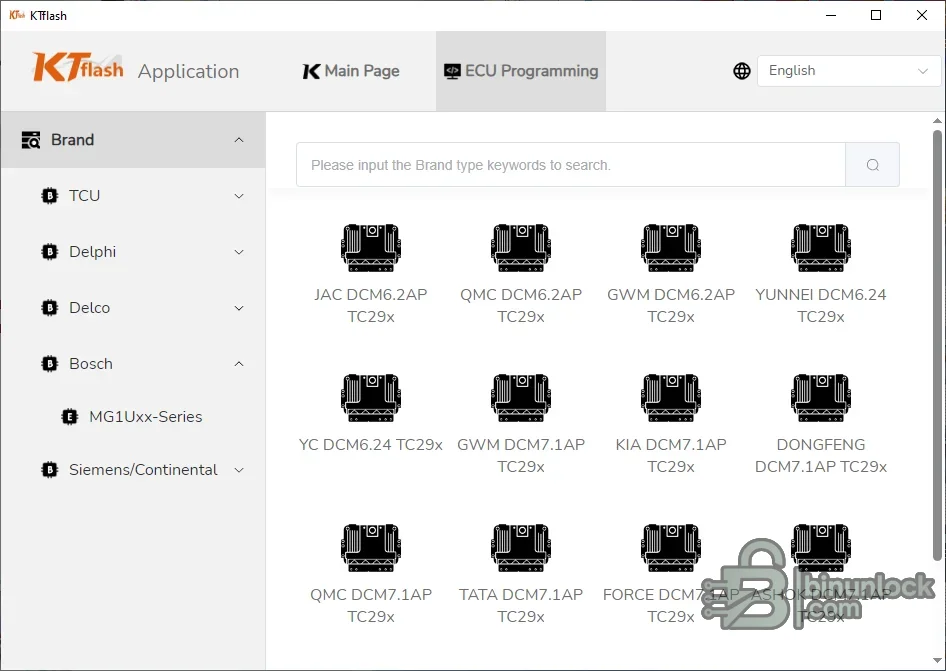
Controller families visible in the supplied interface#
- Bosch controller groups, including the MG1Uxx family shown in the navigation panel
- Delphi DCM families such as DCM6.2AP, DCM6.24 and DCM7.1AP entries shown for multiple vehicle applications
- Siemens and Continental controller groups exposed by the protocol browser
- Delco and TCU groups available from the left-side selector
- Displayed examples include applications for JAC, QMC, GWM, YUNNEI, Kia, Tata, Force, Ashok and Dongfeng
Hardware and compatibility notes#
KTflash is designed around compatible J2534-style programming interfaces. Current ECUHELP documentation describes use with Scanmatik-compatible hardware and bench connections, but the supplied executable does not include an interface, bench harness, protocol subscription, activation service or driver package. Confirm the exact hardware and entitlement required by the selected protocol before connecting a module.- Use the protocol search to match the complete ECU designation, not only the vehicle make
- Verify whether the entry is bench, OBD or another connection type before wiring the controller
- Use the pinout and voltage specification associated with the exact protocol revision
- Do not infer support for a controller merely because a related family appears in the menu
- Some operations may require online entitlement, a licensed dongle or a separately installed driver
Package contents#
- Verified KTflash application executable from the source archive
- Original protocol-selection screenshot used as the resource preview
- No ECU dumps, tuning files, customer data, interface drivers or vehicle logs
- No claim that activation, subscription or programming hardware is bundled
PC and workshop requirements#
- A dedicated Windows workshop computer with local administrator access for required drivers
- Stable vehicle or bench power suitable for the controller and the intended operation
- The correct diagnostic or programming interface, cable and pinout for the selected connection mode
- A verified controller identity and a complete backup before any write-capable function
- Enough free storage for the extracted package, original reads, logs and verification files
Recommended bench workflow#
- Read the controller label and record the manufacturer, family, hardware number and software number
- Install the correct interface driver and confirm the pass-through device is recognized before ECU connection
- Open the protocol catalogue and select the exact controller and connection mode
- Build the bench harness from the documented pinout and verify power, ground, ignition and communication pins
- Create and verify a complete original backup before writing any modified or replacement data
- Keep the original read immutable; perform edits and checksums only on a separate working copy
- After writing, follow the protocol's power-cycle instructions and verify identification, faults and vehicle operation
Important limitations#
- This package is software only and does not supply J2534 hardware, probes, adapters or bench cables
- Protocol availability can differ by license, server state, hardware revision and installed application build
- A bench read is not automatically a complete clone; EEPROM, internal flash and external flash coverage must be verified separately
- Do not interrupt power or communication during erase or write operations
- Do not use a protocol from a similar controller when the exact processor or hardware number differs
- Programming can permanently disable a controller if the connection, file, checksum or voltage is wrong
Troubleshooting checklist#
- Interface not detected: verify the installed driver, Device Manager status and selected pass-through device
- No communication: recheck bench pinout, ignition feed, grounds, CAN polarity and power-supply current limit
- Protocol not found: search by the full ECU designation and compare the controller label with the current protocol catalogue
- Read stops or returns inconsistent sizes: stop and verify voltage, wiring, interface firmware and memory selection
- Write rejected: preserve the original log and confirm the selected protocol, file type, checksum and entitlement
- Controller does not wake after writing: do not repeat random writes; return to the documented recovery procedure with stable power


