
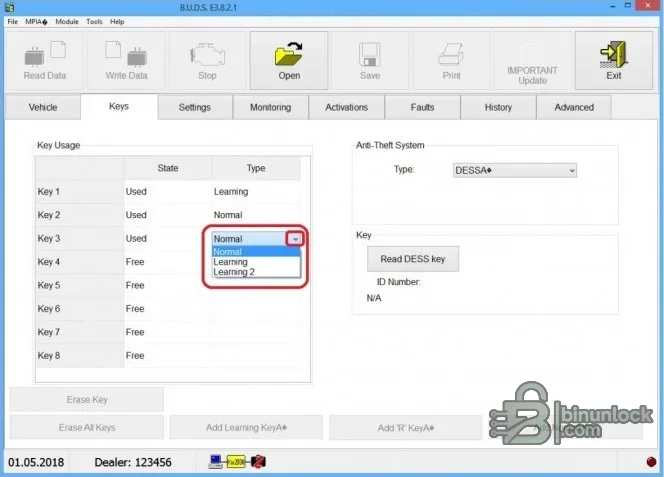
BRP BUDS is the classic workshop diagnostic environment for supported BRP powersports vehicles. Its workspaces cover vehicle identity, settings, live monitoring, actuator functions, fault records, history and advanced service operations. The supplied screens also document the DESS anti-theft key area, including key slots, key types and the ability to read a presented key through the proper interface.
Support depends on vehicle family, model year, protocol, interface generation and the access role available to the technician. Use the vehicle readout and model number as the starting point; never infer full compatibility from the marque alone.
Support depends on vehicle family, model year, protocol, interface generation and the access role available to the technician. Use the vehicle readout and model number as the starting point; never infer full compatibility from the marque alone.
What this package is for#
Use BUDS to identify a connected BRP product, save the current vehicle information, inspect faults and live data, perform documented activations and carry out authorized DESS key service. Before replacing an ECM, preserve the original vehicle and customer fields in a secure workshop record so they can be restored through the documented procedure.Main functions#
- Read VIN, engine number, model number, runtime and service information
- Display and clear supported fault records after documentation
- Monitor live inputs, outputs and operating states
- Run supported actuator activations and service procedures
- Review and change documented vehicle settings
- Read DESS keys and manage supported anti-theft key slots
- Keep diagnostic history and vehicle-specific service context
Supported vehicles, systems and control units#
- BRP families commonly serviced by classic BUDS include selected Can-Am ATV, side-by-side and roadster products
- Selected Sea-Doo personal watercraft and Ski-Doo or Lynx snowmobile generations use this classic platform
- Supported coverage varies by model year; newer products can require BUDS2 or BUDS3 instead
- MPI-2 or MPI-3 and, for some key workflows, a DESS Post interface may be required
- Key programming, ECM replacement and advanced functions require the proper access code and authorization
- Always use the BRP service chart and current manual for the exact product
Package contents#
- Classic BUDS all-products installer
- Companion activation utility preserved as supplied
- Primary DESS key-service screenshot
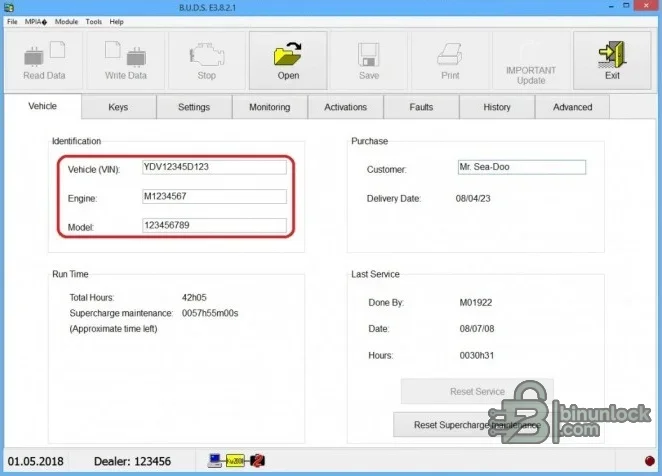
- Additional vehicle and maintenance-information screenshot at the bottom
- The source instruction note is excluded from the clean package
PC, interface and workshop requirements#
- A dedicated Windows workshop computer with local administrator rights for installation and drivers
- Stable battery support appropriate to the vehicle whenever a live diagnostic session is used
- The correct communication interface, cable and driver for the target system
- Reliable controller identification from the label and a complete pre-work diagnostic scan
- Enough free storage for the extracted package, logs and immutable backups
- A compatible BRP MPI communication interface and current interface drivers
- The correct BRP diagnostic cable or DESS Post hardware for the selected procedure
- A legitimate access code and workshop authorization for protected functions
Recommended workflow#
- Record the exact vehicle, model year, controller identity, software number and current symptoms
- Install or extract the package offline and confirm that the required interface driver is present
- Connect stable power and perform identification or a complete scan before any write-capable action
- Save the original report or memory file and make a separate working copy
- Apply only the function documented for the recognized vehicle and controller
- Cycle power only when the service procedure instructs it, then rescan and verify the repair
- For ECM replacement, securely record VIN, engine, model and customer information before removing the original controller
Important limitations#
- A menu entry or brand name is not proof of support for every model year, market or controller revision
- This package does not replace current OEM service information, wiring diagrams or security authorization
- Do not attempt configuration, key, immobilizer or programming work on an unidentified module
- Never use the only original EEPROM, flash, configuration or diagnostic capture as the working file
- Classic BUDS is not interchangeable with later BUDS platforms
- A connected interface without the appropriate access level cannot enable protected operations
Troubleshooting checklist#
- No connection: check ignition state, battery voltage, interface driver, selected protocol and connector pins
- Module not listed: verify model year, platform, controller family and software coverage before continuing
- Implausible values: compare units and conditions with live data from an approved diagnostic platform
- Write or configuration rejected: stop, preserve logs and confirm authorization, session state and power support
- Application will not start: use a clean supported Windows environment and install only documented prerequisites
- DESS key not read: verify the correct post interface, key type and physical connection
- Vehicle family absent: confirm whether the model belongs to a later diagnostic platform


