
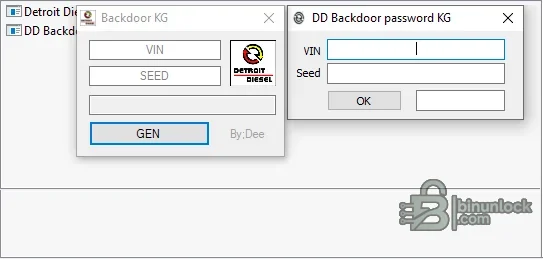
Detroit Diesel Backdoor Password Calculator is an offline response utility for a protected service session that supplies a vehicle identification number and a current numeric seed. The package contains two compact calculator interfaces so a technician can enter the session data, generate the corresponding response and return it to the authorized diagnostic workflow. It does not communicate with a truck, identify an engine controller or retrieve a seed by itself.
Treat every seed as temporary session data. The response belongs to the exact VIN, requested operation and live diagnostic session; copying a value from another vehicle or an expired session is not a valid compatibility test.
Treat every seed as temporary session data. The response belongs to the exact VIN, requested operation and live diagnostic session; copying a value from another vehicle or an expired session is not a valid compatibility test.
What this package is for#
Use the calculator only when an authorized Detroit Diesel diagnostic procedure explicitly presents the matching VIN-and-seed challenge. Record the operation being requested, enter the characters exactly as displayed and verify the generated value before submission. This is a narrow calculation aid, not a general DDEC diagnostic package.Main functions#
- Accept a VIN from the active service session
- Accept the numeric seed displayed by the diagnostic application
- Calculate a corresponding response offline
- Provide two supplied calculator implementations for cross-checking the session format
- Allow the user to clear fields before beginning a new vehicle session
Supported vehicles, systems and control units#
- Detroit Diesel service contexts that use the VIN-and-seed challenge represented by the supplied calculators
- DDEC controller work only when the parent diagnostic application requests this exact response format
- No model, engine series or controller-generation claim is made solely from the Detroit Diesel name
- The utility does not support generic SAE passwords, other truck manufacturers or unrelated seed-key algorithms
- Actual controller connection and operation selection remain inside the compatible Detroit Diesel diagnostic platform
Package contents#
- Two native Windows calculator executables
- Single interface preview showing both supplied layouts
- No vehicle interface drivers, calibration files, VIN lists or saved responses
- Both executables are unsigned and were inspected statically without launch
PC, interface and workshop requirements#
- A dedicated Windows workshop computer with local administrator rights for installation and drivers
- Stable battery support appropriate to the vehicle whenever a live diagnostic session is used
- The correct communication interface, cable and driver for the target system
- Reliable controller identification from the label and a complete pre-work diagnostic scan
- Enough free storage for the extracted package, logs and immutable backups
- A legitimate Detroit Diesel diagnostic session already displaying the VIN and seed challenge
- Exact transcription of the VIN, seed and requested operation
Recommended workflow#
- Open the authorized diagnostic session and record the exact operation
- Confirm the VIN in the diagnostic application matches the vehicle
- Copy the fresh seed without spaces or omitted leading characters
- Calculate the response offline and enter it only into that same session
- Save the diagnostic log and confirm normal controller communication after access
Important limitations#
- A menu entry or brand name is not proof of support for every model year, market or controller revision
- This package does not replace current OEM service information, wiring diagrams or security authorization
- Do not attempt configuration, key, immobilizer or programming work on an unidentified module
- Never use the only original EEPROM, flash, configuration or diagnostic capture as the working file
- A calculated value is not a substitute for service authorization
- Seeds can expire or change when a session is restarted
- Repeated incorrect responses can interrupt the service workflow; stop instead of guessing
Troubleshooting checklist#
- No response generated: verify the complete VIN and numeric seed format
- Response rejected: request a fresh seed and confirm the same operation is still active
- Different results between utilities: stop and recheck every entered character
- VIN mismatch: exit the operation and identify the connected vehicle again
- No seed shown: the parent diagnostic tool or selected procedure is not using this calculator format


