
Description
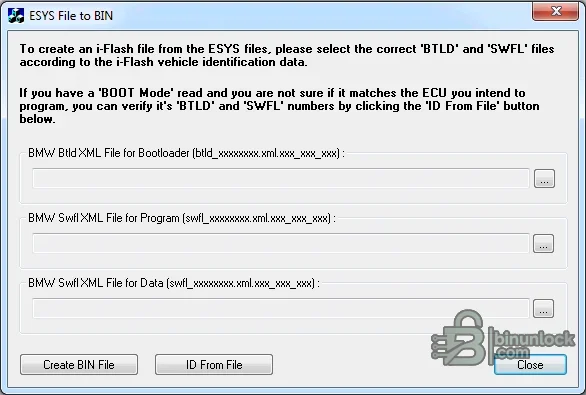
E-SYS File to BIN for BMW is an offline Windows converter for building a binary from matching BMW E-Sys bootloader and software-description files. It is aimed at advanced ECU-file analysis or recovery preparation where the operator already has the correct BTLD and SWFL data for one control unit.
Supported vehicles, ECUs and files#
BMW software-flash data separates a bootloader (BTLD) from one or more software-flash components (SWFL), with XML headers describing binary segments and metadata. The utility provides selectors for BTLD XML, SWFL program XML and SWFL data XML and can read identifiers from an existing file. Inputs must belong to the same ECU/I-step context; filenames that merely look related are not enough.- BMW E-Sys data sets containing the compatible BTLD and SWFL XML/binary components expected by the utility.
- ECU families whose segment layout can be assembled by this converter.
- Offline construction and identification only; no connection to a BMW vehicle is made.
Functions#
- Select the bootloader XML and separate software program/data XML inputs.
- Read identification information from a reference binary when available.
- Assemble the chosen segments into a BIN for comparison, analysis or a supported recovery workflow.
- Expose file-selection and output steps without requiring a complete E-Sys installation for the conversion itself.
System and hardware requirements#
- A Windows PC capable of running the portable application.
- A complete, internally consistent set of BTLD/SWFL XML and related binary components from trusted BMW data.
- Knowledge of the target ECU, shipment/I-step and expected segment addresses and final size.
- Separate E-Sys/ISTA or programming equipment if the result will be compared to or used with a vehicle.
Recommended workflow#
- Record the target ECU and data-set identifiers and keep the source directory unchanged.
- Select only components that belong to the same ECU and software integration context.
- Create the BIN, hash it and verify identifiers, segment boundaries, fill areas and byte count.
- Compare against a known-good read or trusted metadata before any programming use.


