
Description
WinOLS Splitter – Universal Engineering Edition is a portable Windows utility designed to extract original and modified ECU firmware versions from EVC WinOLS .OLS project files.
The software analyzes the OLS project structure, identifies stored calibration versions and reconstructs individual BIN files using the corresponding original firmware as a reference.
This makes it useful for extracting Stage 1, Stage 2, Stage 3 and other tuning versions from a single WinOLS project without manually locating and rebuilding the individual binary blocks.
What is it used for?
WinOLS projects can contain an original ECU file together with multiple modified calibration versions.
WinOLS Splitter provides a workflow for separating these versions into individual BIN files for comparison, archiving and further calibration work.
Main Features
ECU Metadata Detection
The application can extract available identification information from the WinOLS project header, including:
Detected information is used to create meaningful filenames for the extracted BIN files.
Offset Detection & Verification
The program uses reference data from the original BIN to identify the correct location of firmware blocks within the OLS project.
Its advertised offset-detection method uses sample voting rather than relying only on a predefined fixed address.
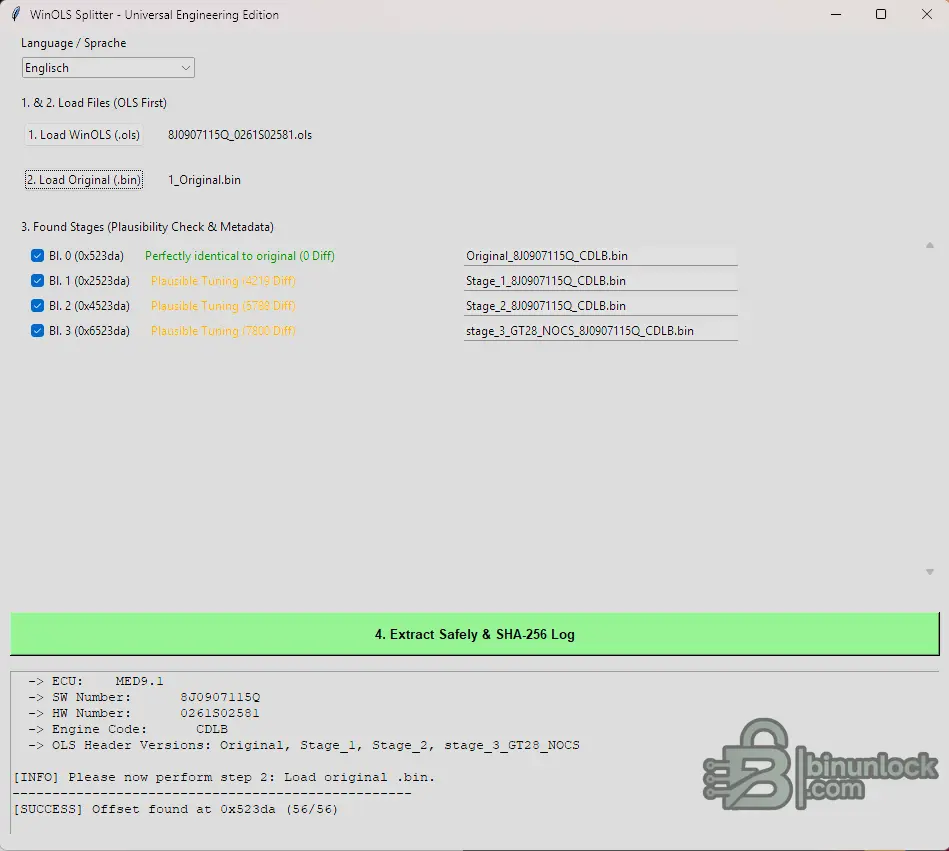
Before extraction, the interface displays a plausibility assessment and the number of bytes that differ from the original firmware.
For example, the program can distinguish between:
These labels and comparison results help users identify the correct version before exporting it.
Protected WinOLS Projects
The tool is advertised with the ability to process certain OLS files affected by project restrictions or person-bound protection.
However, compatibility with every WinOLS encryption or protection method is not guaranteed. Use the utility only with project data you own or are authorized to access.
How to Use
Supported Languages
The interface includes six languages:
Important Information
WinOLS Splitter provides a convenient solution for analyzing WinOLS projects, identifying tuning stages and exporting individual ECU calibration files with offset verification and integrity logging.
The software analyzes the OLS project structure, identifies stored calibration versions and reconstructs individual BIN files using the corresponding original firmware as a reference.
This makes it useful for extracting Stage 1, Stage 2, Stage 3 and other tuning versions from a single WinOLS project without manually locating and rebuilding the individual binary blocks.
What is it used for?
WinOLS projects can contain an original ECU file together with multiple modified calibration versions.
WinOLS Splitter provides a workflow for separating these versions into individual BIN files for comparison, archiving and further calibration work.
Main Features
- OLS Project Analysis — reads WinOLS project files and identifies embedded calibration versions.
- Multiple Stage Extraction — extracts Original, Stage 1, Stage 2, Stage 3 and other detected versions.
- OLS-First Workflow — analyzes project metadata before loading the reference BIN.
- Smart Metadata Detection — extracts available ECU information, software/hardware numbers, engine codes and version names.
- Advanced Offset Detection — uses a 64-sample voting approach to identify candidate data offsets and block spacing.
- Original BIN Comparison — compares detected versions against the selected original firmware.
- Plausibility Checks — identifies identical originals, calculates byte differences and highlights unusual results.
- Protected Project Handling — advertised for processing certain restricted or person-bound OLS projects, subject to file compatibility.
- Automatic File Naming — generates output names using detected ECU metadata and tuning stage descriptions.
- Custom Output Names — allows filenames to be edited before extraction.
- SHA-256 Logging — generates file hashes for exported results.
- Portable Application — standalone Windows executable.
ECU Metadata Detection
The application can extract available identification information from the WinOLS project header, including:
- ECU manufacturer and family
- ECU type, such as Bosch MED / EDC or Siemens / Continental SIMOS / SID
- Software number (SW)
- Hardware number (HW)
- Engine code
- Original and modified version names
- Custom tuning stage descriptions
Detected information is used to create meaningful filenames for the extracted BIN files.
Offset Detection & Verification
The program uses reference data from the original BIN to identify the correct location of firmware blocks within the OLS project.
Its advertised offset-detection method uses sample voting rather than relying only on a predefined fixed address.
Before extraction, the interface displays a plausibility assessment and the number of bytes that differ from the original firmware.
For example, the program can distinguish between:
- Original — identical to the reference BIN.
- Stage 1 — modified calibration with detected differences.
- Stage 2 — another modified calibration version.
- Stage 3 — additional tuning stage with its own modification data.
These labels and comparison results help users identify the correct version before exporting it.
Protected WinOLS Projects
The tool is advertised with the ability to process certain OLS files affected by project restrictions or person-bound protection.
However, compatibility with every WinOLS encryption or protection method is not guaranteed. Use the utility only with project data you own or are authorized to access.
How to Use
- Launch WinOLS_Splitter.exe.
- Choose your preferred interface language.
- Click Load WinOLS (.ols) and select the project file.
- Click Load Original (.bin) and select the corresponding original ECU firmware.
- Review the detected stages, offsets and plausibility results.
- Select the versions you want to extract.
- Adjust the output filenames if necessary.
- Click Extract Safely & SHA-256 Log.
- Review the exported BIN files and verification logs.
Supported Languages
The interface includes six languages:
- English
- German
- Turkish
- Polish
- Italian
- Czech
Important Information
- A matching original BIN file is required for the reference-based extraction workflow.
- Extraction accuracy depends on the OLS project format, stored data and successful offset detection.
- Plausibility checks and SHA-256 hashes do not replace ECU checksum validation.
- Verify extracted BIN files before using them for ECU programming.
- Not every encrypted or restricted WinOLS project is necessarily supported.
- Always retain the original OLS project and reference BIN.
WinOLS Splitter provides a convenient solution for analyzing WinOLS projects, identifying tuning stages and exporting individual ECU calibration files with offset verification and integrity logging.


