
Description
Oil Pressure Fix is a standalone ECU patching utility designed for VAG Bosch MD1CS004 and MD1CP004 engine control units.
The software applies an Oil Pressure Control Fix to supported ECU firmware dumps using context-aware pattern detection instead of relying on fixed memory addresses.
This approach is intended to identify the relevant patch locations across different supported software versions without manually searching for offsets in a hex editor.
What is it used for?
The tool is intended for ECU calibration specialists and automotive electronics technicians working with oil pressure control software modifications on supported Bosch MD1 ECUs.
Rather than requiring manual binary analysis and patch location identification, the application automates the patching process for recognized firmware variants.
Main Features
Dynamic Patching vs. Fixed Offsets
Traditional ECU patches may rely on predefined addresses that differ between firmware versions.
Oil Pressure Fix uses context-aware pattern scanning to locate the relevant firmware structures dynamically.
This reduces dependence on manually identifying patch offsets for each supported software version.
However, dynamic pattern detection does not guarantee compatibility with every firmware revision. Unsupported or unrecognized dumps should not be modified without verification.
Supported ECUs
The application is intended for major and commonly encountered software versions within these ECU families.
Important: Compatibility depends on the exact ECU software version and binary structure. A complete list of supported software identifiers has not been provided.
How to Use
Offline File Processing
The application works with previously extracted ECU firmware files.
It does not directly communicate with the vehicle through OBD and does not replace the ECU programmer required for reading or writing firmware.
Important Information
Oil Pressure Fix provides a convenient offline solution for applying the designated oil pressure control patch to supported VAG Bosch MD1CS004 and MD1CP004 ECU firmware without manually locating patch offsets.
The software applies an Oil Pressure Control Fix to supported ECU firmware dumps using context-aware pattern detection instead of relying on fixed memory addresses.
This approach is intended to identify the relevant patch locations across different supported software versions without manually searching for offsets in a hex editor.
What is it used for?
The tool is intended for ECU calibration specialists and automotive electronics technicians working with oil pressure control software modifications on supported Bosch MD1 ECUs.
Rather than requiring manual binary analysis and patch location identification, the application automates the patching process for recognized firmware variants.
Main Features
- Oil Pressure Control Fix — applies the designated software patch to supported ECU dumps.
- Bosch MD1CS004 Support — compatible with supported software variants.
- Bosch MD1CP004 Support — compatible with supported software variants.
- Dynamic Pattern Scanning — identifies patch locations using firmware patterns rather than fixed offsets.
- Software Version Flexibility — designed to handle differences between supported ECU software versions.
- Automatic Patching — simplified workflow without manually editing hexadecimal addresses.
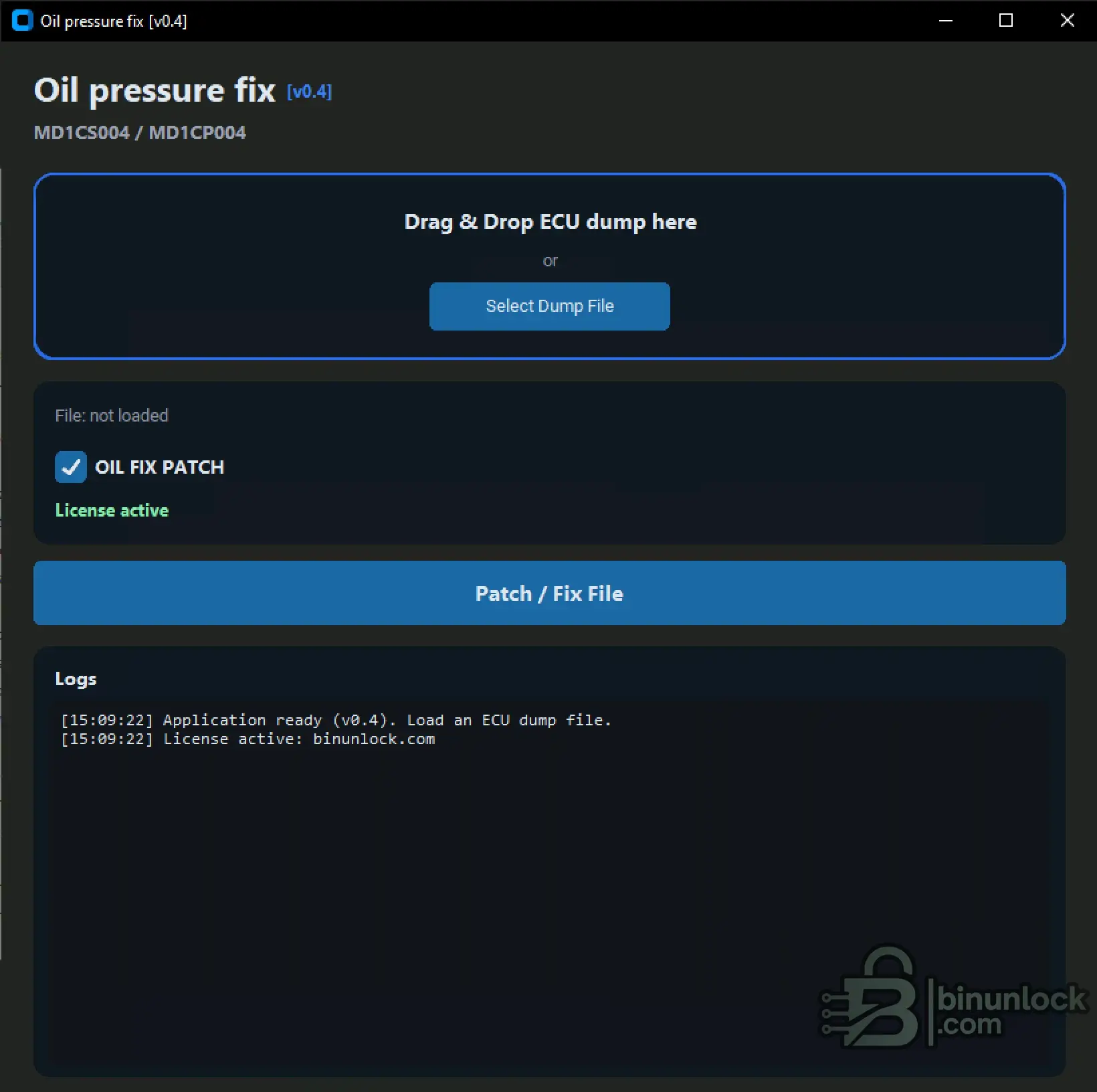
- Drag & Drop — load an ECU dump by dragging it into the application.
- File Selection — alternatively select the dump through the file browser.
- Operation Logs — application log area for status and processing messages.
- Standalone Operation — local firmware processing without requiring an online patching service.
- Windows Installer — installation package with desktop shortcut support.
Dynamic Patching vs. Fixed Offsets
Traditional ECU patches may rely on predefined addresses that differ between firmware versions.
Oil Pressure Fix uses context-aware pattern scanning to locate the relevant firmware structures dynamically.
This reduces dependence on manually identifying patch offsets for each supported software version.
However, dynamic pattern detection does not guarantee compatibility with every firmware revision. Unsupported or unrecognized dumps should not be modified without verification.
Supported ECUs
- VAG Bosch MD1CS004
- VAG Bosch MD1CP004
The application is intended for major and commonly encountered software versions within these ECU families.
Important: Compatibility depends on the exact ECU software version and binary structure. A complete list of supported software identifiers has not been provided.
How to Use
- Read the ECU firmware using a compatible ECU programmer.
- Save a backup of the original dump.
- Launch Oil Pressure Fix.
- Drag and drop the ECU dump into the application or click Select Dump File.
- Check the OIL FIX PATCH option.
- Click Patch / Fix File to process the selected firmware.
- Review the application log and verify the resulting file before programming it back to the ECU.
Offline File Processing
The application works with previously extracted ECU firmware files.
It does not directly communicate with the vehicle through OBD and does not replace the ECU programmer required for reading or writing firmware.
Important Information
- Always keep an untouched copy of the original ECU firmware.
- Verify compatibility with the exact ECU software version.
- Check the resulting binary and any required ECU checksums before flashing.
- A firmware patch does not repair mechanical oil pressure faults.
- Never use a software modification to conceal a genuine low-oil-pressure condition.
Oil Pressure Fix provides a convenient offline solution for applying the designated oil pressure control patch to supported VAG Bosch MD1CS004 and MD1CP004 ECU firmware without manually locating patch offsets.


