
95040 EEPROM Tool is an offline command-line decoder and editor for selected Bosch ME7.5 engine-control EEPROM files and corresponding Volkswagen Group instrument-cluster dumps. It was created primarily for VAG 1.8T Immobilizer III systems and exposes the identity, security, coding and programming-history fields stored in a compatible EEPROM image.
The utility works only with files that have already been read from an ECU or cluster. It does not communicate with the vehicle, read an EEPROM through OBD, program a chip or replace the diagnostic adaptation procedure. Its strongest use is transparent inspection: you can see the VIN, Secret Key Code, immobilizer state, Immo ID, cluster code, soft coding, checksum status and flash counters before deciding whether any authorized repair is appropriate.
The supplied screenshot shows a real 512-byte ECU dump being decoded at the Windows command prompt. The program identifies an Immobilizer III file and displays its status without requiring a graphical interface.
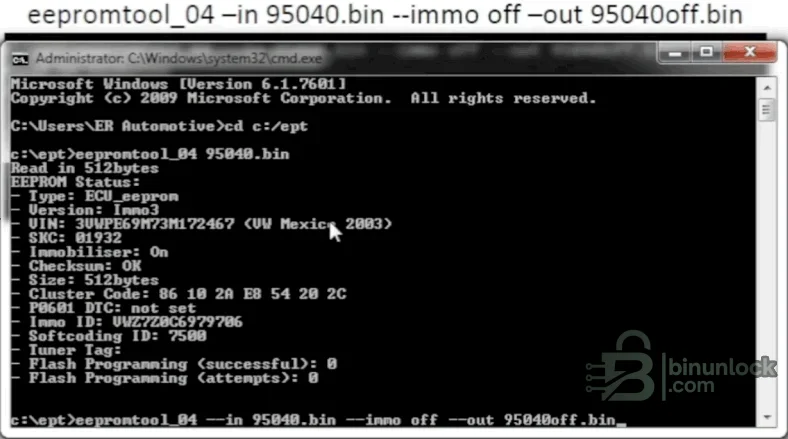
Viewing status is non-writing when no output-changing option is supplied. The shortest form is to pass the input filename directly; the program reads the file, prints the decoded fields and exits.
The parser also contains:
A 512 KiB or 1 MiB flash image is not a 95040 EEPROM. The tool explicitly warns and exits when a full flash is supplied in place of the small serial EEPROM data. Do not trim a flash image by guesswork; obtain the correct EEPROM region with a tool and method documented for the exact ECU.
Representative platforms from that generation can include:
This is orientation, not a model-based compatibility guarantee. A listed chassis can use ME7.1, ME7.1.1, ME7.5, a different EEPROM type, Immobilizer II, Immobilizer III, Immobilizer IV or a non-Bosch controller depending on engine, market and build date. Verify the Bosch number, VAG part number, processor, EEPROM device and dump size before using any write option.
Decoded examples include Golf/Jetta, Bora, Passat, Polo, New Beetle, Touran, Caddy, Transporter, Touareg, Audi A2/A3/A4/A5/A6/A8/TT, Škoda Fabia/Octavia/Superb and SEAT Ibiza/Leon/Toledo/Altea. These tables explain a VIN already present in the file; they do not prove that the corresponding vehicle uses a supported 95040 EEPROM layout.
The tool does not implement direct ECU programming. It changes the local output file, and a separate EEPROM programmer or supported ECU tool is required to write that data. Immobilizer changes must be limited to vehicles and modules you own or are authorized to repair.
The source code contains an important limitation: it cannot calculate the cluster checksum after writing. The author instructs the operator to use VCDS to update the cluster soft coding—even to the same value—so the cluster performs its own checksum update. Do not install a modified cluster dump without understanding that follow-up requirement and retaining the original EEPROM.
These boundaries matter when planning a repair. Do not assume that a displayed value has a supported edit command.
Do not paste real VIN, SKC, Immo ID or cluster-code values into a public support thread. Redact security and owner-identifying data while preserving file size, ECU numbers and the exact command/error text.
A correctly formatted EEPROM file can still be wrong for the ECU, keys or vehicle. Have a recoverable original and the ability to restore the chip before attempting any immobilizer repair.
Run the tool in a disposable working directory so input, output and console records remain clearly separated.
No internet connection or vehicle interface is needed for offline decoding. The executable is a native x86, unsigned standalone build.
The original RAR and its nested source archive passed full integrity and extraction tests. The executable was inspected statically and was not launched during packaging because the source package included an authentic command-line screenshot. The rebuilt publication archive uses encrypted headers and is independently tested and extracted against the pinned three-file inventory.
The utility works only with files that have already been read from an ECU or cluster. It does not communicate with the vehicle, read an EEPROM through OBD, program a chip or replace the diagnostic adaptation procedure. Its strongest use is transparent inspection: you can see the VIN, Secret Key Code, immobilizer state, Immo ID, cluster code, soft coding, checksum status and flash counters before deciding whether any authorized repair is appropriate.
The supplied screenshot shows a real 512-byte ECU dump being decoded at the Windows command prompt. The program identifies an Immobilizer III file and displays its status without requiring a graphical interface.
What the tool can display from an ECU EEPROM#
For a recognized Bosch ME7.5-style 95040 ECU image, the status report can show:- EEPROM type: ECU data rather than instrument-cluster data
- Immobilizer generation: the parser distinguishes its known Immo II and Immo III layouts
- VIN: the 17-character vehicle identification number stored in the ECU
- VIN interpretation: known manufacturer, model-family code, model year and assembly location
- SKC: the Secret Key Code/PIN derived from the stored bytes
- Immobilizer state: On, Off or an error showing inconsistent raw status bytes
- Page checksum status: OK or invalid for the pages handled by the parser
- Cluster code: the seven-byte immobilizer matching value
- P0601 record: whether the two monitored EEPROM bytes contain a stored value
- Immo ID: the immobilizer identity string
- Soft coding: the coding number present in the EEPROM
- Tuner tag: a six-character tag when one has been written
- Flash counters: successful programming count and programming-attempt count
Viewing status is non-writing when no output-changing option is supplied. The shortest form is to pass the input filename directly; the program reads the file, prints the decoded fields and exits.
Supported file layouts#
The author designed the utility around a 512-byte 95040 ECU EEPROM dump. This is the normal and best-tested input size for the ME7.5 workflow.The parser also contains:
- 2,048-byte cluster EEPROM support: automatically selected by file size unless type guessing is overridden
- 1,024-byte R32-style ECU support: experimental logic for a file whose last 512 bytes are entirely
FF - Type overrides: command-line switches for cluster parsing or for preventing automatic guessing
A 512 KiB or 1 MiB flash image is not a 95040 EEPROM. The tool explicitly warns and exits when a full flash is supplied in place of the small serial EEPROM data. Do not trim a flash image by guesswork; obtain the correct EEPROM region with a tool and method documented for the exact ECU.
Vehicle and ECU scope#
The official project description says the tool was written for Volkswagen Group 1.8T engines using Immobilizer III, with other engines and immobilizer versions only lightly tested. The EEPROM structure is associated with selected Bosch ME7.5-era applications across Volkswagen, Audi, SEAT and Škoda.Representative platforms from that generation can include:
- Volkswagen Golf/Bora Mk4, Passat B5, New Beetle and selected Polo applications
- Audi A3 8L, A4 B6/8E, TT 8N and selected related ME7.5 platforms
- SEAT Leon/Toledo 1M and Ibiza-era applications using compatible VAG immobilizer architecture
- Škoda Octavia 1U and selected Fabia/Superb-era systems
This is orientation, not a model-based compatibility guarantee. A listed chassis can use ME7.1, ME7.1.1, ME7.5, a different EEPROM type, Immobilizer II, Immobilizer III, Immobilizer IV or a non-Bosch controller depending on engine, market and build date. Verify the Bosch number, VAG part number, processor, EEPROM device and dump size before using any write option.
VIN decoding coverage#
The bundled source contains World Manufacturer Identifier entries for Volkswagen, Volkswagen Commercial Vehicles, Audi, Audi Hungary/Brazil, Škoda and SEAT, plus regional Volkswagen production. It also maps many period VAG chassis codes and model-year characters.Decoded examples include Golf/Jetta, Bora, Passat, Polo, New Beetle, Touran, Caddy, Transporter, Touareg, Audi A2/A3/A4/A5/A6/A8/TT, Škoda Fabia/Octavia/Superb and SEAT Ibiza/Leon/Toledo/Altea. These tables explain a VIN already present in the file; they do not prove that the corresponding vehicle uses a supported 95040 EEPROM layout.
ECU editing functions#
For a compatible ECU EEPROM, the command-line options can:- Set the immobilizer flag On or Off
- Replace the stored 17-character VIN
- Recalculate the supported EEPROM page checksums
- Write a modified result to a separately specified output file
- Skip automatic checksum correction only when explicitly requested for controlled analysis
The tool does not implement direct ECU programming. It changes the local output file, and a separate EEPROM programmer or supported ECU tool is required to write that data. Immobilizer changes must be limited to vehicles and modules you own or are authorized to repair.
Cluster EEPROM functions#
A 2,048-byte cluster dump can be parsed for VIN, SKC, cluster code and Immo ID. The utility can also set those values and pair a cluster dump to data taken from a compatible ECU EEPROM file. Pairing copies the VIN, Immo ID, cluster code and SKC into the cluster working image.The source code contains an important limitation: it cannot calculate the cluster checksum after writing. The author instructs the operator to use VCDS to update the cluster soft coding—even to the same value—so the cluster performs its own checksum update. Do not install a modified cluster dump without understanding that follow-up requirement and retaining the original EEPROM.
Information that is read-only or limited#
The status screen exposes several fields that are not all editable in both file types:- SKC replacement is implemented for cluster data, not for an ECU dump
- Cluster code and Immo ID replacement are implemented for cluster data
- ECU immobilizer On/Off and VIN replacement are supported by the ECU parser
- Flash-attempt and success counters are reported for inspection; no normal option is provided to reset them
- The P0601 bytes are reported, but the public command-line interface does not expose a dedicated clear option
- Cluster checksum calculation is not implemented
These boundaries matter when planning a repair. Do not assume that a displayed value has a supported edit command.
Basic status workflow#
- Read the 95040 EEPROM at least twice with a suitable programmer and compare the files.
- Store one exact original as read-only and calculate its SHA-256.
- Open a Command Prompt in the extracted tool folder.
- Run the executable with the input file or use
--inand--status. - Confirm the file type, byte size, VIN, Immo version and checksum result.
- Compare the VIN, ECU label and immobilizer information with authorized vehicle records.
- If any decoded field is implausible, stop and inspect the dump in a hex editor before editing.
Do not paste real VIN, SKC, Immo ID or cluster-code values into a public support thread. Redact security and owner-identifying data while preserving file size, ECU numbers and the exact command/error text.
Safe modification workflow#
- Duplicate the verified original and work only on the copy.
- Run a status-only pass and save the console output privately.
- Select only the one authorized change required by the repair.
- Always supply a new output filename for a write operation.
- Let the program recalculate supported ECU page checksums unless an expert validation workflow explicitly requires otherwise.
- Run status again on the output and confirm every expected field.
- Compare original and output byte-by-byte; investigate every changed range.
- For a cluster edit, complete the documented diagnostic soft-coding/checksum step.
- Write with stable power and a programmer that supports verification.
- Read the memory back and compare it with the intended output before reassembly.
A correctly formatted EEPROM file can still be wrong for the ECU, keys or vehicle. Have a recoverable original and the ability to restore the chip before attempting any immobilizer repair.
Command-line options#
The bundled executable and Python source expose the following workflow controls:--ininput EEPROM binary--outoutput file, required for changes--statusdisplay decoded data--immo on|offset the ECU immobilizer state--vinreplace the VIN--skcset the cluster SKC--ccset the cluster code--iiset the cluster Immo ID--pairpair a cluster input with a supplied ECU EEPROM--fixcswrite with checksum correction--nofixcssuppress ECU checksum correction for controlled analysis--clusterparse the input as cluster data--forcedisable automatic type guessing
Run the tool in a disposable working directory so input, output and console records remain clearly separated.
System requirements#
- Windows PC with native 32-bit x86 application support; WOW64 is required on 64-bit Windows
- Windows 7 or later is a practical baseline; an isolated Windows VM is recommended for legacy unsigned utilities
- Command Prompt or PowerShell access
- 1 GHz processor, 512 MB RAM and less than 100 MB free disk space
- A suitable EEPROM/ECU programmer for acquiring and restoring the 95040 or cluster data
- VCDS or an equivalent authorized diagnostic workflow for the required cluster soft-coding checksum update
- A hex editor and binary comparison tool for reviewing changes
- Python 2-compatible runtime only if you choose to run the included source instead of the bundled executable
No internet connection or vehicle interface is needed for offline decoding. The executable is a native x86, unsigned standalone build.
Package contents and integrity#
The cleaned archive contains the standalone Windows executable, the matching Python source file and the project's short README. Redundant ZIP and TAR source wrappers are replaced by their verified expanded files, so the operational binary and reviewable source are immediately accessible without nested extraction.The original RAR and its nested source archive passed full integrity and extraction tests. The executable was inspected statically and was not launched during packaging because the source package included an authentic command-line screenshot. The rebuilt publication archive uses encrypted headers and is independently tested and extracted against the pinned three-file inventory.
Limitations and security notes#
- Primary testing was for VAG 1.8T Immobilizer III; other layouts may be misread
- The standard ECU input is 512 bytes; a full flash is not interchangeable
- The 1,024-byte R32 path is explicitly experimental
- Cluster checksum repair is not implemented in the utility
- The program cannot read or write an ECU directly
- Immobilizer data is security-sensitive and must be handled only with authorization
- VIN, SKC, Immo ID and cluster codes should never be posted publicly
- Unsigned legacy binaries should be scanned independently and used in isolation
Troubleshooting#
- The tool says the file is 512 KiB or 1 MiB: you supplied ECU flash rather than the small serial EEPROM dump.
- VIN or Immo ID cannot be decoded: confirm that the input is the expected layout and that the read is not byte-swapped or corrupted.
- Checksum is invalid: compare repeated reads first; do not correct an unstable dump.
- The 1,024-byte file is rejected as R32: the final 512 bytes are not all
FF, so the experimental layout test failed. - Cluster-code copies do not match: the parser found inconsistent replicated blocks; inspect the raw dump and do not pair it blindly.
- An output option does nothing: confirm that the operation is implemented for the selected ECU or cluster type and that
--outwas supplied. - Modified cluster data does not validate: restore the original and complete the documented VCDS soft-coding checksum workflow only after confirming the file layout.
- The executable is blocked by security software: quarantine it, verify the pinned hash and obtain an independent scan before deciding whether to run it.


