
VBF Convert to BIN is a small offline utility for extracting raw binary data from compatible Versatile Binary Format firmware containers used in Ford- and Volvo-related service workflows. It can convert a complete VBF file or extract a selected part using the address-offset controls shown in the interface.
A VBF is more than a renamed BIN: it contains a text header and one or more addressed data blocks, and it can include checksums or metadata needed by the original programming process. This tool focuses on extraction. It does not rebuild a production-ready VBF, validate signatures, provide security access or flash a control unit.
The main preview is the genuine application window. It shows separate full and partial conversion controls, a VBF address-offset field and an option affecting blank-area handling.
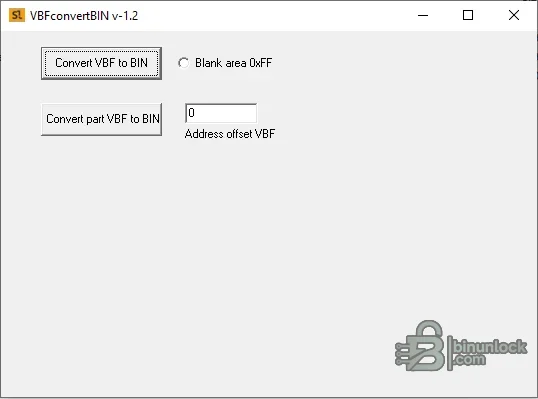
The exact output layout depends on the source addresses and the converter's handling of gaps. Preserve the VBF header and original container for every job.
Newer platforms can use encrypted, signed, compressed or multi-stage packages. Treat those as unsupported unless the output can be independently verified.
Do not guess an offset for a file that will later be programmed. Compare it with the module memory map or a known-good extraction.
If the output begins with the original text header or every block is shifted, correct the extraction parameters rather than manually cutting bytes without an address record.
No diagnostic interface or internet connection is required for extraction.
A VBF is more than a renamed BIN: it contains a text header and one or more addressed data blocks, and it can include checksums or metadata needed by the original programming process. This tool focuses on extraction. It does not rebuild a production-ready VBF, validate signatures, provide security access or flash a control unit.
The main preview is the genuine application window. It shows separate full and partial conversion controls, a VBF address-offset field and an option affecting blank-area handling.
What the converter does#
- Opens a compatible VBF container from local storage
- Extracts data blocks into a flat BIN representation
- Offers a full-file conversion workflow
- Offers a partial conversion workflow using a specified VBF address offset
- Provides a blank-area option for output regions that are not populated by input blocks
The exact output layout depends on the source addresses and the converter's handling of gaps. Preserve the VBF header and original container for every job.
Where VBF files are encountered#
VBF containers are associated with OEM update and service-programming ecosystems, especially Ford, Volvo and related platform families. They may carry ECU, transmission, body, infotainment or other module software. A matching extension does not guarantee that every container is plain, unsigned or supported by this legacy converter.Newer platforms can use encrypted, signed, compressed or multi-stage packages. Treat those as unsupported unless the output can be independently verified.
Understanding blocks, addresses and gaps#
A VBF header can describe the logical address and length of each data block. When converting to a flat binary, the program must decide where the first byte belongs and what to place between non-contiguous blocks.- Base address: determines how absolute firmware addresses map to offset zero in the output file
- Partial extraction: selects a specific addressed portion rather than every block
- Blank areas: gaps may need padding, commonly with an erased-flash value, but the correct behavior depends on the target memory
- Block order: should follow the address map rather than filename order
Do not guess an offset for a file that will later be programmed. Compare it with the module memory map or a known-good extraction.
Recommended conversion workflow#
- Copy the original VBF to a read-only evidence folder.
- Record its byte size and SHA-256 hash.
- Open the header in a text or hex viewer and record block addresses and lengths.
- Convert a working copy using the full-conversion mode first.
- Record the output size and hash.
- If only one region is required, use partial conversion with the documented address offset.
- Compare extracted block boundaries against the header declarations.
- Inspect the BIN for expected module identifiers, calibration IDs and non-blank data.
- Validate checksums with a method specific to the exact module before editing or programming.
How to validate the BIN output#
- The length is consistent with the highest and lowest declared block addresses
- Block content appears at the expected offsets
- Gaps contain the intended padding rather than shifted data
- Known software identifiers remain readable and correspond to the source container
- A second VBF parser produces equivalent payload blocks
- The output is not merely a byte-for-byte copy of the complete container and header
- Checksum or signature requirements are understood before any modification
If the output begins with the original text header or every block is shifted, correct the extraction parameters rather than manually cutting bytes without an address record.
System requirements#
- Windows PC with 32-bit x86 application support
- Windows 7, 8.1, 10 or 11; an isolated VM is recommended for older unsigned tools
- The two included Borland runtime package libraries kept beside the executable
- At least 1 GB RAM and free disk space equal to several copies of the largest expected firmware image
- A hex editor, hashing utility and independent VBF parser or module-specific checker
No diagnostic interface or internet connection is required for extraction.
What this utility does not provide#
- No vehicle communication or J2534/VCI control
- No security-access seed/key calculation
- No guarantee of support for encrypted or signed containers
- No automatic ECU or module identification
- No map editing, checksum correction or signature generation
- No reconstruction of a flash-ready VBF after the BIN is edited
Safe editing and programming#
An extracted BIN is an analysis artifact until proven otherwise. If the objective is to edit a calibration, identify whether the BIN represents a complete memory image or only addressed blocks, use the correct definition and preserve all original metadata. For a later OEM programming job, use the original signed container and approved service process whenever possible.Package contents and integrity#
The cleaned package contains the converter executable and the two Borland runtime libraries it needs. The source archive passed a full test and extraction, all three files were pinned by size and SHA-256, and the executable was inspected statically without execution. The final archive uses encrypted headers and is independently extracted to verify the complete payload.Troubleshooting#
- Application will not start: keep both BPL runtime files beside the executable and use a 32-bit-compatible Windows environment.
- Output is unexpectedly large: inspect the lowest and highest block addresses and the selected blank-area behavior.
- Output is empty or very small: the VBF may use an unsupported structure, compression or encryption.
- Partial conversion is shifted: confirm whether the entered value is an absolute VBF address or an output-relative offset.
- Checksum fails: extraction does not automatically correct module-specific checksums or signatures.


