
Ford EEC-V Bank Order Swap - BIN Converter for PCM Flash Files Tool
EECV Bank Order Swap is a lightweight Windows utility for converting supported Ford EEC-V PCM BIN files between known flash-file sizes and bank orders.
If you work with EEC-V Ford PCMs using different flash tools and calibration editors, you may occasionally need to reorganize banks or resize a BIN manually in a hex editor.
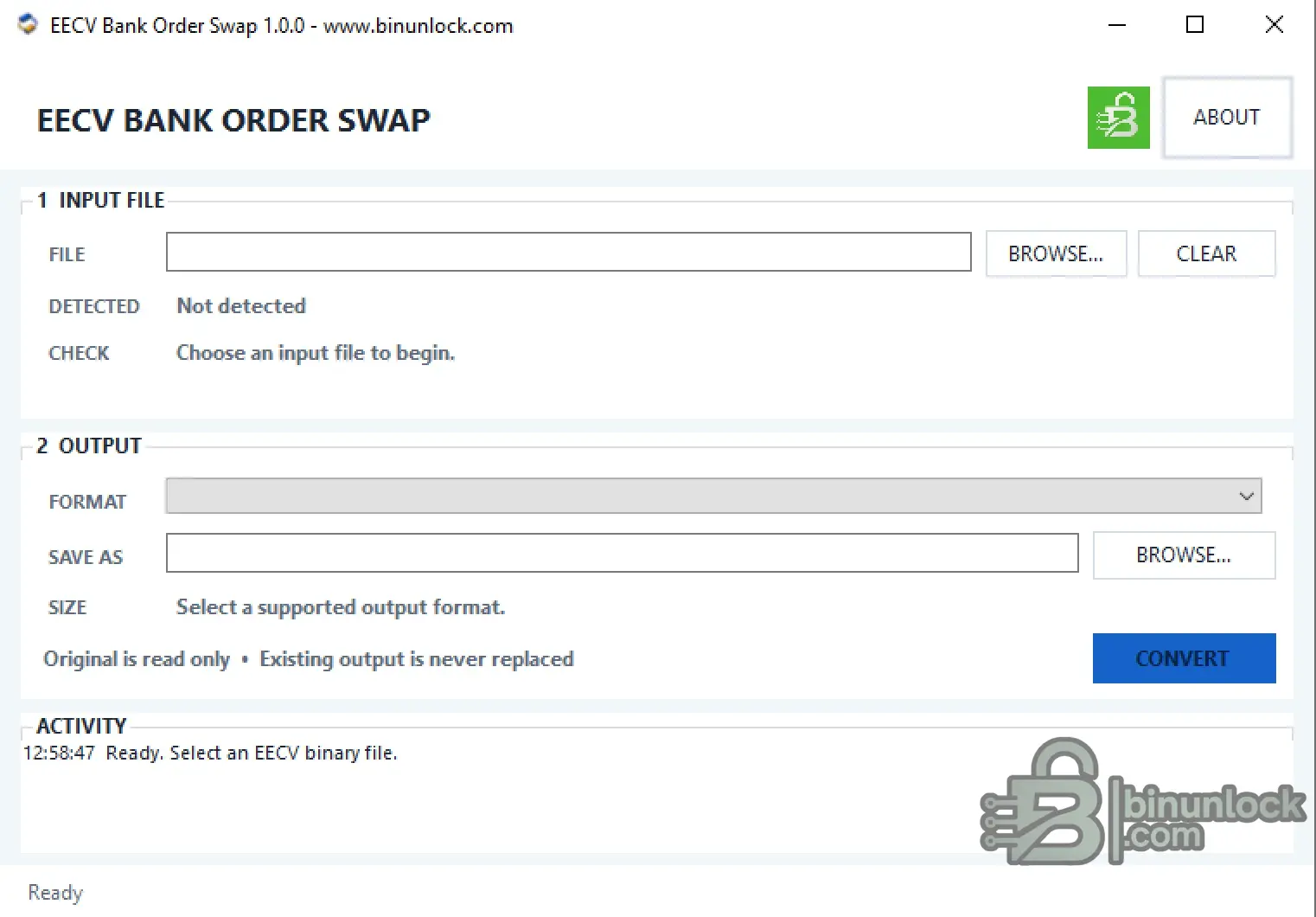
This utility automates that work: load a supported source BIN, verify the detected format, choose an available target format and create a new converted file.
All analysis and conversion are performed locally on the computer.
Why Use EECV Bank Order Swap?
Different Ford EEC-V flashing tools and editors may expect the same PCM data in different file layouts.
Traditionally, converting between these layouts may require manually:
EECV Bank Order Swap performs the supported conversion automatically.
This makes it useful when moving EEC-V PCM files between different programmers, flash utilities and calibration-editing workflows.
Supported Formats
The current release recognizes the following EEC-V BIN formats:
The source file must match a supported format exactly before an output format becomes available.
Supported Conversions
Only valid conversion paths for the detected source format are offered.
Automatic Format Detection
After selecting an input BIN, the application checks the file and reports the detected format before conversion.
The workspace provides:
For 88K and 112K files, there is no embedded bank-order signature, so identification is based on the exact supported file size.
For the legacy two-bank 224K variant, the application displays a separate warning that must be reviewed and confirmed by the operator.
Safe File Conversion
The application is designed to keep the original source intact.
The original BIN should always be retained as the master backup.
Typical Workflow
No manual bank rearrangement in a hex editor is required for the supported conversions.
Offline Operation
EECV Bank Order Swap is a local file-processing utility.
It does not:
Reading and programming remain separate operations performed with the appropriate Ford-compatible flash tool.
System Requirements
File Integrity
Version: 1.0.0
SHA-256:
VirusTotal:
View VirusTotal report
The VirusTotal report above corresponds to the executable identified by the exact SHA-256 hash shown above.
Important
EECV Bank Order Swap is a lightweight Windows utility for converting supported Ford EEC-V PCM BIN files between known flash-file sizes and bank orders.
If you work with EEC-V Ford PCMs using different flash tools and calibration editors, you may occasionally need to reorganize banks or resize a BIN manually in a hex editor.
This utility automates that work: load a supported source BIN, verify the detected format, choose an available target format and create a new converted file.
All analysis and conversion are performed locally on the computer.
Why Use EECV Bank Order Swap?
Different Ford EEC-V flashing tools and editors may expect the same PCM data in different file layouts.
Traditionally, converting between these layouts may require manually:
- Opening the BIN in a hex editor
- Reordering flash banks
- Resizing the binary
- Moving the correct data ranges
- Saving a correctly structured output for another tool
EECV Bank Order Swap performs the supported conversion automatically.
This makes it useful when moving EEC-V PCM files between different programmers, flash utilities and calibration-editing workflows.
Supported Formats
The current release recognizes the following EEC-V BIN formats:
Code:
88K
112K
216K-0198
224K-1809
256K-0189
The source file must match a supported format exactly before an output format becomes available.
Supported Conversions
Code:
88K        -> 224K-1809

112K       -> 224K-1809

216K-0198  -> 224K-1809
216K-0198  -> 256K-0189

224K-1809  -> 88K
224K-1809  -> 112K
224K-1809  -> 216K-0198
224K-1809  -> 256K-0189

256K-0189  -> 216K-0198
256K-0189  -> 224K-1809
Only valid conversion paths for the detected source format are offered.
Automatic Format Detection
After selecting an input BIN, the application checks the file and reports the detected format before conversion.
The workspace provides:
- Input file selection
- Automatic supported-format detection
- Input validation result
- Available target-format selection
- Output path selection
- Expected output size
- Conversion status
- Activity log
For 88K and 112K files, there is no embedded bank-order signature, so identification is based on the exact supported file size.
For the legacy two-bank 224K variant, the application displays a separate warning that must be reviewed and confirmed by the operator.
Safe File Conversion
The application is designed to keep the original source intact.
- The input BIN is opened read-only
- Input and output cannot use the same path
- Unsupported conversion directions are blocked
- An existing output file is not silently replaced
- Output is first written to a temporary file
- The completed result is then safely published to the selected destination
The original BIN should always be retained as the master backup.
Typical Workflow
- Select the original EEC-V BIN file
- Check the detected format and validation result
- Select one of the supported output formats
- Choose a new output filename
- Select CONVERT
- Review the final status and resulting file
- Use the converted BIN only with the intended compatible flash / editing workflow
No manual bank rearrangement in a hex editor is required for the supported conversions.
Offline Operation
EECV Bank Order Swap is a local file-processing utility.
It does not:
- Connect to the vehicle
- Communicate directly with the PCM
- Read the ECU
- Write or flash the ECU
- Upload the BIN to a remote server
Reading and programming remain separate operations performed with the appropriate Ford-compatible flash tool.
System Requirements
- Windows 7 SP1 through Windows 11
- 32-bit or 64-bit Windows
- Microsoft .NET Framework 4.8
File Integrity
Version: 1.0.0
SHA-256:
Code:
925efd13167f36562ca815c2ba1274f2ed665666e2960d6a9baaf58b6f6d3f5dVirusTotal:
View VirusTotal report
The VirusTotal report above corresponds to the executable identified by the exact SHA-256 hash shown above.
Important


