
GM MCVM Utility - T87/T87A/T93 Solenoid Data Read & Write J2534 Tool
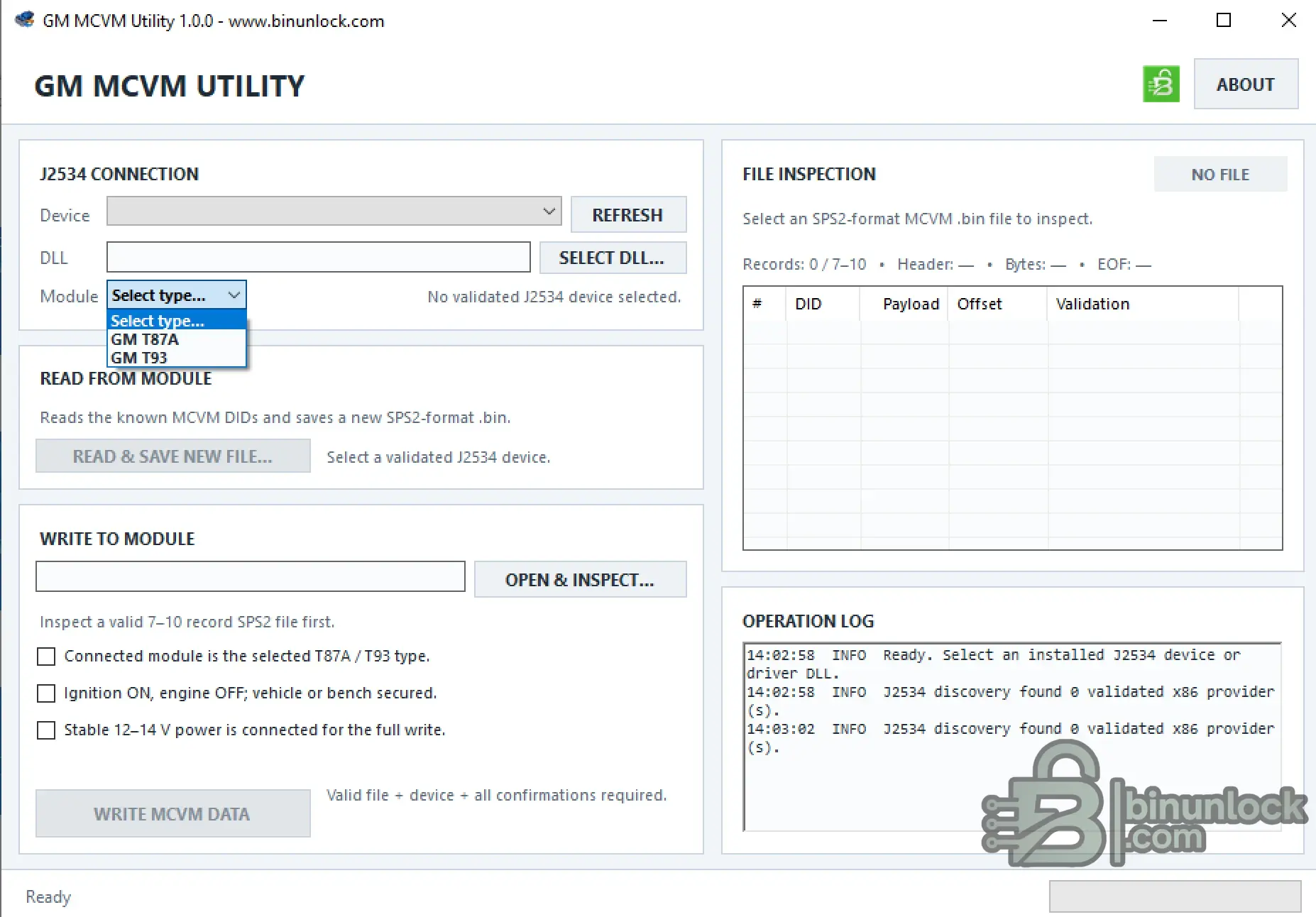
GM MCVM Utility is a Windows service tool for reading and writing MCVM solenoid characterization data on supported GM transmission control modules.
The current release supports GM T87, T87A and T93 modules and communicates through a locally installed SAE J2534 04.04 interface.
MCVM files use the standard GM / SPS2-compatible record structure, making the utility useful for authorized transmission-module replacement, characterization-data backup and restore workflows.
Supported Modules
The utility is intended for supported GM 8+ speed transmission-control applications using MCVM solenoid characterization data.
Key Features
Read MCVM Data
The READ & SAVE NEW FILE workflow reads the known MCVM DIDs from the selected transmission module and creates a new SPS2-format BIN file.
Typical workflow:
A valid read requires at least 7 accepted records from the expected MCVM data set.
Write MCVM Data
The WRITE MCVM DATA workflow accepts a valid SPS2-compatible MCVM BIN and writes the inspected characterization records to the selected transmission module.
Before write access is enabled, the application requires confirmation that:
MCVM BIN File Inspection
Before vehicle write operations, GM MCVM Utility inspects the selected file and validates its record structure.
The inspection view displays:
The utility rejects invalid input before vehicle access when conditions such as the following are detected:
A normal supported file contains approximately 7-10 valid MCVM records.
GM SPS2 File Compatibility
The utility reads and writes MCVM files using the standard GM-supplied / SPS2-compatible record format.
This allows characterization data to be retained as a normal BIN file for authorized backup, module replacement and restoration workflows.
Always verify that the MCVM file belongs to the correct vehicle, transmission configuration and module before writing it.
J2534 Interface Requirements
GM MCVM Utility requires a working 32-bit SAE J2534 04.04 driver for the connected interface.
The workspace can:
The correct driver must be installed and working before module communication is attempted.
System Requirements
Package Contents
The current package contains:
VirusTotal
View VirusTotal analysis
Validation Status
Important
GM MCVM Utility is a Windows service tool for reading and writing MCVM solenoid characterization data on supported GM transmission control modules.
The current release supports GM T87, T87A and T93 modules and communicates through a locally installed SAE J2534 04.04 interface.
MCVM files use the standard GM / SPS2-compatible record structure, making the utility useful for authorized transmission-module replacement, characterization-data backup and restore workflows.
Supported Modules
- GM T87
- GM T87A
- GM T93
The utility is intended for supported GM 8+ speed transmission-control applications using MCVM solenoid characterization data.
Key Features
- Read MCVM data directly from supported transmission modules
- Write MCVM data back to supported T87 / T87A / T93 modules
- SAE J2534 04.04 communication
- Automatic installed J2534 provider discovery
- Manual J2534 DLL selection
- GM SPS2-compatible MCVM BIN format
- MCVM BIN file inspection before writing
- DID record validation
- Module-type selection
- Operation log
- Read and save a new MCVM BIN
- Existing output files are not silently overwritten
Read MCVM Data
The READ & SAVE NEW FILE workflow reads the known MCVM DIDs from the selected transmission module and creates a new SPS2-format BIN file.
Typical workflow:
- Connect the supported J2534 interface
- Switch ignition ON with the engine OFF
- Select the correct J2534 device / driver
- Select the correct module family
- Read the MCVM data
- Review the recovered DID records
- Save the result as a new BIN file
A valid read requires at least 7 accepted records from the expected MCVM data set.
Write MCVM Data
The WRITE MCVM DATA workflow accepts a valid SPS2-compatible MCVM BIN and writes the inspected characterization records to the selected transmission module.
Before write access is enabled, the application requires confirmation that:
- The connected module matches the selected T87 / T87A / T93 type
- Ignition is ON and engine is OFF
- Vehicle or bench setup is secured
- Stable 12-14 V programming power is available
- The selected MCVM BIN passed file inspection
- A validated J2534 provider is selected
MCVM BIN File Inspection
Before vehicle write operations, GM MCVM Utility inspects the selected file and validates its record structure.
The inspection view displays:
- Record count
- DID
- Payload
- Record offset
- Validation result
- Header / file information
The utility rejects invalid input before vehicle access when conditions such as the following are detected:
- Truncated MCVM data
- Invalid file structure
- Unknown DID records
- Duplicate DID records
- Invalid record count
- Unexpected trailing data
A normal supported file contains approximately 7-10 valid MCVM records.
GM SPS2 File Compatibility
The utility reads and writes MCVM files using the standard GM-supplied / SPS2-compatible record format.
This allows characterization data to be retained as a normal BIN file for authorized backup, module replacement and restoration workflows.
Always verify that the MCVM file belongs to the correct vehicle, transmission configuration and module before writing it.
J2534 Interface Requirements
GM MCVM Utility requires a working 32-bit SAE J2534 04.04 driver for the connected interface.
The workspace can:
- Search installed J2534 providers
- Select a validated installed device
- Load a specific J2534 DLL manually
The correct driver must be installed and working before module communication is attempted.
System Requirements
- Windows 7 SP1 through Windows 11
- 32-bit or 64-bit Windows
- Microsoft .NET Framework 4.8
- Working 32-bit SAE J2534 04.04 driver
- Compatible J2534 hardware
- Stable workshop / bench power supply
Package Contents
The current package contains:
Code:
GM_MCVM_Utility_1.0.0.exeVirusTotal
View VirusTotal analysis
Validation Status
Important


