
GM E86 LML Flash Workspace - Combine & Split ECM Flash Files Tool
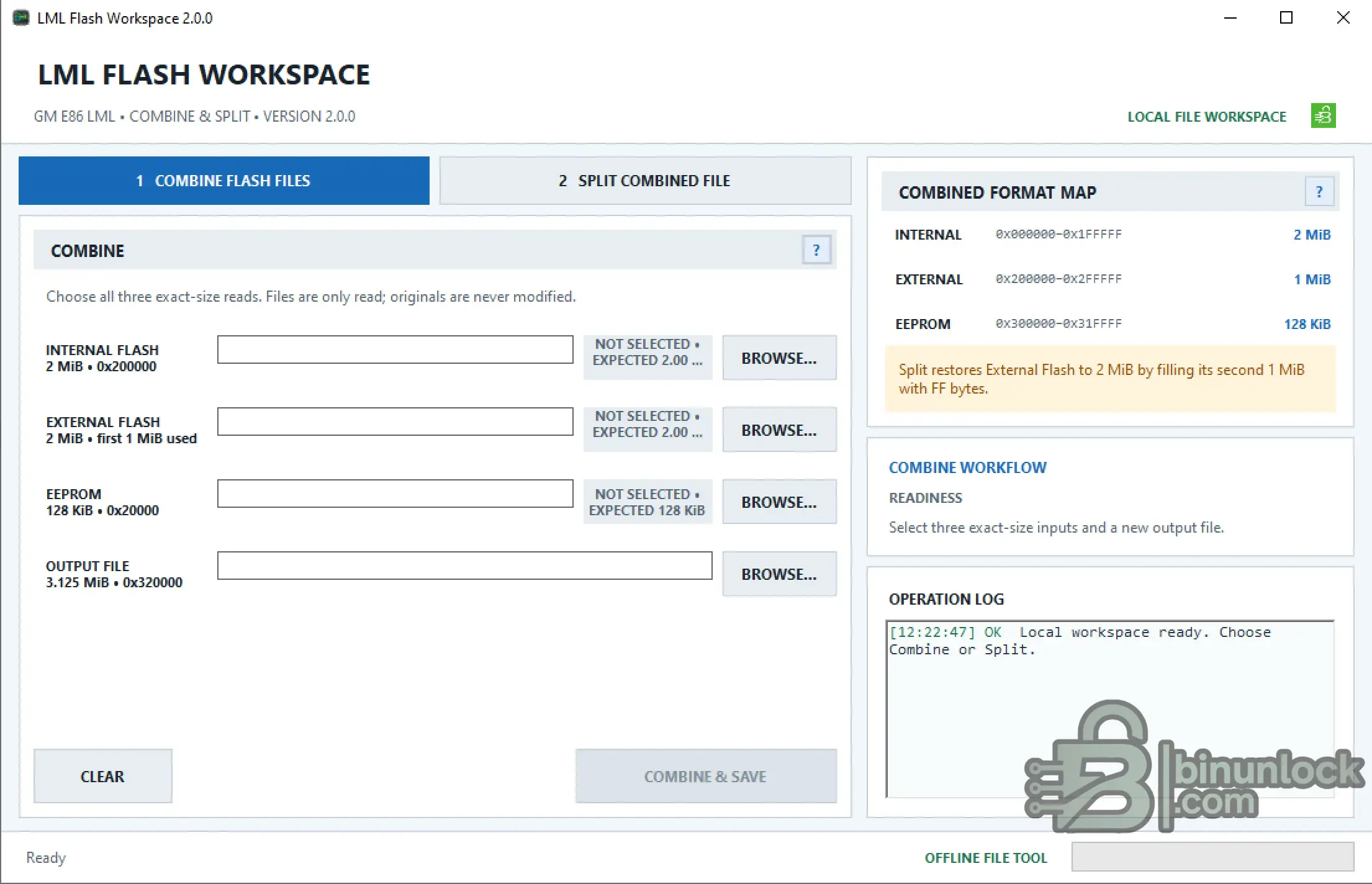
LML Flash Workspace is a portable Windows utility for offline processing of GM E86 LML ECM memory files.
The tool combines separate Internal Flash, External Flash and EEPROM reads into one standardized binary image and can split the combined image back into three files for programmer use.
All processing is performed locally on the computer. The application does not connect to the vehicle or ECM, does not program the ECU and does not perform checksum correction.
Key Features
Exact File Sizes
The workspace expects exact memory-read sizes:
Renaming a file does not make an incorrect read compatible. If the size is wrong, obtain the correct read using the appropriate programmer mode.
Combined Image Format
The 3.125 MiB combined image uses the following layout:
Only the first 1 MiB of the 2 MiB External Flash is stored inside the combined format.
The second 1 MiB of External Flash is not present in the combined image.
Combine Flash Files
The Combine workflow creates one 3.125 MiB image from three separate ECM reads:
The original files remain unchanged.
The resulting combined binary has the exact size:
Split Combined File
The Split workflow converts a valid 3.125 MiB combined image back into three programmer files.
For an input named:
the workspace creates:
Important External Flash behavior:
The first 1 MiB of the restored External Flash comes directly from the combined image.
The second 1 MiB is filled with:
This is intentional because the second half of the original External Flash is not stored inside the combined 3.125 MiB format and therefore cannot be reconstructed from it.
Offline & Portable
LML Flash Workspace is a local file-processing tool.
It does not:
Read and write operations must be performed separately with the appropriate professional programmer.
System Requirements
The application is portable and can be launched directly from a normal accessible folder.
Package Contents
The current package contains:
No additional installation package is required.
File Integrity
File: LML_Flash_2.0.0.exe
Version: 2.0.0
SHA-256:
VirusTotal:
View VirusTotal report
The VirusTotal report above corresponds to the executable identified by the exact SHA-256 hash shown above.
Important
LML Flash Workspace is a portable Windows utility for offline processing of GM E86 LML ECM memory files.
The tool combines separate Internal Flash, External Flash and EEPROM reads into one standardized binary image and can split the combined image back into three files for programmer use.
All processing is performed locally on the computer. The application does not connect to the vehicle or ECM, does not program the ECU and does not perform checksum correction.
Key Features
- GM E86 LML ECM file workspace
- Completely offline operation
- Combine Internal Flash + External Flash + EEPROM
- Split combined image back into programmer files
- Strict input file-size validation
- Original source files are opened read-only
- Existing output files are not silently overwritten
- Integrated combined-format map
- Operation log
- Portable Windows application
- No vehicle or ECM connection required
Exact File Sizes
The workspace expects exact memory-read sizes:
Code:
Internal Flash : 2,097,152 bytes - 2 MiB
External Flash : 2,097,152 bytes - 2 MiB
EEPROM         :   131,072 bytes - 128 KiB
Combined Image : 3,276,800 bytes - 3.125 MiB
Renaming a file does not make an incorrect read compatible. If the size is wrong, obtain the correct read using the appropriate programmer mode.
Combined Image Format
The 3.125 MiB combined image uses the following layout:
Code:
INTERNAL : 0x000000 - 0x1FFFFF   2 MiB
EXTERNAL : 0x200000 - 0x2FFFFF   1 MiB
EEPROM   : 0x300000 - 0x31FFFF   128 KiB
Only the first 1 MiB of the 2 MiB External Flash is stored inside the combined format.
The second 1 MiB of External Flash is not present in the combined image.
Combine Flash Files
The Combine workflow creates one 3.125 MiB image from three separate ECM reads:
- Select the 2 MiB Internal Flash
- Select the 2 MiB External Flash
- Select the 128 KiB EEPROM
- Choose a new output file
- Select COMBINE & SAVE
The original files remain unchanged.
The resulting combined binary has the exact size:
Code:
3,276,800 bytes
0x320000
Split Combined File
The Split workflow converts a valid 3.125 MiB combined image back into three programmer files.
For an input named:
Code:
Example.binthe workspace creates:
Code:
Example_IntFlash.bin - 2 MiB
Example_ExtFlash.bin - 2 MiB
Example_EEPROM.bin   - 128 KiB
Important External Flash behavior:
The first 1 MiB of the restored External Flash comes directly from the combined image.
The second 1 MiB is filled with:
Code:
FFThis is intentional because the second half of the original External Flash is not stored inside the combined 3.125 MiB format and therefore cannot be reconstructed from it.
Offline & Portable
LML Flash Workspace is a local file-processing tool.
It does not:
- Connect to the vehicle
- Connect directly to the ECM
- Read memory from the ECM
- Write or flash the ECM
- Correct checksums
- Require registration or user login
Read and write operations must be performed separately with the appropriate professional programmer.
System Requirements
- Windows 10 or Windows 11
- Microsoft .NET Framework 4.8
- Normal Windows user account
- Writable local folder for output files
The application is portable and can be launched directly from a normal accessible folder.
Package Contents
The current package contains:
Code:
LML_Flash_2.0.0.exeNo additional installation package is required.
File Integrity
File: LML_Flash_2.0.0.exe
Version: 2.0.0
SHA-256:
Code:
3e9f22fea3fe2c1eb909e3144205942c256e16a4eec2b17a2739ba676150f860VirusTotal:
View VirusTotal report
The VirusTotal report above corresponds to the executable identified by the exact SHA-256 hash shown above.
Important


