
Description
GM DPS (Development Programming System) is General Motors’ engineering-grade environment for programming, validating and servicing electronic control units. It provides controlled workflows to load firmware/calibrations, execute test plans, and verify module integrity across powertrain, chassis and body domains.

Key capabilities
What’s shown here
Typical workflow
Best practices
Note: Use DPS with proper authorization, licenses and OEM-approved datasets only. This summary does not instruct on bypassing security or licensing and is intended for legitimate service/engineering contexts.
Tested environment
Verified on Windows 10 LTSC (2019). Also operates on Windows 7, 8/8.1, 10, 11.
Minimum requirements
• CPU 2-core 2.0+ GHz • RAM 4 GB+ (8 GB recommended) • Disk 2 GB+ free • Display 1366×768+ • VCI: GM MDI/MDI2 or approved J2534 • Stable 12V supply during programming.
Disclaimer
This post consolidates publicly available information for educational/service purposes. Files and screenshots are shared from public sources; our forum does not host proprietary content. Use only within legal and manufacturer-approved procedures. Rights holders may contact us for prompt assistance.
Key capabilities
- ECU programming/flash: push operating systems and calibrations to supported modules with guided sequences and progress control.
- Multi-bus support: UDS/KWP over CAN (and related transport layers) for vehicle and bench setups.
- Session control: enter/exit diagnostic sessions, security-unlock with authorized access, and finalize programming with post-flash routines.
- Data services: read/write identifiers, clear DTCs after programming, and generate detailed logs for traceability.
- Flexible transport: works with GM MDI/MDI2 VCIs and compatible SAE J2534 pass-thru interfaces.
- Batch/testing modes: repeatable scripts and archives help standardize lab or remanufacturing processes.
What’s shown here
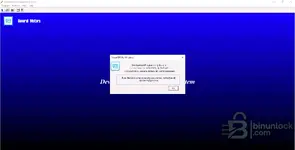
- Windows build with DPS for Windows interface (blue startup screen).
- About dialog indicating installed version 4.54.1000 (Up To Date).
Typical workflow
- Connect a stabilized power supply to the vehicle or bench harness.
- Link your VCI (GM MDI/MDI2 or approved J2534) and confirm communication.
- Load the correct programming package/archive for the ECU part number and target level.
- Execute the programming routine; do not interrupt power or communication.
- Run post-flash steps (resets, learn procedures), verify DTC status, and document the session.
Best practices
- Match levels: always use packages intended for the specific ECU hardware/SPS target level.
- Stable power: 12–14V battery support is mandatory during flash.
- Backups & logs: save pre-state info (VIN, IDs) and keep DPS logs for future traceability.
Note: Use DPS with proper authorization, licenses and OEM-approved datasets only. This summary does not instruct on bypassing security or licensing and is intended for legitimate service/engineering contexts.
Tested environment
Verified on Windows 10 LTSC (2019). Also operates on Windows 7, 8/8.1, 10, 11.
Minimum requirements
• CPU 2-core 2.0+ GHz • RAM 4 GB+ (8 GB recommended) • Disk 2 GB+ free • Display 1366×768+ • VCI: GM MDI/MDI2 or approved J2534 • Stable 12V supply during programming.
Disclaimer
This post consolidates publicly available information for educational/service purposes. Files and screenshots are shared from public sources; our forum does not host proprietary content. Use only within legal and manufacturer-approved procedures. Rights holders may contact us for prompt assistance.


