
BMW SME HVS 01/02 Cell Restore Tool - ZGW, DTC & Cell Data Restore
SME Cell Restore is a focused Windows service utility for supported BMW HVS 01/02 / SME 1/2 high-voltage battery control-unit workflows.
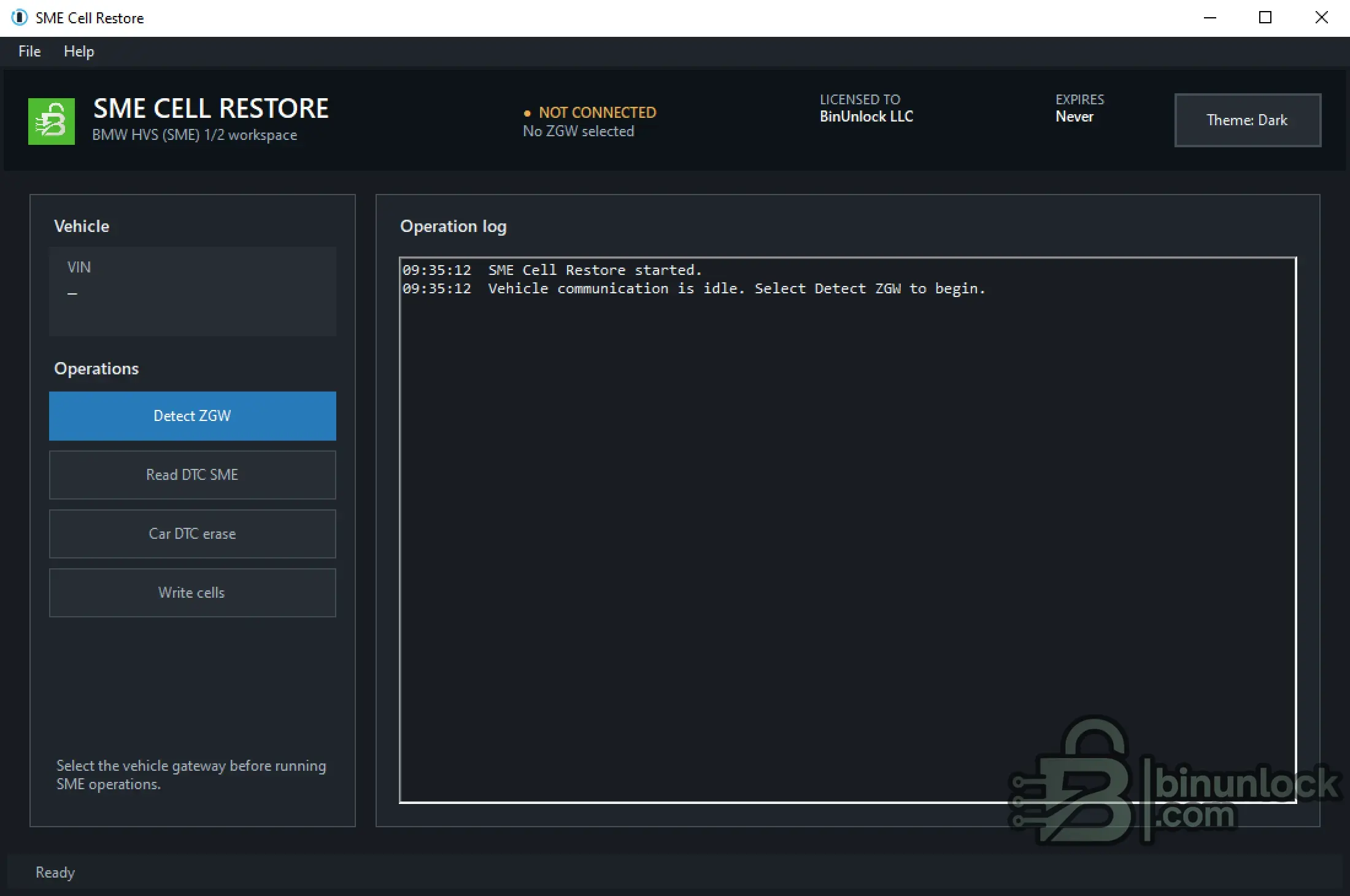
The application combines BMW ZGW gateway discovery, vehicle identification, normal and shadow SME DTC diagnostics, DTC erase functions and a guarded 29-step cell-data restore sequence in one dedicated workspace.
BMW Compatibility
SME Cell Restore is intended for BMW high-voltage vehicles equipped with the supported HVS 01/02 / SME control-unit architecture.
Compatibility must be confirmed from the actual vehicle, full VIN, detected ZGW endpoint, HVS / SME system and the approved repair workflow.
Do not determine compatibility only by BMW model or chassis name. The correct HVS / SME architecture, programming state, coding state and authorization prerequisites must be verified before any write operation.
Key Features
ZGW Gateway Discovery
The Detect ZGW function searches the active local IPv4 network interfaces for BMW gateway responses.
The discovery result provides:
A gateway must be selected before SME diagnostic or write functions become available.
The selected IP and complete VIN should always be compared with the physical vehicle and current work order before continuing.
SME Diagnostics
The dedicated DTC workspace separates normal and shadow SME fault memory.
Available functions include:
Normal and shadow DTC results are handled independently, while the currently selected result remains visible in the shared diagnostic list.
DTC reports can be saved as text files for Before / After workshop documentation.
Vehicle-Wide DTC Erase
Car DTC erase is a separate vehicle-wide diagnostic erase operation.
Its scope is broader than the normal and shadow SME erase functions and should only be used when required by the approved repair procedure.
Diagnostic evidence should be saved before performing any erase operation.
29-Step Cell-Data Restore
The Write cells function runs the dedicated replacement cell-data sequence for the supported BMW HVS 01/02 workflow.
The sequence includes:
Once started, the cell-data restore sequence is intentionally non-cancellable.
Power, wired ENET communication and the Windows computer must remain stable until the application returns control.
Scope Boundary
SME Cell Restore does not:
The software is a focused diagnostic and cell-data workflow tool, not a physical battery repair or security-bypass solution.
System Requirements
Other diagnostic applications, active ISTA / E-Sys sessions, competing VPN routes and software using the same endpoint should be closed before running SME Cell Restore.
License & Interface
SME Cell Restore uses an HWID-bound license file:
The main header displays:
The complete interface can be switched between Light and Dark themes.
Documentation
The complete English operating guide is attached directly to this resource:
The PDF contains detailed preparation, safety, gateway discovery, DTC, cell-data restore, troubleshooting, recovery and post-write verification procedures.
Use the attached guide for the complete operating workflow rather than relying only on this resource overview.
File Integrity
File: SME_Cell_Restore_2.0.exe
Version: 2.0
SHA-256:
VirusTotal:
View VirusTotal report
The VirusTotal report above corresponds to the executable with the exact SHA-256 hash shown above.
Always compare the downloaded executable with this SHA-256 before running the application.
Important
SME Cell Restore is a focused Windows service utility for supported BMW HVS 01/02 / SME 1/2 high-voltage battery control-unit workflows.
The application combines BMW ZGW gateway discovery, vehicle identification, normal and shadow SME DTC diagnostics, DTC erase functions and a guarded 29-step cell-data restore sequence in one dedicated workspace.
BMW Compatibility
SME Cell Restore is intended for BMW high-voltage vehicles equipped with the supported HVS 01/02 / SME control-unit architecture.
Compatibility must be confirmed from the actual vehicle, full VIN, detected ZGW endpoint, HVS / SME system and the approved repair workflow.
Do not determine compatibility only by BMW model or chassis name. The correct HVS / SME architecture, programming state, coding state and authorization prerequisites must be verified before any write operation.
Key Features
- BMW HVS 01/02 / SME 1/2 service workspace
- BMW ZGW network discovery
- Detected ZGW IP and complete vehicle VIN display
- Normal SME DTC reading
- Shadow SME DTC reading
- Embedded SME DTC catalogue with approximately 950 entries
- Normal SME DTC erase with automatic follow-up read
- Shadow SME DTC erase with automatic follow-up read
- Vehicle-wide Car DTC erase
- SME control-unit restart
- DTC list export to TXT
- Guarded 29-step cell-data restore sequence
- Automatic retry, delay and reconnect handling
- Non-interruptible write protection
- Chronological operation log
- Current operation status display
- Light and Dark interface themes
- HWID-based licensing
ZGW Gateway Discovery
The Detect ZGW function searches the active local IPv4 network interfaces for BMW gateway responses.
The discovery result provides:
- ZGW IP address
- Reported 17-character vehicle VIN
- Detected gateway information
A gateway must be selected before SME diagnostic or write functions become available.
The selected IP and complete VIN should always be compared with the physical vehicle and current work order before continuing.
SME Diagnostics
The dedicated DTC workspace separates normal and shadow SME fault memory.
Available functions include:
- Read DTC
- Erase DTC
- Read Shadow DTC
- Erase Shadow DTC
- Restart ECU
- Save DTC list
Normal and shadow DTC results are handled independently, while the currently selected result remains visible in the shared diagnostic list.
DTC reports can be saved as text files for Before / After workshop documentation.
Vehicle-Wide DTC Erase
Car DTC erase is a separate vehicle-wide diagnostic erase operation.
Its scope is broader than the normal and shadow SME erase functions and should only be used when required by the approved repair procedure.
Diagnostic evidence should be saved before performing any erase operation.
29-Step Cell-Data Restore
The Write cells function runs the dedicated replacement cell-data sequence for the supported BMW HVS 01/02 workflow.
The sequence includes:
- Selected ZGW destination verification
- Second operator confirmation before writing
- 29 visible progress steps
- Automatic retry branches
- Required delays and reconnect handling
- Disabled Close and cancellation controls while active
- Explicit completion or failure status
Once started, the cell-data restore sequence is intentionally non-cancellable.
Power, wired ENET communication and the Windows computer must remain stable until the application returns control.
Scope Boundary
SME Cell Restore does not:
- Repair damaged battery cells or physical high-voltage components
- Repair contactors, insulation faults, sensors, connectors or wiring
- Calculate a BMW programming plan
- Flash or code HVS 01/02
- Create NCD coding data
- Issue or bypass BMW security authorization
- Replace ISTA test plans or approved BMW workshop procedures
The software is a focused diagnostic and cell-data workflow tool, not a physical battery repair or security-bypass solution.
System Requirements
- Microsoft Windows 10 or Windows 11
- Microsoft .NET Framework 4.8
- Known-good wired BMW Ethernet / ENET connection
- Active IPv4 network adapter
- Regulated workshop programming support supply
- Stable computer power with sleep and hibernation disabled
- Valid computer-bound sme.lic license
Other diagnostic applications, active ISTA / E-Sys sessions, competing VPN routes and software using the same endpoint should be closed before running SME Cell Restore.
License & Interface
SME Cell Restore uses an HWID-bound license file:
Code:
sme.licThe main header displays:
- Selected ZGW status
- Licensed customer
- License expiry
- Current interface theme
The complete interface can be switched between Light and Dark themes.
Documentation
The complete English operating guide is attached directly to this resource:
Code:
SME-Cell-Restore-2.0-User-Guide-EN.pdfThe PDF contains detailed preparation, safety, gateway discovery, DTC, cell-data restore, troubleshooting, recovery and post-write verification procedures.
Use the attached guide for the complete operating workflow rather than relying only on this resource overview.
File Integrity
File: SME_Cell_Restore_2.0.exe
Version: 2.0
SHA-256:
Code:
0a7ac615a2970cb2e8ba7ee699841e3f9c98a2ebb37e7ffd41c7e4d5ae83181cVirusTotal:
View VirusTotal report
The VirusTotal report above corresponds to the executable with the exact SHA-256 hash shown above.
Always compare the downloaded executable with this SHA-256 before running the application.
Important


