
Description
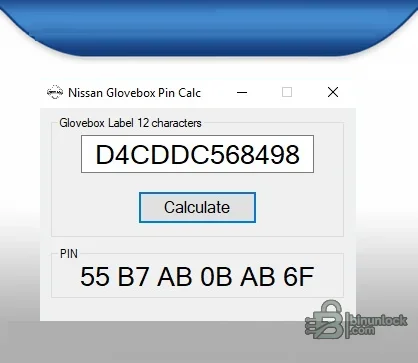
Nissan Glove Box PIN Calculator is a portable offline Windows utility for deriving the immobilizer PIN associated with one supported 12-character glove-box label format. It is a format-specific decoder for authorized key and immobilizer service, not a universal Nissan PIN calculator and not a direct vehicle diagnostic tool.
Supported vehicles, ECUs and files#
Nissan immobilizer generations use several different security inputs, including older ICU/SEC labels, glove-box labels, BCM pre-PIN schemes and later server/AES procedures. This application accepts exactly the 12-character label shown by its interface and displays a six-byte hexadecimal-style result. Other label lengths and BCM/security codes require the correct separate procedure.- Nissan/Infiniti vehicles whose immobilizer service procedure explicitly calls for the supported 12-character glove-box label algorithm.
- Offline calculation from a label already present on the authorized vehicle.
- No OBD, BCM read, key programming or online security-server function.
Functions#
- Accept the complete 12-character identifier exactly as printed.
- Calculate and display the corresponding output used by the compatible service workflow.
- Run without a vehicle interface or internet connection.
- Allow the technician to verify the label transcription before moving to the diagnostic tool.
System and hardware requirements#
- A Windows PC with a compatible .NET Framework environment; the application is a small managed Windows Forms executable.
- Physical access to the supported glove-box label and authorization to perform immobilizer service.
- A separate Nissan-capable diagnostic/key-programming interface for the actual registration procedure.
- A stable battery supply and all required keys during immobilizer programming.
Recommended workflow#
- Photograph the label and transcribe all 12 characters, preserving zeros and letter case as shown.
- Calculate the output twice and compare it with the expected format for the specific service tool.
- Use the result only in the documented immobilizer procedure for that vehicle generation.
- If the label format or diagnostic prompt differs, stop and identify the correct PIN scheme rather than guessing.


