
VW G4/G5 PIN Calculator is an offline dump utility for authorized Volkswagen immobilizer and key-replacement work. The application reads a supported dashboard or engine-controller memory file and derives the PIN used by the matching service procedure. It does not read the module through OBD, program a key or identify the memory device automatically.
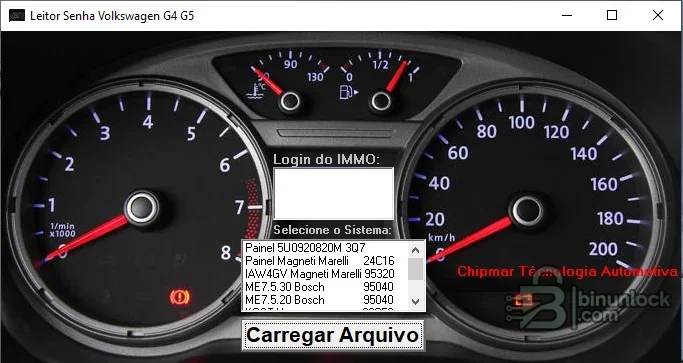
These labels are the support evidence visible in the supplied program. They do not establish coverage for every Volkswagen, Audi, SEAT or Skoda module, and the G4/G5 name should not be used as a substitute for the exact part number and memory layout.
This application does not adapt a replacement cluster, clone an ECU, prepare a transponder or perform component protection. Those steps require suitable equipment and the vehicle-specific procedure.
Do not rely on the filename supplied by a previous technician. Verify file size, byte order and memory type against the physical device and programmer settings.
Immobilizer PIN data is sensitive. Use this tool only for authorized repair and do not publish complete dumps, VINs, PINs, component-security bytes or customer key information.
For support, provide module part number, memory type, programmer and mode, dump size and a redacted screenshot. Do not attach the complete security file publicly.
Confirmed systems visible in the interface#
- Dashboard 5U0920820M / 3Q7 selection
- Magneti Marelli dashboard using 24C16 memory
- Magneti Marelli IAW4GV using 95320 memory
- Bosch ME7.5.30 using 95040 memory
- Bosch ME7.5.20 using 95040 memory
These labels are the support evidence visible in the supplied program. They do not establish coverage for every Volkswagen, Audi, SEAT or Skoda module, and the G4/G5 name should not be used as a substitute for the exact part number and memory layout.
How the workflow fits a repair#
The technician first reads the relevant EEPROM or full memory with external hardware. A copy is opened under the matching system selection, and the calculated PIN is then used only in a compatible diagnostic or key-learning procedure. Depending on vehicle architecture, the instrument cluster, ECU, comfort module or separate immobilizer may be the authority for key data.This application does not adapt a replacement cluster, clone an ECU, prepare a transponder or perform component protection. Those steps require suitable equipment and the vehicle-specific procedure.
Required hardware and information#
- Windows computer for the portable file utility
- EEPROM or MCU programmer that supports 24C16, 95040, 95320 or the exact fitted memory
- Correct in-circuit or removed-chip adapter, voltage and wiring
- Dashboard or ECU part number and a verified memory-device identity
- Two matching reads plus an untouched backup
- Diagnostic and key-programming tools for the subsequent authorized procedure
Do not rely on the filename supplied by a previous technician. Verify file size, byte order and memory type against the physical device and programmer settings.
Recommended PIN-reading workflow#
- Confirm ownership and document the vehicle, module and memory identities.
- Read the device twice and compare both dumps byte for byte.
- Store the untouched original securely and work only on a copy.
- Choose the exact dashboard or ECU entry shown by the program.
- Open the dump and record the result privately.
- Validate plausibility with diagnostic data or an independent trusted method.
- Carry out key learning or module adaptation with stable power and the correct diagnostic workflow.
- Verify every authorized key and re-scan all involved modules.
Compatibility limits#
Part numbers, EEPROM types and data layouts change across model years and suppliers. A 95040 dump from one Bosch controller is not automatically compatible with another 95040 entry, and a file merely opening without error is not enough. If the module, memory or file size differs from the selected label, stop rather than trying the calculated result.Immobilizer PIN data is sensitive. Use this tool only for authorized repair and do not publish complete dumps, VINs, PINs, component-security bytes or customer key information.
Troubleshooting#
An empty or implausible result usually points to the wrong memory selection, a bad read, byte-order mismatch or unsupported layout. Repeat the hardware read, verify pin one and supply voltage, inspect for all-FF or all-00 regions and compare file length with the programmer configuration. If a valid PIN is rejected, confirm the diagnostic procedure and whether a fresh security session is required.For support, provide module part number, memory type, programmer and mode, dump size and a redacted screenshot. Do not attach the complete security file publicly.


