
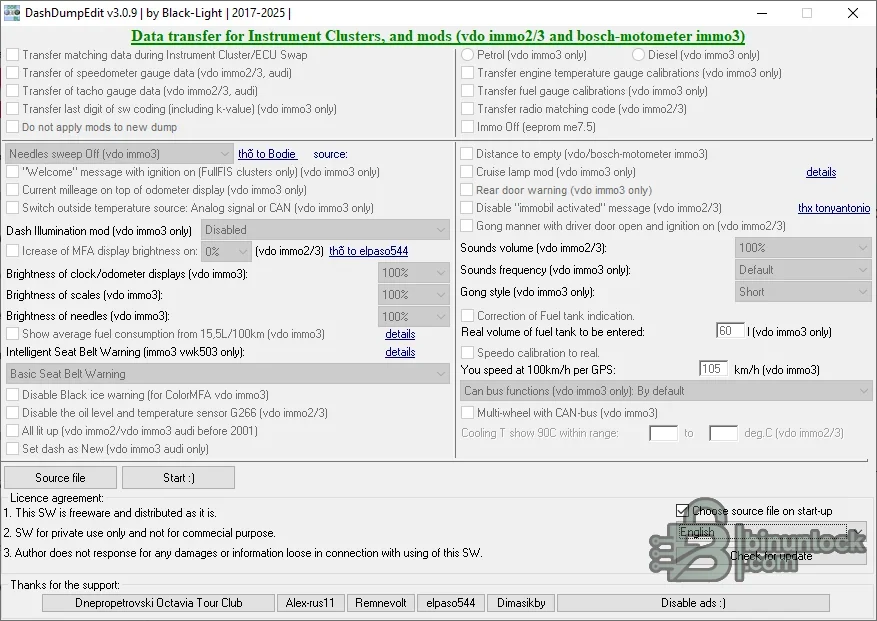
DashDumpEdit is an offline instrument-cluster dump editor for selected Volkswagen Group VDO and Bosch-Motometer generations. It can transfer matching data between a source and target dump and exposes calibration or convenience options for supported immo2 and immo3 layouts.
The package contains the current application and an older branch with multilingual resources. It does not communicate with a dashboard directly; a complete EEPROM or MCU read and an external programmer are required before any file operation.
The package contains the current application and an older branch with multilingual resources. It does not communicate with a dashboard directly; a complete EEPROM or MCU read and an external programmer are required before any file operation.
What this resource is for#
Use the tool for documented cluster replacement, repair and configuration work where the original and donor data are both available. The visible options cover transfer of cluster identity or gauge data plus selected display, warning, lighting and CAN-related settings.Confirmed functions#
- Transfer matching cluster or ECU data between compatible dumps
- Transfer speedometer, tachometer, temperature and fuel-gauge calibration data where supported
- Handle radio matching-code data on recognized VDO immo2/immo3 files
- Configure needle sweep, welcome text, current-mileage display and selected warnings
- Adjust clock, odometer, FIS and scale brightness on supported layouts
- Apply selected fuel-tank, speed, sound, coolant display and CAN-bus options
Supported controllers, files and vehicles#
- VDO immo2 and immo3 instrument-cluster dumps recognized by the application
- Bosch-Motometer immo3 functions explicitly marked in the UI
- Selected Volkswagen, Audi, Seat and Skoda cluster generations
- Exact EEPROM/MCU layout and software revision determine compatibility; vehicle model alone is insufficient
Package contents#
- Current application branch
- Older application branch for legacy comparison
- Language files for multiple European and Asian languages
- No flash interface, driver or automatic checksum service is bundled
System and interface requirements#
- Windows PC or isolated virtual machine
- EEPROM/MCU programmer capable of verified complete cluster reads
- Original and donor dumps of the expected size
- Stable bench power, anti-static handling and a proven way to restore the original memory
Recommended workshop workflow#
- Read every source memory twice and compare the results
- Label original and donor files with cluster part numbers and memory type
- Open the source first and confirm displayed values are plausible
- Select only the required transfer or calibration functions and save to a new file
- Review changed offsets and verify lawful mileage documentation before writing
Compatibility limits and responsible use#
- Opening a file does not prove that all displayed data are decoded correctly
- Do not use calibration or mileage functions to misrepresent vehicle history
- Immobilizer-related transfers between incompatible clusters can prevent starting
- Hardware faults, CAN faults and damaged EEPROM cells cannot be repaired by a file editor alone
Troubleshooting#
- Blank or shifted fields: check memory type, byte order and read length
- Donor transfer fails: verify both clusters use the same supported generation
- Gauge values are wrong: restore the original and review the selected calibration source
- Cluster does not wake after writing: verify checksum, soldering, supply and original backup


