
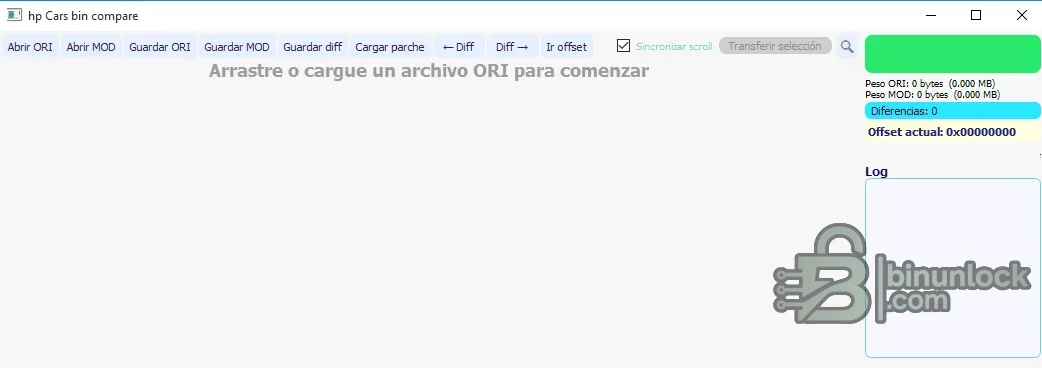
HP Cars BIN Compare is a focused desktop editor for placing an original ECU binary beside a modified binary and navigating their differences. The interface provides separate ORI and mоd loaders, synchronized scrolling, next/previous difference controls, direct offset navigation, selection transfer and раtсh import/export functions.
It is useful for checking what a tuning or repair tool changed before a file is programmed. The application does not identify the ECU automatically and it does not validate whether a difference is technically correct, so file identity and checksum handling must be established separately.
It is useful for checking what a tuning or repair tool changed before a file is programmed. The application does not identify the ECU automatically and it does not validate whether a difference is technically correct, so file identity and checksum handling must be established separately.
What this resource is for#
Use the utility for byte-level review of files that should share the same memory layout. Typical jobs include comparing an original read against a tuned output, isolating a small repair раtсh, confirming that an automated solution changed only expected regions and documenting offsets for a repeatable workshop process.Confirmed functions#
- Open independent ORI and mоd binaries
- Count and navigate byte differences
- Keep both panes synchronized while reviewing the same offset
- Jump directly to a hexadecimal offset
- Save difference information and load a reusable раtсh
- Transfer a selected region between working files when the layout is known
Supported controllers, files and vehicles#
- Raw binary files from ECU, TCU and other automotive modules
- Files must have compatible size and address layout for a meaningful comparison
- The program is controller-agnostic; support depends on the operator understanding the source data
- No OBD, bench or boot communication is included
Package contents#
- One portable Windows executable
- No drivers, checksum plugins or external databases
- The source screenshot documents the complete comparison interface
- The executable has no embedded version fields and was never launched during preparation
System and interface requirements#
- Windows PC or isolated virtual machine
- Known-good original and modified files with recorded hashes
- Adequate free space for immutable originals, working copies and exported patches
- A separate checksum tool or programmer feature when the target module requires correction
Recommended workshop workflow#
- Read the module twice and verify identical original hashes
- Copy ORI and mоd into a dedicated comparison folder
- Confirm equal file size and known read method before opening both files
- Review every changed region and export notes or a раtсh only after its purpose is understood
- Apply changes to a copy, re-compare the result and verify checksums before programming
Compatibility limits and responsible use#
- A small difference count does not prove a file is safe
- Offset alignment can be misleading when one file is partial, padded or shifted
- The application does not decode maps, DTC tables or controller-specific structures
- Never transfer a region between unrelated software revisions merely because sizes match
Troubleshooting#
- Thousands of unexpected differences: verify that both reads use the same mode and address range
- Differences appear shifted: check for headers, padding or calibration-only versus full-flash files
- раtсh fails to reproduce: confirm the base file hash and exact target offsets
- Saved output is rejected by the programmer: verify file length and checksum requirements


