
SID807EVO is an offline binary editor dedicated to supported Siemens/Continental SID807-family firmware. After a dump is opened, the application reports the detected software identity, extracts available ECU information and exposes selectable DPF, EGR, start-stop and PIN-code operations plus a DTC processing field.
The interface demonstrates recognition of a specific Siemens software string and reports the maps it found before saving. This is still software-layout dependent: the same controller label can contain a different firmware branch that the application does not recognize safely.
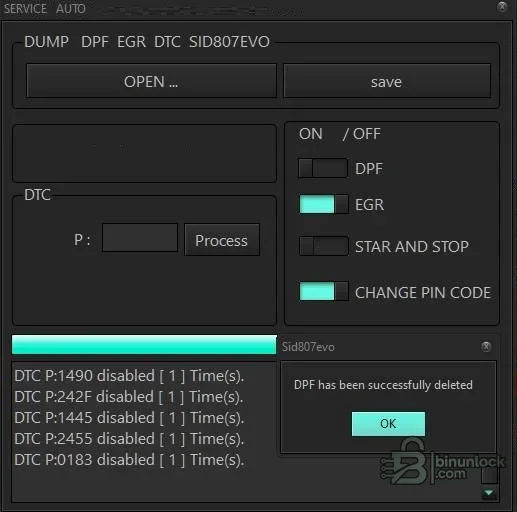
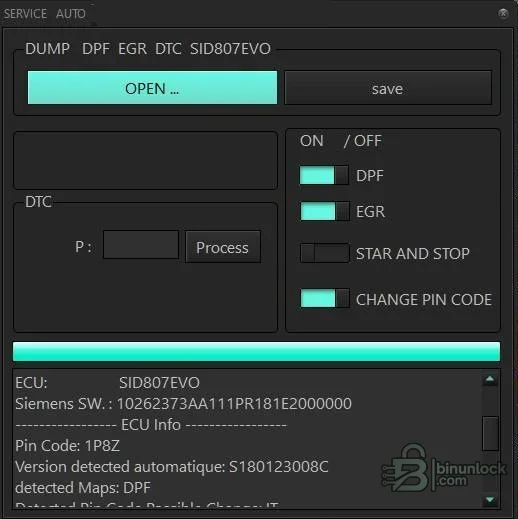
The interface demonstrates recognition of a specific Siemens software string and reports the maps it found before saving. This is still software-layout dependent: the same controller label can contain a different firmware branch that the application does not recognize safely.
What this resource is for#
Use the utility for controlled file analysis and repair preparation when a complete SID807 read and the exact module identity are known. It can automate known file patches, but hardware diagnosis, checksum validation, flashing and post-write testing remain separate responsibilities.Confirmed functions#
- Open and identify a supported SID807 binary
- Display software identity, detected PIN and recognized map information
- Apply selectable DPF and EGR file operations
- Apply a start-stop file operation where supported
- Change the PIN field on recognized files
- Process a specified P-code/DTC and save a new binary
Supported controllers, files and vehicles#
- Siemens/Continental SID807EVO layouts recognized by the embedded logic
- The supplied UI evidence shows a Siemens software string beginning 10262373 and a detected calibration branch
- Compatibility must be checked by full software identity and file size, not only SID807 on the label
- Other SID8xx controllers are outside the claimed scope unless the application explicitly detects them
Package contents#
- One portable Windows executable
- Two source screenshots showing operation results and ECU detection
- No driver, flash interface or external checksum module
- Executable identity was inspected statically and never launched during preparation
System and interface requirements#
- Windows PC or isolated virtual machine
- Full ECU read from a compatible bench, boot or service programmer
- Verified original backup and a binary comparison tool
- Checksum correction support in the programmer/editor when the output requires it
- Stable ECU power and a recovery-capable write method
Recommended workshop workflow#
- Record ECU hardware and software identifiers before reading
- Create two identical reads and preserve the original
- Open a copy and confirm the detected software and maps match the module
- Enable only the required operation, process one DTC at a time and save to a new file
- Compare the output, verify checksum handling and program only after a recovery plan is ready
Compatibility limits and responsible use#
- A detected controller name is not proof that every selected раtсh is valid
- Emissions-related functions may be limited to lawful repair, off-road or motorsport use
- Disabling a DTC does not repair the underlying sensor, wiring or aftertreatment fault
- Wrong PIN or start-stop changes can create additional diagnostic or security problems
Troubleshooting#
- No detection: confirm full-read size and exact software branch
- Wrong PIN or empty map list: close without saving and repeat the original read
- DTC not found: do not force a generic byte pattern into the file
- Programming failure: restore the original with the tool vendor’s documented recovery method


