
Fiat Navi Programmer is a file-based service utility for supported Fiat navigation units, with TravelPilot RNS 3 shown as the tested device family in the interface. It works with a FIS 24C32 memory dump, can calculate the stored security code, program a chosen code into a working file and clear the error counter.
The software does not read the navigation unit directly. A technician must remove or access the EEPROM with a suitable programmer, make verified backups and then write the processed dump back using normal electronics-service precautions.
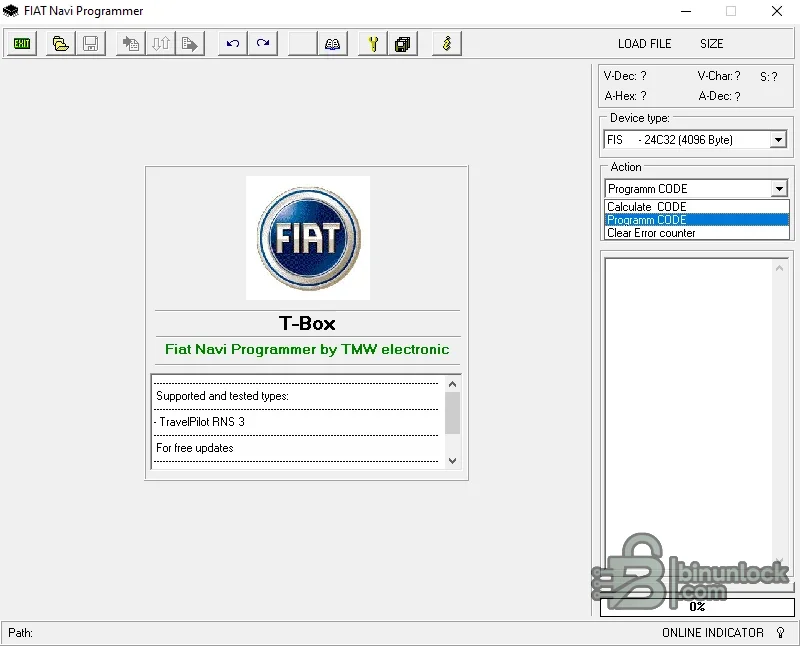
The software does not read the navigation unit directly. A technician must remove or access the EEPROM with a suitable programmer, make verified backups and then write the processed dump back using normal electronics-service precautions.
What this resource is for#
Use the program during lawful head-unit repair, replacement or code recovery when ownership is established and the exact memory content has been read. It can help restore a known code after EEPROM replacement or recover access when the unit is locked by repeated incorrect entries.Confirmed functions#
- Load a navigation EEPROM dump
- Calculate the security code from a recognized file
- Program a selected code into a copy of the dump
- Clear the stored error counter
- Display decoded values and the loaded-file size before processing
Supported controllers, files and vehicles#
- TravelPilot RNS 3 listed as supported and tested by the application
- FIS 24C32 memory with a 4096-byte dump selected in the interface
- Compatibility is based on exact unit and EEPROM layout, not every Fiat radio or navigation model
- Other TravelPilot generations and different memory sizes must not be assumed compatible
Package contents#
- Main T-Box Fiat Navi Programmer executable
- Startup and readme instructions
- Application manifest file
- One verified source screenshot documenting device type and available actions
System and interface requirements#
- Windows workshop PC or isolated virtual machine
- EEPROM programmer and the correct clip, adapter or desoldering workflow for 24C32 memory
- At least two matching reads of the original chip
- Stable bench supply and anti-static handling for the navigation electronics
Recommended workshop workflow#
- Photograph the unit label and record serial and hardware identifiers
- Read the EEPROM twice and compare hashes
- Open a copy, select the correct device and verify that decoded values are plausible
- Calculate or program only the required code and save to a new file
- Compare the output, write it to a spare or backed-up device and test on the bench
Compatibility limits and responsible use#
- A 4096-byte file is not sufficient proof that it belongs to the supported layout
- The utility does not generate codes from the radio serial number alone
- Incorrect EEPROM writes can leave the unit locked or non-functional
- Use only for units you own or are authorized to service
Troubleshooting#
- File rejected: confirm the dump is exactly the selected memory size and not byte-swapped
- Implausible code: verify the device family and repeat the EEPROM read
- Unit remains locked: allow any manufacturer lockout period and confirm the error counter was written correctly
- Write verification fails: inspect the chip, adapter contact and supply voltage before retrying


