josegarcia
Watchlisted
I'm having a problem with Client Update; it only updates to version 2.8.32.8. How can I fix it so it updates to version 2.8.330?
I'm having a problem with Client Update; it only updates to version 2.8.32.8. How can I fix it so it...
ClientUpdate
.bw
.msi
C:\ProgramData\Tech Tool\ClientUpdate\
Los archivos que mencionaste para uso sin conexión no están en las carpetas.Dado que utiliza un kit sin conexión , no puede simplemente hacer clic en "Actualizar" y esperar que descargue la última versión de los servidores de Volvo. Es probable que el actualizador interno simplemente reinstale la versión que encuentra en su caché local (que es la 2.8.32.8).
Para actualizar a 2.8.330 , debe realizar una actualización manual sin conexión .
Aquí está el procedimiento estándar para estos kits:
- Detener servicios: cierre Tech Tool y detenga los servicios "Tech Tool Core" y "Client Update" en Servicios de Windows.
- Ubica los archivos de actualización: en la carpeta que descargaste (el kit 2.8.330), busca una carpeta llamada
o un archivo zip que contenga archivos con extensiones comoCode:ClientUpdateoCode:.bw.Code:.msi- Borrar caché antiguo: vaya a este directorio en su PC:
Elimine todo lo que esté dentro de esta carpeta (o muévalo a una carpeta de respaldo).Code:C:\ProgramData\Tech Tool\ClientUpdate\- Copiar archivos nuevos: copie los archivos de actualización 2.8.330 que descargó en ese directorio.
- Ejecute el actualizador: Ahora, ejecute la herramienta "Actualización de cliente" desde el menú Inicio (o reinicie el servicio). Debería detectar los archivos localmente y solicitarle que instale la versión 2.8.330.
Importante: Si intenta actualizar por internet, probablemente perderá su licencia/activación. Utilice únicamente los archivos incluidos en el kit sin conexión.
Los archivos que mencionaste para uso sin conexión no están en las carpetas.
setup.exe
install.exe
v2.8.360 — Preconfigured VMware image with guided tests, live data, and parameter setup
- Bin
- diagnostics volvo
- 🖥️ Automotive VMware Images
updated version
Hi Can i get APCI+0.7.1.0 instead of 0.5.1??
ClientUpdate or Databases folder of your download. Newer APCI+ versions are often delivered as .bw or .msi update packages.Thanks for the clarification yes am using 2.8 version can you guide which upgrade version have to install the main Tech tool software.APCI+ versions are tightly integrated with the Tech Tool core version. You typically cannot just install a newer APCI+ version on an older Tech Tool installation without causing "Incompatible Database" errors.
If you are using the 2.8.330 kit discussed in this thread, it should already come with a compatible and relatively new APCI+ database (likely newer than 0.5.1).
To get APCI+ 0.7.1.0 specifically:
- Check the Update Files: Look in the
ClientUpdateorDatabasesfolder of your download. Newer APCI+ versions are often delivered as.bwor.msiupdate packages.- Update Tech Tool: Ensure you have fully updated to the latest build provided in the kit. The APCI+ database is often updated automatically during the main software update.
If you are trying to force APCI+ 0.7.1.0 onto an older version (like 2.7 or early 2.8), it will not work. You must upgrade the main Tech Tool software first.
Thanks for the clarification yes am using 2.8 version can you guide which upgrade version have to in...
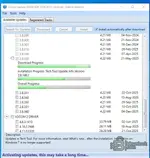
Hi team i stuck with this attached update almost 4hrs please help me![]()
Ctrl + Shift + Esc).C:\ProgramData\Tech Tool\ClientUpdate
Has anyone been able to run this program without issues?
when i run installer whith new win 10 22H2 uncheck box download update automatically it finish insta...
services.msc).C:\ProgramData\Tech Tool\ClientUpdate
C:\ProgramData\Tech Tool\Logs\ClientUpdate.log
after that program need open on line dose not allowable to open offline
.dll or .jar files with the original factory versions. The original versions always require a connection to the Volvo Central Systems server.M311331, XX2255, or similar). Do not try to use a real dealer ID or a random user ID.Would you be able to assist for the password to decompress the file?New release thread for Volvo Tech Tool (TT) + APCI 2025 - Full Offline Kit: discuss, share feedback, and get help.
The complete offline dealer tool for Volvo, Mack, and Renault Trucks with the latest 2024 APCI datab
- Bin
- renault volvo
- 🚚 Truck & Bus Software
Volvo Tech Tool (TT) + APCI 2025 - Full Offline Kit
The complete offline dealer tool for Volvo, Mack, and Renault Trucks with the latest 2024 APCI datab
Frequently Asked Questions
Which Windows version is recommended?
For maximum stability during ECU flashing and diagnostics, a clean installation of Windows 10 (64-bit) is recommended.
Is it compatible with J2534 PassThru?
Most modern software versions support standard J2534 interfaces like Scanmatik 2 Pro, OpenPort 2.0, and specific VCI adapters.
What's inside:
- Overview & screenshots
- Version history and compatibility
- Download link and setup notes
View full details and download — Volvo Tech Tool (TT) + APCI 2025 - Full Offline Kit