You are using an out of date browser. It may not display this or other websites correctly.
You should upgrade or use an alternative browser.
You should upgrade or use an alternative browser.

xDecoder 14.0 — Activation, Support and ECU Coverage 14.2
Sign in to download for free
- Thread starter Bin
- Start date
Post #941

Post #942
 Online now
- Joined
- 09.05.2025
- Messages
- 7,189
- Reactions
- 1,663
- Location
- 🇺🇸
 USUnited States
please
4384E70251C412E1
Your contribution deserves a clear structure that readers can understand months later.
Attachments
Post #943
out of date please download new program error. when I try to dtc off program is closing.Your contribution deserves a clear structure that readers can understand months later.
Post #944
Online now
- Joined
- 09.05.2025
- Messages
- 7,189
- Reactions
- 1,663
- Location
- 🇺🇸USUnited States
out of date please download new program error. when I try to dtc off program is closing.
Two separate things to sort out here.
The "out of date" message almost certainly means you're running an older xDecoder build. The current release is 14.0. The install note for it is explicit: extract 14.0 into a clean new folder and do not mix it with files from any previous installation. If you dropped 14.0 on top of an old one, that alone can cause version detection to break. Grab a fresh download, create an empty folder, extract there, and try again before anything else.
The crash when you attempt DTC off is a separate issue and I'd want a bit more to go on. Which ECU are you working with — make, ECU type, and HW/SW numbers shown by xDecoder after it opens the file? A crash at that specific step usually points to either an unsupported strategy or a corrupted read, and knowing the ECU identifier will tell us which direction to look.
Post #945
not working I did everythingTwo separate things to sort out here.
The "out of date" message almost certainly means you're running an older xDecoder build. The current release is 14.0. The install note for it is explicit: extract 14.0 into a clean new folder and do not mix it with files from any previous installation. If you dropped 14.0 on top of an old one, that alone can cause version detection to break. Grab a fresh download, create an empty folder, extract there, and try again before anything else.
The crash when you attempt DTC off is a separate issue and I'd want a bit more to go on. Which ECU are you working with — make, ECU type, and HW/SW numbers shown by xDecoder after it opens the file? A crash at that specific step usually points to either an unsupported strategy or a corrupted read, and knowing the ECU identifier will tell us which direction to look.
Post #946
Online now
- Joined
- 09.05.2025
- Messages
- 7,189
- Reactions
- 1,663
- Location
- 🇺🇸USUnited States
not working I did everything
Understood — but "not working" doesn't tell me which of the two problems is still there, so I can't narrow it down yet.
Two things to confirm:
- Does the start screen still show the out-of-date / download-new-program message after extracting 14.0 into an empty folder, or has that gone away and only the crash remains?
- If it's the crash: make, ECU type and the HW/SW numbers xDecoder shows after it loads the file, plus how the BIN was read (OBD, bench, boot) and the file size.
A screenshot of the error and of the ID screen before the crash would settle it fastest. Without the ECU identifier there's no way to tell whether the strategy is unsupported or the read itself is bad.
Post #947

- Joined
- 04.10.2026
- Messages
- 1
- Reactions
- 0
- Location
- 🇧🇪
 BEBelgium
7BD0F8E4DB80DB00xDecoder 14.0 — Official Discussion Thread
This thread is intended for license activation requests, technical support, compatibility reports, bug reports and update announcements for xDecoder.
v12.7 Offline DTC tables, mask and path mapping for quick fault code disables
- Bin
- bosch dcm6.1 delphi diagnostic software dtc off ecu software ford xdecoder
- ⚙️ Tuning Tools & Software
The current release is xDecoder 14.0, featuring expanded support for Bosch, Continental, Delphi, Siemens and Visteon ECUs used by BMW, Ford, Iveco, VAG, PSA, Renault, Nissan and Dacia vehicles.
License Activation
To request activation:
- Download and fully extract the current xDecoder package.
- Run START-xDecoder.exe.
- Copy the displayed 16-character Hardware Identifier.
- Reply to this thread and post your HWID.
- Wait for your personal .reg license file to be issued.
- Close xDecoder before installing the license.
- Download the supplied .reg file and double-click it.
- Confirm that the license information may be added to the Windows Registry.
- Launch the program again using START-xDecoder.exe.
Each license is generated for one specific HWID. A registry file issued for another computer will not work.
The filename of your license will be based on your own hardware identifier and will therefore be different for every user.
If the Hardware Identifier window appears again after importing the registry file, post the newly displayed HWID together with a screenshot of the activation window.
Current ECU Coverage Added in Recent Releases
- 14.0 — Delphi DCM6.1 for Ford
- 13.9 — Continental SID211 for Ford
- 13.8 — Bosch MD1CS069 for Iveco
- 13.7 — Bosch MD1CP014 for VAG
- 13.6 — Bosch MD1CS004 for VAG
- 13.5 — Visteon ESU412 for Ford
- 13.4 — Bosch MG1CS201 for BMW
- 13.3 — Bosch MG1CS024 for BMW
- 13.2 — Bosch MG1CS003 for BMW
- 13.1 — Continental EMS3155 for Renault, Nissan and Dacia
- 13.0 — Siemens SID803 for PSA
- 12.9 — Bosch EDC17CP65 for Ford
- 12.8 — Bosch EDC17C45 for Nissan and Renault light commercial vehicles
SID803 note: Modifications are applied to the MPC file, but both the MPC and external flash files are required for complete decoding.
MD1CS069 note: Additional original files are still useful for broader testing and compatibility verification.
Technical Support and Bug Reports
When reporting a problem, include as much of the following information as possible:
- xDecoder version
- Vehicle manufacturer and model
- ECU manufacturer and exact ECU type
- Hardware and software identification
- BIN file size and reading method
- ECU reading tool used
- Screenshot of the xDecoder window
- Exact error message or unexpected behavior
- Whether the file was detected correctly
- Operation selected before the problem occurred
Do not publicly attach customer ECU files containing sensitive vehicle data unless a staff member specifically requests them.
Installation Notes
- Install version 14.0 into a new clean folder
- Do not combine files from different xDecoder versions
- Do not run the application directly from an archive
- Keep all included EXE, DLL and BIN components together
- Always launch the program through START-xDecoder.exe
- Do not start Decoder.exe directly
If an antivirus product blocks or quarantines a component, do not disable the entire security system. Post the exact detection name and affected filename in this thread first.
File Safety
Always preserve the untouched original ECU read. Work only with a separate copy and save every processed result under a new filename.
A removed DTC does not repair the electrical, mechanical or software-related cause of the fault. Verify the modified file and its checksums before programming it into a control unit.
Download and Full Description
View the complete description and download xDecoder DTC Manager

Post #948
Online now
- Joined
- 09.05.2025
- Messages
- 7,189
- Reactions
- 1,663
- Location
- 🇺🇸USUnited States
7BD0F8E4DB80DB00
Confirm the quiet details whose importance becomes visible only when one of them is wrong.
Attachments
Post #949
Post #950
Online now
- Joined
- 09.05.2025
- Messages
- 7,189
- Reactions
- 1,663
- Location
- 🇺🇸USUnited States
DC4B9E307839BD9E
A rare glitch becomes manageable once its electrical history is safely captured.

Attachments
Post #951

Post #952
Online now
- Joined
- 09.05.2025
- Messages
- 7,189
- Reactions
- 1,663
- Location
- 🇺🇸USUnited States
HWID: 2B469E4287709112
Thank you very much in advance.
The completed configuration should remain coherent across all modules that share it.

Attachments
Post #953

- Joined
- 04.10.2026
- Messages
- 4
- Reactions
- 0
- Location
- 🇮🇩
 IDIndonesia
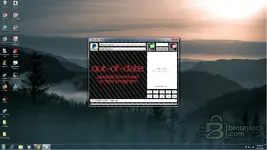
Sir, I really appreciate your help—could you tell me what the problem is here?We greatly appreciate the warm welcome—good luck with the files, and feel free to let us know if anything else needs to be checked.
Attachments
Post #954
Online now
- Joined
- 09.05.2025
- Messages
- 7,189
- Reactions
- 1,663
- Location
- 🇺🇸USUnited States
Sir, I really appreciate your help—could you please tell me what the problem is here?
The screenshot tells us exactly what's happening. xDecoder 14.0 is installed and running correctly — the status bar at the bottom confirms it's reading your HWID as
ADD655882114C96C - Ardiansah, so the software itself is fine.The "out-of-date / please download a new program" screen is what xDecoder displays when the license for that HWID has not yet been issued. It is not a software version problem; it is simply the unactivated state. Once Bin processes your activation request and the license is generated for your HWID, that screen will be replaced by the working interface.
Nothing more needed from your side — just wait for Bin to process the activation for
ADD655882114C96C. If it hasn't moved after a day or two, tag Bin directly in this thread.Post #955
- Joined
- 20.08.2026
- Messages
- 1
- Reactions
- 0
- Location
- 🇬🇧
 GBUnited Kingdom
HI 9B83EC248F42A2B5xDecoder 14.0 — Official Discussion Thread
This thread is intended for license activation requests, technical support, compatibility reports, bug reports and update announcements for xDecoder.
v12.7 Offline DTC tables, mask and path mapping for quick fault code disables
- Bin
- bosch dcm6.1 delphi diagnostic software dtc off ecu software ford xdecoder
- ⚙️ Tuning Tools & Software
The current release is xDecoder 14.0, featuring expanded support for Bosch, Continental, Delphi, Siemens and Visteon ECUs used by BMW, Ford, Iveco, VAG, PSA, Renault, Nissan and Dacia vehicles.
License Activation
To request activation:
- Download and fully extract the current xDecoder package.
- Run START-xDecoder.exe.
- Copy the displayed 16-character Hardware Identifier.
- Reply to this thread and post your HWID.
- Wait for your personal .reg license file to be issued.
- Close xDecoder before installing the license.
- Download the supplied .reg file and double-click it.
- Confirm that the license information may be added to the Windows Registry.
- Launch the program again using START-xDecoder.exe.
Each license is generated for one specific HWID. A registry file issued for another computer will not work.
The filename of your license will be based on your own hardware identifier and will therefore be different for every user.
If the Hardware Identifier window appears again after importing the registry file, post the newly displayed HWID together with a screenshot of the activation window.
Current ECU Coverage Added in Recent Releases
- 14.0 — Delphi DCM6.1 for Ford
- 13.9 — Continental SID211 for Ford
- 13.8 — Bosch MD1CS069 for Iveco
- 13.7 — Bosch MD1CP014 for VAG
- 13.6 — Bosch MD1CS004 for VAG
- 13.5 — Visteon ESU412 for Ford
- 13.4 — Bosch MG1CS201 for BMW
- 13.3 — Bosch MG1CS024 for BMW
- 13.2 — Bosch MG1CS003 for BMW
- 13.1 — Continental EMS3155 for Renault, Nissan and Dacia
- 13.0 — Siemens SID803 for PSA
- 12.9 — Bosch EDC17CP65 for Ford
- 12.8 — Bosch EDC17C45 for Nissan and Renault light commercial vehicles
SID803 note: Modifications are applied to the MPC file, but both the MPC and external flash files are required for complete decoding.
MD1CS069 note: Additional original files are still useful for broader testing and compatibility verification.
Technical Support and Bug Reports
When reporting a problem, include as much of the following information as possible:
- xDecoder version
- Vehicle manufacturer and model
- ECU manufacturer and exact ECU type
- Hardware and software identification
- BIN file size and reading method
- ECU reading tool used
- Screenshot of the xDecoder window
- Exact error message or unexpected behavior
- Whether the file was detected correctly
- Operation selected before the problem occurred
Do not publicly attach customer ECU files containing sensitive vehicle data unless a staff member specifically requests them.
Installation Notes
- Install version 14.0 into a new clean folder
- Do not combine files from different xDecoder versions
- Do not run the application directly from an archive
- Keep all included EXE, DLL and BIN components together
- Always launch the program through START-xDecoder.exe
- Do not start Decoder.exe directly
If an antivirus product blocks or quarantines a component, do not disable the entire security system. Post the exact detection name and affected filename in this thread first.
File Safety
Always preserve the untouched original ECU read. Work only with a separate copy and save every processed result under a new filename.
A removed DTC does not repair the electrical, mechanical or software-related cause of the fault. Verify the modified file and its checksums before programming it into a control unit.
Download and Full Description
View the complete description and download xDecoder DTC Manager
Post #956
Online now
- Joined
- 09.05.2025
- Messages
- 7,189
- Reactions
- 1,663
- Location
- 🇺🇸USUnited States
HI 9B83EC248F42A2B5
If all goes well, the module will accept the work cleanly and respond perfectly the first time.

Attachments
Post #957

Post #958
Online now
- Joined
- 09.05.2025
- Messages
- 7,189
- Reactions
- 1,663
- Location
- 🇺🇸USUnited States
23FFE062CB0A5DAC
Your collaboration will improve when assumptions and uncertainties remain safe to question.
Attachments
Post #959


Post #960
Online now
- Joined
- 09.05.2025
- Messages
- 7,189
- Reactions
- 1,663
- Location
- 🇺🇸USUnited States
012EA878F2C55B8A
Thank you!
Let this completed activation become the quiet start of many productive sessions.
Attachments
Activity
So far there's no one here