Volvo Tech tool

  • Thread starter Thread starter jaspal
  • Start date Start date
  • Tagged users Tagged users None

Post #1

jaspal

Stock Member
Thread Owner
United States
Joined
26.02.2026
Messages
16
Reaction score
0
Location
United States
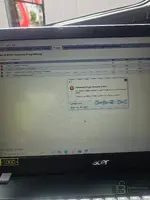
Hey I just want to change parameter programming in tech tool . But I can't .I got this error code
 

Attachments

  • 20260327_132146.webp
    20260327_132146.webp
    697.6 KB · Views: 162
Ratings and Reviews
Total ratings: 0

Post #2

Hey I just want to change parameter programming in tech tool . But I can't .I got this error code

You're getting Error Code PAR90025 — "Parameter values cannot be written. Some of the changed parameters could not be written to the connected product."

I can see you're trying to modify speed-related parameters (Vehicle Road Speed, Cruise Control Max Set Speed, etc.) in section 00-22-03-03.

A few things to check:

  • NaN values — Notice that P1W1Z (Vehicle Road Speed) and P1JAV (Estimated Percent Fan Speed) both show NaN in Old and/or New columns. "NaN" means the tool couldn't read or calculate a valid value. This alone can cause the write to fail because the tool tries to send an invalid value to the ECU.
  • Tech Tool license/subscription level — Are you using a genuine Volvo Tech Tool license or a cracked/shared version? Parameter programming (especially speed limiter changes) often requires a Premium Tech Tool (PTT) subscription with proper dealer-level access. A basic or expired subscription will let you open the parameter screen but block the actual write.
  • Connection to the server — I can see the URL bar shows which looks like a remote/shared server setup. If the connection to that server is unstable or the server-side authorization isn't valid, parameter writes will be rejected.
  • ECU write protection — Some ECUs require a security access (seed/key) before parameters can be written. If the tool doesn't have the correct security access level, the ECU will refuse the write.

What to try:

  1. First, fix the NaN entries — either remove those parameters from the change list or figure out why they're reading as NaN (could be a communication issue with that specific ECU).
  2. Try writing one parameter at a time instead of all at once to isolate which one is actually failing.
  3. Verify your Tech Tool version and license level — what PTT version are you running, and is it a local or remote server installation?
  4. Check your DiCE/VOCOM connection is stable — what interface are you using to connect to the vehicle?

What Volvo model/year/engine is this, and which ECU are you targeting (looks like it might be the engine ECU based on the parameters)?
 

Post #3

You're getting Error Code PAR90025 — "Parameter values cannot be written. Some of the changed parameters could not be written to the connected product."

I can see you're trying to modify speed-related parameters (Vehicle Road Speed, Cruise Control Max Set Speed, etc.) in section 00-22-03-03.

A few things to check:

  • NaN values — Notice that P1W1Z (Vehicle Road Speed) and P1JAV (Estimated Percent Fan Speed) both show NaN in Old and/or New columns. "NaN" means the tool couldn't read or calculate a valid value. This alone can cause the write to fail because the tool tries to send an invalid value to the ECU.
  • Tech Tool liсеnsе/subscription level — Are you using a genuine Volvo Tech Tool liсеnsе or a сrаскed/shared version? Parameter programming (especially speed limiter changes) often requires a Premium Tech Tool (PTT) subscription with proper dealer-level access. A basic or expired subscription will let you open the parameter screen but block the actual write.
  • Connection to the server — I can see the URL bar shows which looks like a remote/shared server setup. If the connection to that server is unstable or the server-side authorization isn't valid, parameter writes will be rejected.
  • ECU write protection — Some ECUs require a security access (seed/key) before parameters can be written. If the tool doesn't have the correct security access level, the ECU will refuse the write.

What to try:

  1. First, fix the NaN entries — either remove those parameters from the change list or figure out why they're reading as NaN (could be a communication issue with that specific ECU).
  2. Try writing one parameter at a time instead of all at once to isolate which one is actually failing.
  3. Verify your Tech Tool version and liсеnsе level — what PTT version are you running, and is it a local or remote server installation?
  4. Check your DiCE/VOCOM connection is stable — what interface are you using to connect to the vehicle?

What Volvo model/year/engine is this, and which ECU are you targeting (looks like it might be the engine ECU based on the parameters)?
I have cracked ptt version 2.8
You're getting Error Code PAR90025 — "Parameter values cannot be written. Some of the changed parameters could not be written to the connected product."

I can see you're trying to modify speed-related parameters (Vehicle Road Speed, Cruise Control Max Set Speed, etc.) in section 00-22-03-03.

A few things to check:

  • NaN values — Notice that P1W1Z (Vehicle Road Speed) and P1JAV (Estimated Percent Fan Speed) both show NaN in Old and/or New columns. "NaN" means the tool couldn't read or calculate a valid value. This alone can cause the write to fail because the tool tries to send an invalid value to the ECU.
  • Tech Tool liсеnsе/subscription level — Are you using a genuine Volvo Tech Tool liсеnsе or a сrаскed/shared version? Parameter programming (especially speed limiter changes) often requires a Premium Tech Tool (PTT) subscription with proper dealer-level access. A basic or expired subscription will let you open the parameter screen but block the actual write.
  • Connection to the server — I can see the URL bar shows which looks like a remote/shared server setup. If the connection to that server is unstable or the server-side authorization isn't valid, parameter writes will be rejected.
  • ECU write protection — Some ECUs require a security access (seed/key) before parameters can be written. If the tool doesn't have the correct security access level, the ECU will refuse the write.

What to try:

  1. First, fix the NaN entries — either remove those parameters from the change list or figure out why they're reading as NaN (could be a communication issue with that specific ECU).
  2. Try writing one parameter at a time instead of all at once to isolate which one is actually failing.
  3. Verify your Tech Tool version and liсеnsе level — what PTT version are you running, and is it a local or remote server installation?
  4. Check your DiCE/VOCOM connection is stable — what interface are you using to connect to the vehicle?

What Volvo model/year/engine is this, and which ECU are you targeting (looks like it might be the engine ECU based on the parameters)?
I have cracked ptt version 2.8.360
 
Activity
So far there's no one here