
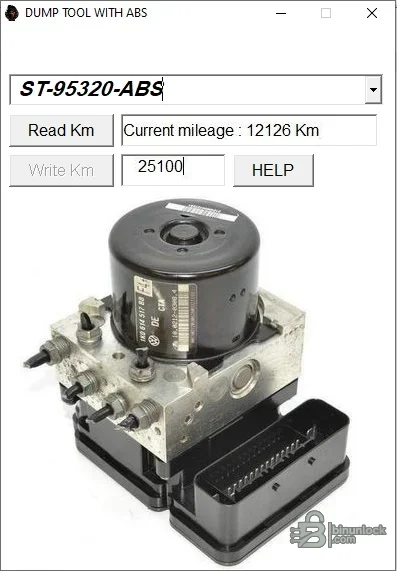
ABS Dump Tool is a compact offline EEPROM editor for workshop jobs where the replacement or repaired Renault/Dacia ABS unit must retain a verified odometer value. The supplied interface reads the value stored in an already extracted dump, displays the current distance in kilometres and can write a technician-entered value to a separate working file.
Match the exact memory marking, dump size, module manufacturer and part number before opening a file. Renault and Dacia used different ABS/ESP generations across models and production years, so selection by vehicle badge alone is unsafe. If the module uses another EEPROM family or the file length differs from a known-good read, stop and obtain module-specific documentation.
The software does not communicate with a vehicle through OBD and does not read an EEPROM by itself. It also does not include pinouts, a wiring diagram, an EEPROM programmer, an in-circuit clip or a diagnostic interface.
Start with a complete original read from the target module. Make at least two reads and compare their hashes or byte content before editing; inconsistent reads usually indicate a connection, power or device-selection problem. Keep the untouched dump outside the working folder so it cannot be overwritten accidentally.
The program does not advertise automatic checksum repair, VIN adaptation, coding, variant configuration, immobilizer functions or fault-code diagnostics. Use dealer-level or brand-specific diagnostic software after installation when the replacement ABS unit requires coding, calibration, bleeding or steering-angle procedures.
The package contains one unsigned portable executable and no installer or driver. Test it in an isolated workshop environment, keep the original binary recoverable and do not use it as the sole authority for module compatibility.
Supported ABS and memory profiles#
This build exposes two selectable profiles in its own interface: ST-95320-ABS and ST-95640-ABS. Embedded program text identifies the intended application as Renault and Dacia ABS mileage data. Those labels describe memory/layout profiles; they are not a promise that every ABS unit fitted to either brand is compatible.Match the exact memory marking, dump size, module manufacturer and part number before opening a file. Renault and Dacia used different ABS/ESP generations across models and production years, so selection by vehicle badge alone is unsafe. If the module uses another EEPROM family or the file length differs from a known-good read, stop and obtain module-specific documentation.
What the utility can do#
- Open a previously read ABS EEPROM dump
- Select the ST-95320 or ST-95640 ABS profile
- Decode and display the stored distance in kilometres
- Accept a replacement value for a legitimate module repair or synchronization job
- Write the edited data to a working file for later verification
The software does not communicate with a vehicle through OBD and does not read an EEPROM by itself. It also does not include pinouts, a wiring diagram, an EEPROM programmer, an in-circuit clip or a diagnostic interface.
Required hardware and source data#
Use an automotive EEPROM programmer that explicitly supports the memory device fitted to the ABS module, together with the correct voltage, adapter and connection method. Depending on the module and workshop procedure, the memory may be read in circuit, with a clip or adapter, or after removal from the board. The supplied package does not determine which method is safe for a particular control unit.Start with a complete original read from the target module. Make at least two reads and compare their hashes or byte content before editing; inconsistent reads usually indicate a connection, power or device-selection problem. Keep the untouched dump outside the working folder so it cannot be overwritten accidentally.
Recommended repair workflow#
- Record the vehicle VIN, ABS part number, hardware label, EEPROM marking and the legally verified odometer value.
- Read the memory more than once with the correct programmer and confirm that the dumps are identical.
- Choose the matching profile in ABS Dump Tool and open a copy of the original file.
- Use Read Km and compare the decoded value with the vehicle history and other control units.
- Enter the required repair value only after the module identity and unit of measurement have been confirmed.
- Use Write Km, save under a new filename and compare the output with the original at byte level.
- Write and verify the edited dump with the programmer, then scan the vehicle and confirm ABS operation and consistency.
Compatibility limits#
No model-by-model support table is included in this release. A 95320 or 95640 marking by itself is not sufficient evidence because the same memory family can be used with different data layouts. The tool should be treated as compatible only when its decoded value is plausible, the exact ABS profile is known and an independent reference confirms the layout.The program does not advertise automatic checksum repair, VIN adaptation, coding, variant configuration, immobilizer functions or fault-code diagnostics. Use dealer-level or brand-specific diagnostic software after installation when the replacement ABS unit requires coding, calibration, bleeding or steering-angle procedures.
System requirements#
- Windows desktop environment capable of running a native 32-bit application
- A local folder with read/write access for original, working and verified dump files
- An external EEPROM programmer and the correct module adapter or connection equipment
- A second hex or checksum tool for independent comparison where the module layout requires it
The package contains one unsigned portable executable and no installer or driver. Test it in an isolated workshop environment, keep the original binary recoverable and do not use it as the sole authority for module compatibility.


