
AlfaDiag is a Windows diagnostic application for selected Alfa Romeo and Fiat-family electronic control units communicating through K-Line or CAN. The supplied interface provides dedicated workspaces for ECU identification, live sensor monitoring, actuator control, calibration routines, fault codes, performance logging and dyno-style analysis. It is intended for focused controller diagnosis through a supported cable rather than generic ELM-style vehicle scanning.
Compatibility is determined by the exact ECU profile and communication protocol selected inside the application. Identify the vehicle and controller from current diagnostic data before connecting, because an apparently similar engine or ABS unit can use a different address, pinout or message set.
Compatibility is determined by the exact ECU profile and communication protocol selected inside the application. Identify the vehicle and controller from current diagnostic data before connecting, because an apparently similar engine or ABS unit can use a different address, pinout or message set.
What this package is for#
Use AlfaDiag to identify a supported controller, record fault codes and live values, compare sensor data with known operating conditions and run documented actuator or calibration tests. Start read-only, save the original observations and activate a component only when the workshop procedure and physical conditions make the test safe.Main functions#
- Connect to a selected K-Line or CAN control-unit profile
- Read ECU identity and software information
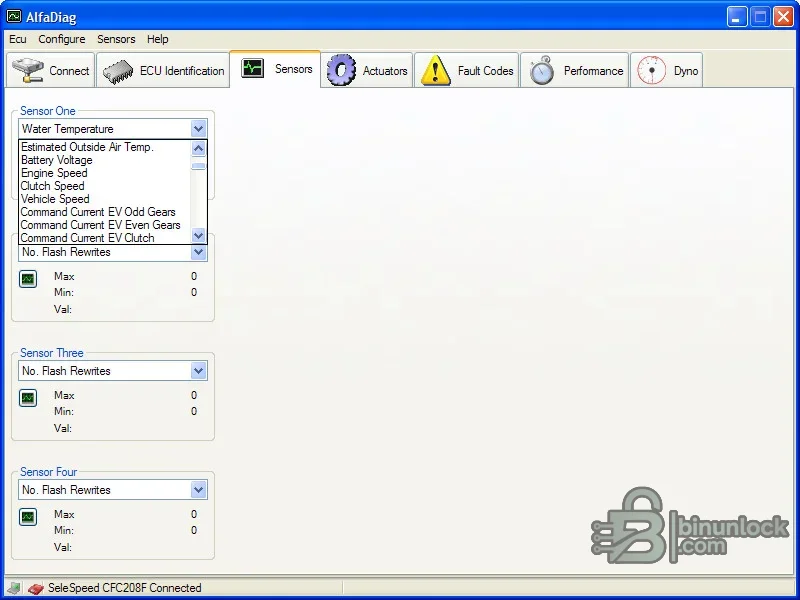
- Display multiple live sensors with minimum, maximum and current values
- Read and clear supported fault codes after documentation
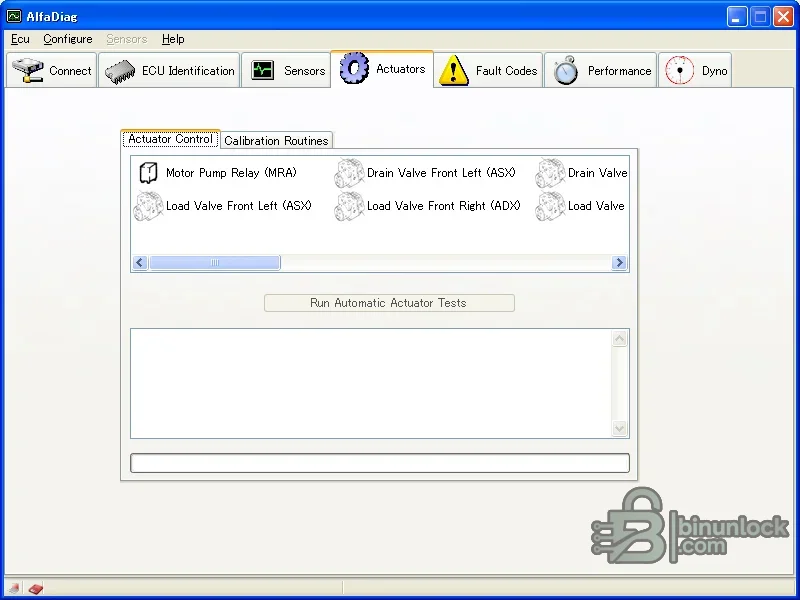
- Run supported actuator controls and automatic actuator tests
- Access controller-specific calibration routines
- Record performance data and use the supplied analysis workspace
Supported vehicles, systems and control units#
- Selected Alfa Romeo and Fiat-family engine controllers represented in the installed profiles
- Supported systems can include engine ECU, ABS, airbag and steering functions where a matching profile exists
- The interface visibly exposes engine, clutch, vehicle-speed and automated-gearbox sensor values
- Actuator availability depends on the selected ECU; disabled controls are not evidence of a fault
- A compatible K-Line or CAN adapter and correct pin routing are required
- No claim is made for every Alfa Romeo, Fiat, Lancia or Abarth model
Package contents#
- Verified full AlfaDiag diagnostic executable selected from the supplied bundle
- Primary actuator and calibration preview
- Additional live-sensor preview at the bottom
- Older release, loader, demo executable and source note are excluded from the clean package
- No vehicle logs, VINs, calibration dumps or customer records
PC, interface and workshop requirements#
- A dedicated Windows workshop computer with local administrator rights for installation and drivers
- Stable battery support appropriate to the vehicle whenever a live diagnostic session is used
- The correct communication interface, cable and driver for the target system
- Reliable controller identification from the label and a complete pre-work diagnostic scan
- Enough free storage for the extracted package, logs and immutable backups
- A supported K-Line or CAN diagnostic interface with the correct driver
- Correct adapter lead and pin assignment for the target vehicle connector
- A service procedure defining safe conditions for actuator and calibration tests
Recommended workflow#
- Record the exact vehicle, model year, controller identity, software number and current symptoms
- Install or extract the package offline and confirm that the required interface driver is present
- Connect stable power and perform identification or a complete scan before any write-capable action
- Save the original report or memory file and make a separate working copy
- Apply only the function documented for the recognized vehicle and controller
- Cycle power only when the service procedure instructs it, then rescan and verify the repair
- Before an actuator test, secure the vehicle and keep clear of fans, pumps, valves and moving mechanisms
Important limitations#
- A menu entry or brand name is not proof of support for every model year, market or controller revision
- This package does not replace current OEM service information, wiring diagrams or security authorization
- Do not attempt configuration, key, immobilizer or programming work on an unidentified module
- Never use the only original EEPROM, flash, configuration or diagnostic capture as the working file
- Calibration routines can change learned values and must not be used as exploratory tests
- Dyno or performance views are diagnostic displays and do not replace a controlled dynamometer procedure
Troubleshooting checklist#
- No connection: check ignition state, battery voltage, interface driver, selected protocol and connector pins
- Module not listed: verify model year, platform, controller family and software coverage before continuing
- Implausible values: compare units and conditions with live data from an approved diagnostic platform
- Write or configuration rejected: stop, preserve logs and confirm authorization, session state and power support
- Application will not start: use a clean supported Windows environment and install only documented prerequisites
- Connected but no data: verify the exact ECU profile, baud rate and K-Line or CAN route
- Actuator controls disabled: confirm that the selected controller supports the function and prerequisite states are satisfied


