
Aston Martin Mileage Decoder is an offline instrument-cluster file utility for reading a stored distance value from supported DB9 and Rapide binary dumps and creating a separately modified copy with a replacement value. The interface accepts either miles or kilometres, displays both units and selects a model-specific data region before searching for the expected repeated pattern.
This software is intended for lawful odometer restoration after documented instrument-cluster repair or replacement. It does not read a vehicle through OBD, identify a cluster automatically or prove that a dump belongs to a particular car. Record the original displayed mileage, VIN, repair order and module identifiers before any file operation, and comply with the disclosure and odometer laws that apply where the vehicle is registered.
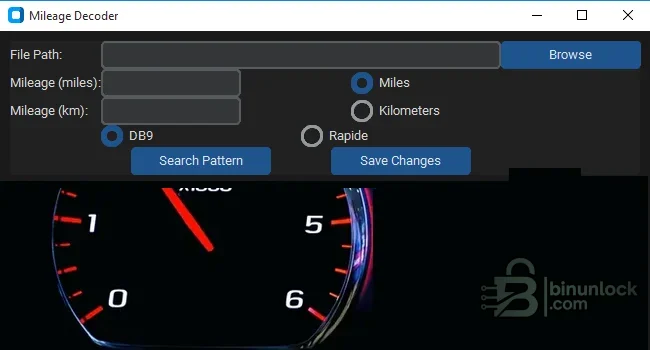
The source-folder label also mentions Vantage, DBS, Virage and 9S12 hardware, but those vehicles are not selectable in the inspected interface. They are therefore not claimed as verified compatibility for this build. Do not assume that a similar-looking cluster or processor family uses the same offsets or encoding.
Compatibility must be confirmed from the exact instrument-cluster part number, hardware revision, processor/memory type and original file structure. Model names cover multiple years and revisions, and a donor cluster can differ from the original even when the housing and connector appear identical. This package does not include an application list that maps every part number or model year.
When saving, the tool derives the replacement counter from the entered distance and writes the encoded four-byte value repeatedly into the new copy. A successful dialog only confirms that the application completed its file operation; it does not confirm checksum validity, correct vehicle identity, correct physical write or legal mileage documentation.
Do not start with an unverified file downloaded from another vehicle. Preserve the original read in read-only storage and calculate a SHA-256 hash before editing so every later result can be traced back to the captured source.
Confirm whether the cluster and the legal service record are expressed in miles or kilometres. Changing the display unit in a vehicle menu is not the same as correcting the stored total-distance data after hardware replacement. Never use a unit conversion to disguise an actual reduction in accumulated distance.
Use a dedicated or disposable workshop environment and scan the installer with current security tools before use. Do not disable endpoint protection globally merely because an unsigned automotive utility is unfamiliar to it.
The retained installer is unsigned and includes large standard Python/OpenBLAS and image-library runtimes. Static inspection reduces uncertainty but is not a malware-clean guarantee. The software was not executed during packaging because a genuine source screenshot was already available.
The final verification is both technical and documentary: the cluster must operate correctly, the displayed total must match the supported records, all diagnostic faults must be addressed, and the repair must be disclosed and retained with the vehicle history.
This software is intended for lawful odometer restoration after documented instrument-cluster repair or replacement. It does not read a vehicle through OBD, identify a cluster automatically or prove that a dump belongs to a particular car. Record the original displayed mileage, VIN, repair order and module identifiers before any file operation, and comply with the disclosure and odometer laws that apply where the vehicle is registered.
Verified functions in the program#
The original application was recursively unpacked and its main Python bytecode was inspected without executing it. That inspection confirms a local-only workflow built around file selection, pattern search, mileage display and export of a new file.- Two verified interface profiles: DB9 and Rapide
- Display and entry in miles or kilometres, with automatic unit conversion
- Pattern search within a model-specific region of the selected binary file
- Reading of a four-byte big-endian stored distance value
- Creation of a sibling file whose name ends in
_modified - The selected original file is copied before the new value is written; the application does not intentionally overwrite the source file
The source-folder label also mentions Vantage, DBS, Virage and 9S12 hardware, but those vehicles are not selectable in the inspected interface. They are therefore not claimed as verified compatibility for this build. Do not assume that a similar-looking cluster or processor family uses the same offsets or encoding.
DB9 and Rapide compatibility boundaries#
Aston Martin's owner documentation identifies the odometer as the instrument-cluster display of the vehicle's total distance. The utility works on an offline binary read, not on the dashboard display units themselves. Its DB9 and Rapide radio buttons select different fixed search regions in the file, which means the correct profile is essential even when both dumps have a plausible size.Compatibility must be confirmed from the exact instrument-cluster part number, hardware revision, processor/memory type and original file structure. Model names cover multiple years and revisions, and a donor cluster can differ from the original even when the housing and connector appear identical. This package does not include an application list that maps every part number or model year.
How the stored value is located#
The inspected logic searches its selected region for a four-byte value that is neither allFF nor all 00 and is repeated twenty times. It then treats the following four bytes as a big-endian counter and converts that stored count to miles using the application's internal factor. This explains why a random file, a partial read or the wrong cluster family can return “pattern not found.”When saving, the tool derives the replacement counter from the entered distance and writes the encoded four-byte value repeatedly into the new copy. A successful dialog only confirms that the application completed its file operation; it does not confirm checksum validity, correct vehicle identity, correct physical write or legal mileage documentation.
Required hardware and source information#
- A programmer capable of reading the exact instrument-cluster memory or MCU used by the target unit
- Correct pinout, adapter and voltage settings for the identified board revision
- Stable bench power, ESD protection and appropriate soldering or in-circuit access equipment
- At least two independent reads of the original cluster that compare byte-for-byte
- A hex editor or binary comparison tool for checking size, fill patterns and the generated changes
- A diagnostic system suitable for Aston Martin module identification, fault scanning and replacement commissioning
- A written record of the VIN, displayed distance, cluster part number, units and reason for repair
Do not start with an unverified file downloaded from another vehicle. Preserve the original read in read-only storage and calculate a SHA-256 hash before editing so every later result can be traced back to the captured source.
Recommended repair workflow#
- Photograph the original odometer and record the mileage or kilometre value, VIN, date and repair order.
- Identify the cluster hardware and memory device from its label and PCB rather than selecting a profile from the vehicle name alone.
- Read the memory at least twice and compare the files. Stop if they differ, are unexpectedly short, or contain implausible all-FF/all-00 regions.
- Keep immutable backups and open only a working copy in the decoder.
- Choose DB9 or Rapide only after the hardware has been confirmed, then use Search Pattern and compare the displayed value with the documented odometer.
- Enter the legally correct replacement distance in the intended unit and use Save Changes. Keep the generated
_modifiedfile separate from the original. - Compare the two files and verify that changes are limited to the expected repeated data region. Stop if unrelated areas differ.
- Write with stable power, read the target memory back and compare it byte-for-byte with the generated file.
- Reinstall the cluster, perform a complete diagnostic scan and verify the odometer, warning lamps, message centre, gauges and vehicle configuration.
- Retain the original file and repair documentation with the vehicle's permanent service history.
Miles, kilometres and rounding#
The application uses a fixed conversion factor between miles and kilometres and rounds the kilometre display to two decimal places. When saving a kilometre entry it converts back to an integer mile value before encoding. Small rounding differences are therefore possible and should be considered before writing the final file.Confirm whether the cluster and the legal service record are expressed in miles or kilometres. Changing the display unit in a vehicle menu is not the same as correcting the stored total-distance data after hardware replacement. Never use a unit conversion to disguise an actual reduction in accumulated distance.
System requirements#
- 64-bit Windows workshop computer; Windows 10 or Windows 11 is the practical target environment for the bundled x64 application
- Approximately 120 MB of free storage for installation, working files and backups
- Standard desktop graphics capable of displaying the compact 650 × 350 application window
- Permission to run an unsigned Inno Setup installer and the installed local application
- No separate Python installation is required because the installer bundles Python, CustomTkinter, Tcl/Tk, NumPy and supporting libraries
- No network connection is required by the inspected application logic
Use a dedicated or disposable workshop environment and scan the installer with current security tools before use. Do not disable endpoint protection globally merely because an unsigned automotive utility is unfamiliar to it.
Troubleshooting#
- Pattern not found: verify the DB9/Rapide selection, dump completeness, cluster part number and read method; do not search-and-replace arbitrary byte sequences
- Displayed distance is implausible: confirm the unit, source file and hardware profile, then compare against the physical odometer and service history
- Invalid mileage value: enter a plain numeric value in the selected unit and avoid separators or text the program cannot parse
- Modified file is not created: use a writable working directory and check whether security software quarantined or blocked the unsigned process
- Cluster fails after writing: stop further writes, restore the verified original where safe, re-read the memory and diagnose power, communication, configuration and hardware faults
- Vehicle configuration or warnings are wrong: the decoder is not a commissioning tool; use the applicable diagnostic procedure and correct donor hardware
Recursive package audit and safety notes#
The source RAR was fully tested and extracted. Its Inno Setup executable was then unpacked without installation, revealing 1,027 bundled files. The internal PyInstaller application was also opened: its archive was not encrypted, the main bytecode imported only GUI and local-file modules, and no network URL or network client appeared in the application-specific code.The retained installer is unsigned and includes large standard Python/OpenBLAS and image-library runtimes. Static inspection reduces uncertainty but is not a malware-clean guarantee. The software was not executed during packaging because a genuine source screenshot was already available.
Legal and professional use#
Odometer data is regulated in many jurisdictions. Use this resource only to restore the documented true distance after a legitimate cluster repair or replacement, never to reduce mileage for resale or conceal vehicle history. If the true distance cannot be established, follow the applicable unknown-mileage disclosure procedure rather than guessing.The final verification is both technical and documentary: the cluster must operate correctly, the displayed total must match the supported records, all diagnostic faults must be addressed, and the repair must be disclosed and retained with the vehicle history.


