
Audi J518 ELV EEPROM Dump Converter is an offline workshop utility for translating supported access/start authorization EEPROM data between the 3L40K 2 KB and 0L01Y 4 KB layouts exposed by the program. It is intended for controlled J518 steering-lock and immobilizer repair work where a technician already has a verified read from the original module and needs the alternate file layout for compatible service hardware.
This is a file converter, not an OBD diagnostic application, EEPROM reader, flashing tool or online component-adaptation service. It does not identify the vehicle automatically and it cannot prove that a dump belongs to the correct hardware. The operator remains responsible for module identification, a stable bench read, backups and the final write/adaptation procedure.
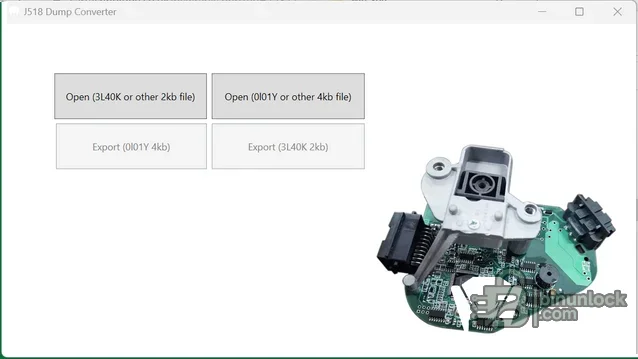
The wording “other 2 KB” and “other 4 KB” appears in the original interface, but it should not be treated as universal MCU compatibility. Confirm the mask, board revision and expected file size from the physical module and the documentation for the programmer being used.
Accordingly, vehicle model alone is not enough to approve a conversion. The most direct use case is a J518 unit whose EEPROM device and dump size match the converter's 3L40K/0L01Y workflow. Part number, MCU mask, PCB revision and read size must all be checked before processing. Later Audi platforms, BCM2 systems, unrelated KESSY modules and generic ELV emulators are outside the evidence available for this package.
The 2 KB and 4 KB sizes refer to EEPROM dump files, not the complete flash contents of every processor. A file with the expected byte count can still be incomplete, byte-swapped, filled with a repeated value, read from the wrong memory region or taken from incompatible hardware. Size is a first gate, not proof of correctness.
Do not use a random internet dump as the starting point. Immobilizer EEPROM data can be vehicle-specific and security-sensitive; keep customer files private and retain an immutable backup away from the working directory.
.NET Core 3.1 reached end of support in December 2022 and no longer receives security fixes from Microsoft. If the legacy Windows Desktop Runtime is required, use the tool in an isolated workshop environment rather than weakening security controls on a general-purpose office computer. A newer runtime is not automatically compatible with an application explicitly targeting the older framework.
Faults such as no-crank, no-ignition or steering-lock complaints can also be caused by power supply, wiring, the access/start switch, keys, network communication or mechanical failure. Diagnose the complete system and verify the original module before treating an EEPROM conversion as the repair.
Use this utility only for lawful repair of a vehicle or module you own or are authorized to service. Never publish customer EEPROM data, VIN-linked immobilizer information, key material or converted files. A successful export is only an intermediate workshop step: the final result must be confirmed by read-back verification, a complete diagnostic scan and safe functional testing.
This is a file converter, not an OBD diagnostic application, EEPROM reader, flashing tool or online component-adaptation service. It does not identify the vehicle automatically and it cannot prove that a dump belongs to the correct hardware. The operator remains responsible for module identification, a stable bench read, backups and the final write/adaptation procedure.
What the converter does#
The interface provides separate import and export paths for a 3L40K or other supported 2 KB file and an 0L01Y or other supported 4 KB file. After a valid source is loaded, the tool generates the corresponding EEPROM layout for the opposite target format. Status messages in the application distinguish a successfully loaded file, file corruption and the file-generation stage.- Import a 3L40K-format 2,048-byte EEPROM read and export the corresponding 0L01Y-format 4,096-byte file
- Import an 0L01Y-format 4,096-byte EEPROM read and export the corresponding 3L40K-format 2,048-byte file
- Work entirely with local binary files; no vehicle interface or internet connection is used by the converter
- Preserve the untouched source read separately so the conversion can be audited or repeated
The wording “other 2 KB” and “other 4 KB” appears in the original interface, but it should not be treated as universal MCU compatibility. Confirm the mask, board revision and expected file size from the physical module and the documentation for the programmer being used.
J518 module and vehicle context#
Audi identifies J518 as the access/start authorization control unit at diagnostic address 05 in Immobilizer IV systems. Official Audi service information lists this immobilizer generation on the A8 D3 from model year 2004, the A6 C6 from model year 2005 and the Q7 from model year 2007. On the relevant A6 and Q7 applications J518 is associated with the steering-column installation; the A8 arrangement differs and uses a separate N360 steering-column lock actuator.Accordingly, vehicle model alone is not enough to approve a conversion. The most direct use case is a J518 unit whose EEPROM device and dump size match the converter's 3L40K/0L01Y workflow. Part number, MCU mask, PCB revision and read size must all be checked before processing. Later Audi platforms, BCM2 systems, unrelated KESSY modules and generic ELV emulators are outside the evidence available for this package.
Supported EEPROM layouts and MCU masks#
- 3L40K: the program expects a 2 KB source or target file for this path
- 0L01Y: the program expects a 4 KB source or target file for this path
- 1L59W: appears in broader J518 service-tool documentation, but it is not named by this converter's interface; do not assume direct support without independent verification
The 2 KB and 4 KB sizes refer to EEPROM dump files, not the complete flash contents of every processor. A file with the expected byte count can still be incomplete, byte-swapped, filled with a repeated value, read from the wrong memory region or taken from incompatible hardware. Size is a first gate, not proof of correctness.
Required workshop hardware and source data#
- A compatible EEPROM/MCU programmer and the correct adapter or verified connection method for the installed device
- Stable power, ESD protection and appropriate soldering or in-circuit reading equipment
- At least two repeat reads of the original EEPROM that compare byte-for-byte
- A clear record of the J518 part number, PCB revision, MCU mask, vehicle VIN and diagnostic fault state
- A hex editor or comparison utility for checking file length, repeated-fill areas and unexpected differences
- An OEM-capable diagnostic platform for the post-repair scan and any authorized online adaptation that the vehicle requires
Do not use a random internet dump as the starting point. Immobilizer EEPROM data can be vehicle-specific and security-sensitive; keep customer files private and retain an immutable backup away from the working directory.
Recommended conversion workflow#
- Record the vehicle, module label, part numbers, board revision and physical MCU marking before desoldering or connecting a programmer.
- Read the original memory at least twice and compare the files. Stop if the reads differ or the source is all FF/00, truncated or the wrong size.
- Make read-only backups and work from a separate copy. Name files by module and date rather than overwriting the original.
- Select the import button matching the verified source mask and byte count. If the program reports corruption, do not force the file through another route.
- Export to a new filename and confirm that the result is exactly the expected target size.
- Compare the generated output with the source and with a known structural reference for the exact hardware family; document the SHA-256 of both files.
- Write only with stable power and a verified programmer procedure, then read the target back and compare it with the generated file.
- Reassemble the module, perform a complete diagnostic scan and complete only the manufacturer-authorized adaptation procedure applicable to that vehicle.
System requirements#
- Windows desktop environment capable of running a 32-bit Windows application
- Microsoft Windows Desktop Runtime for .NET Core 3.1, matching the application's runtime configuration
- Approximately 1 MB of local storage for the program and working EEPROM files, plus separate backup storage
- Local permission to run an unsigned portable application and read/write files in the chosen workshop directory
- No internet connection is required for the conversion itself
.NET Core 3.1 reached end of support in December 2022 and no longer receives security fixes from Microsoft. If the legacy Windows Desktop Runtime is required, use the tool in an isolated workshop environment rather than weakening security controls on a general-purpose office computer. A newer runtime is not automatically compatible with an application explicitly targeting the older framework.
What the tool does not do#
The converter does not read J518 over OBD, calculate a missing dump, repair physical relays or motor drivers, diagnose terminal-15/terminal-50 circuits, clear every possible fault code, teach keys, remove component protection or perform online Immobilizer IV adaptation. It also does not validate the cryptographic or vehicle-specific contents of a file after conversion.Faults such as no-crank, no-ignition or steering-lock complaints can also be caused by power supply, wiring, the access/start switch, keys, network communication or mechanical failure. Diagnose the complete system and verify the original module before treating an EEPROM conversion as the repair.
Troubleshooting file and runtime errors#
- File corrupted: confirm exact byte count, repeat the source read, check the selected import route and rule out a damaged or encrypted wrapper file
- Application does not start: verify the Windows Desktop Runtime requirement, CPU architecture and that all four packaged application files remain together
- Export has the wrong size: stop and confirm the selected source/target route; do not pad or trim a security EEPROM manually
- Written module remains inoperative: restore the verified backup where safe, re-read the memory, check hardware and power, scan every related control unit and follow the OEM adaptation process
- Program is blocked by security software: do not disable protection globally; scan the package independently and use a disposable isolated machine if authorized to proceed
Package contents, verification and responsible use#
The cleaned package contains the application host, managed program library, dependency manifest and runtime configuration. A developer-symbol file containing a personal build path and a text file that only pointed to an external runtime download were excluded. The retained executables are unsigned; they were inspected statically and were not executed during packaging, and no malware-clean claim is made.Use this utility only for lawful repair of a vehicle or module you own or are authorized to service. Never publish customer EEPROM data, VIN-linked immobilizer information, key material or converted files. A successful export is only an intermediate workshop step: the final result must be confirmed by read-back verification, a complete diagnostic scan and safe functional testing.


