
BMW EGS7 / 7DTC300 / AISIN ISN Reset Tool - EEPROM & ENET Workspace
EGS OBD ISN Workspace is a Windows service utility for BMW transmission-control workflows supporting EGS7 (GEN3), 7DTC300 and AISIN EGS.
The application combines local EEPROM analysis, 16-byte ISN recovery, BMW ENET / ZGW discovery and a guarded two-phase EGS reset workflow in one workspace.
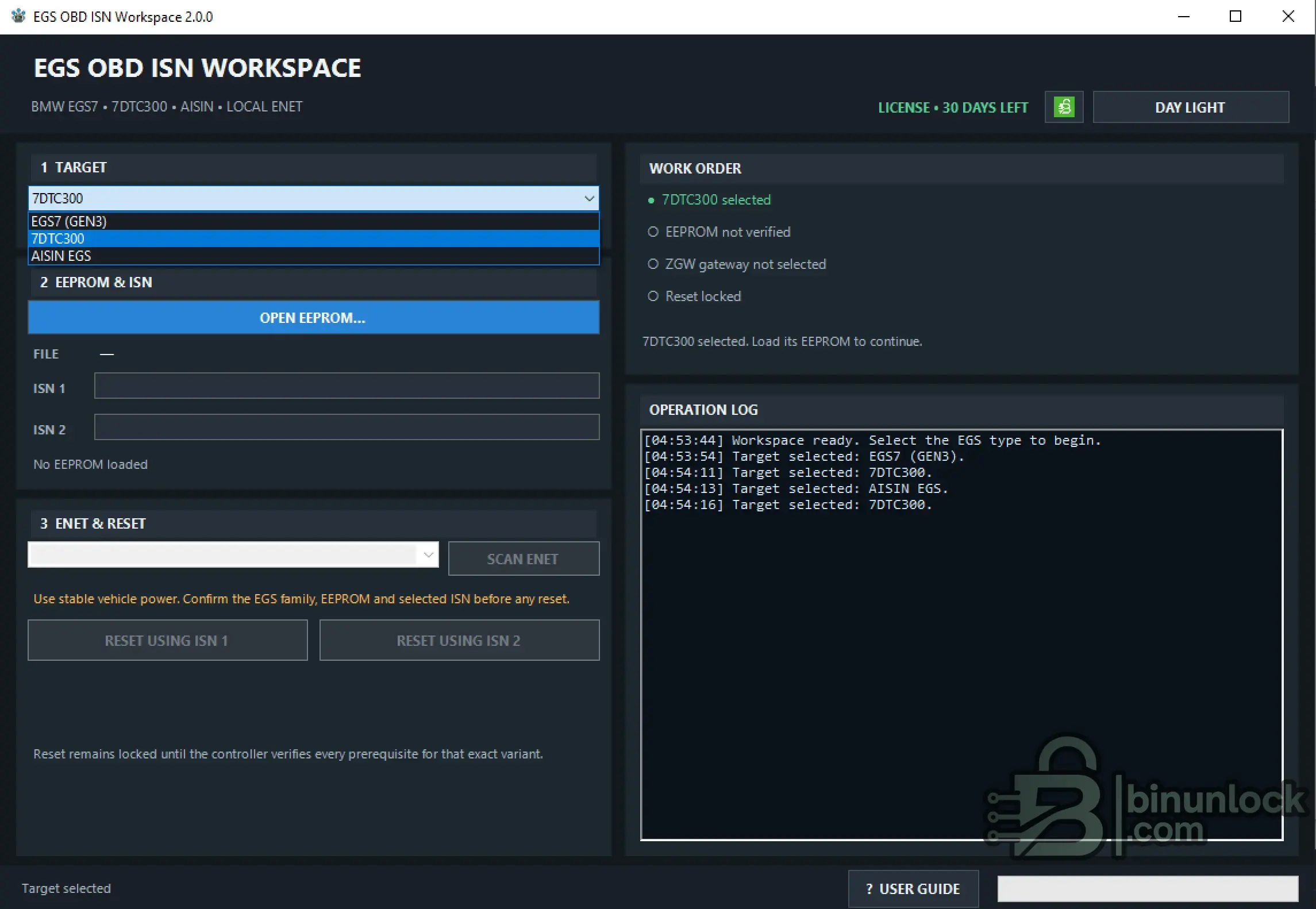
Supported EGS Families
Each family has its own EEPROM validation rules and reset availability. Select the correct controller family before loading the EEPROM image.
Key Features
EEPROM Reading & Analysis
The EEPROM must be read from the source controller separately using Flex, PCM Flash or another suitable EEPROM reading tool.
EGS OBD ISN Workspace does not read the EEPROM directly from the EGS. It analyses the selected local BIN after the read has been completed.
Typical workflow:
EEPROM processing is local and read-only. The selected BIN is not modified by the application.
EEPROM Requirements
EGS7 (GEN3)
Supported image size:
A supported EGS7 signature and complete primary ISN payload must also be present.
EGS7 uses the verified primary ISN 1.
7DTC300
The parser searches for the supported 7DTC300 structure and can recover one or two valid 16-byte ISN values.
Variant 2 remains locked when a valid ISN 2 is not present.
AISIN EGS
Accepted EEPROM sizes:
AISIN uses the verified primary ISN 1.
BMW ENET / ZGW Connection
After a valid EEPROM is loaded, the workspace can discover the BMW ZGW on the wired ENET network.
Available connection methods:
A known and verified network route may also be used where the workshop setup provides access to the correct ZGW endpoint.
The application itself performs vehicle operations locally and does not use a remote ECU-processing backend.
Work Order Safety Gates
Before a reset becomes available, the workspace verifies the required prerequisites:
Changing the target controller clears dependent EEPROM and gateway state to prevent data from different controllers being mixed.
Two-Phase EGS ISN Reset
The reset workflow is intentionally guarded.
Available actions:
The workspace performs the confirmed EGS reset workflow in two phases using the selected ZGW route and verified ISN source.
Reset Result
The application reports definite protocol success only when the final response ends with:
A C0 01 result confirms the application's expected protocol-success condition but does not replace post-reset coding and functional verification.
If the response does not end in C0 01, or communication is interrupted, do not repeatedly retry the reset without first establishing the current EGS state.
Local / Offline Operation
The vehicle workflow is designed to remain on the workshop computer and BMW ENET network.
There is no cloud EEPROM parser, remote ECU-function lookup, telemetry, update check or daily usage quota in the vehicle workflow.
System Requirements
Validation Status
Documentation
The complete English User Guide is included:
The manual covers supported EGS families, EEPROM requirements, ENET / ZGW discovery, reset variants, operation results, recovery decisions and post-reset verification.
File Integrity
File: EGS_OBD_ISN_Workspace_2.0.0.exe
Version: 2.0.0
SHA-256:
VirusTotal:
View VirusTotal report
The VirusTotal report above corresponds to the executable identified by the exact SHA-256 hash shown above.
Always compare the downloaded executable with this SHA-256 before running the application.
Important
EGS OBD ISN Workspace is a Windows service utility for BMW transmission-control workflows supporting EGS7 (GEN3), 7DTC300 and AISIN EGS.
The application combines local EEPROM analysis, 16-byte ISN recovery, BMW ENET / ZGW discovery and a guarded two-phase EGS reset workflow in one workspace.
Supported EGS Families
- BMW EGS7 (GEN3)
- 7DTC300
- AISIN EGS
Each family has its own EEPROM validation rules and reset availability. Select the correct controller family before loading the EEPROM image.
Key Features
- BMW EGS7 / 7DTC300 / AISIN EGS support
- Local EEPROM analysis
- 16-byte ISN recovery
- 32-character hexadecimal ISN display
- ISN 1 / ISN 2 support where available
- BMW ENET / ZGW network discovery
- Manual ZGW IPv4 entry
- Guarded two-phase EGS reset
- Variant-specific reset locking
- Work Order prerequisite checks
- Chronological Operation Log
- Definite C0 01 protocol-success detection
- Dark Night / Day Light themes
- HWID-based offline licensing
- Embedded English User Guide
EEPROM Reading & Analysis
The EEPROM must be read from the source controller separately using Flex, PCM Flash or another suitable EEPROM reading tool.
EGS OBD ISN Workspace does not read the EEPROM directly from the EGS. It analyses the selected local BIN after the read has been completed.
Typical workflow:
- Read and save the complete EEPROM from the intended EGS
- Keep an untouched backup of the original file
- Select the correct EGS family in the workspace
- Load the EEPROM with OPEN EEPROM
- Verify the recovered ISN data
- Connect to the intended BMW ZGW over ENET
- Use only the reset variant unlocked by the verified EEPROM
EEPROM processing is local and read-only. The selected BIN is not modified by the application.
EEPROM Requirements
EGS7 (GEN3)
Supported image size:
Code:
200,000 to 1,200,000 bytesA supported EGS7 signature and complete primary ISN payload must also be present.
EGS7 uses the verified primary ISN 1.
7DTC300
The parser searches for the supported 7DTC300 structure and can recover one or two valid 16-byte ISN values.
- ISN 1 - primary reset variant
- ISN 2 - second reset variant when a valid second value is actually recovered
Variant 2 remains locked when a valid ISN 2 is not present.
AISIN EGS
Accepted EEPROM sizes:
Code:
64 KiB  - 65,536 bytes
128 KiB - 131,072 bytes
AISIN uses the verified primary ISN 1.
BMW ENET / ZGW Connection
After a valid EEPROM is loaded, the workspace can discover the BMW ZGW on the wired ENET network.
Available connection methods:
- SCAN ENET - discover available local BMW ZGW addresses
- Manual entry of a separately verified ZGW IPv4 address
A known and verified network route may also be used where the workshop setup provides access to the correct ZGW endpoint.
The application itself performs vehicle operations locally and does not use a remote ECU-processing backend.
Work Order Safety Gates
Before a reset becomes available, the workspace verifies the required prerequisites:
- Target - supported EGS family selected
- EEPROM - accepted file and valid ISN recovered
- ZGW - valid gateway IPv4 address selected
- Reset - requested reset variant has a valid verified ISN source
Changing the target controller clears dependent EEPROM and gateway state to prevent data from different controllers being mixed.
Two-Phase EGS ISN Reset
The reset workflow is intentionally guarded.
Available actions:
- RESET USING ISN 1
- RESET USING ISN 2 - 7DTC300 only when a valid second ISN is recovered
The workspace performs the confirmed EGS reset workflow in two phases using the selected ZGW route and verified ISN source.
Reset Result
The application reports definite protocol success only when the final response ends with:
Code:
C0 01A C0 01 result confirms the application's expected protocol-success condition but does not replace post-reset coding and functional verification.
If the response does not end in C0 01, or communication is interrupted, do not repeatedly retry the reset without first establishing the current EGS state.
Local / Offline Operation
The vehicle workflow is designed to remain on the workshop computer and BMW ENET network.
- EEPROM analysis - local computer
- ZGW discovery - local ENET
- EGS reset - selected local ZGW
- License validation - local computer after activation
There is no cloud EEPROM parser, remote ECU-function lookup, telemetry, update check or daily usage quota in the vehicle workflow.
System Requirements
- Windows 7 SP1 / 8.1 / 10 / 11
- 32-bit or 64-bit Windows
- Microsoft .NET Framework 4.8
- 1024 × 768 or greater display
- Known-good BMW ENET cable
- Active wired IPv4 adapter
- Stable regulated workshop power supply
- E-Sys / ISTA and competing diagnostic clients closed during reset
Validation Status
Documentation
The complete English User Guide is included:
Code:
User_Guide_EN.pdfThe manual covers supported EGS families, EEPROM requirements, ENET / ZGW discovery, reset variants, operation results, recovery decisions and post-reset verification.
File Integrity
File: EGS_OBD_ISN_Workspace_2.0.0.exe
Version: 2.0.0
SHA-256:
Code:
9f9f3a3cfc5e9f0640c21470c0944c67192e7dd30bf984dde06d5508d0423170VirusTotal:
View VirusTotal report
The VirusTotal report above corresponds to the executable identified by the exact SHA-256 hash shown above.
Always compare the downloaded executable with this SHA-256 before running the application.
Important


