
Bosch ECU Database is a third-party offline reference utility for identifying Bosch engine-control units and cross-referencing Bosch numbers with vehicle-manufacturer OE numbers. It is designed for workshop parts identification, donor-ECU research and label verification when a Bosch number, an OEM reference or a binary dump is available but the controller family is not yet clear.
The embedded dataset was inspected directly during packaging. It contains 33,963 cross-reference rows built around 16,186 distinct Bosch numbers, 146 recorded manufacturer or brand labels and 1,182 distinct ECU-family/designation strings. Each matched row can show the Bosch reference, controller family, vehicle brand and corresponding manufacturer reference. This is a substantial offline snapshot rather than an empty search shell.
The utility is not an official Robert Bosch application and its database is not a live parts catalog. Treat every result as a strong identification lead, then verify the physical label, hardware and software numbers, connector layout, engine application and current manufacturer catalog before buying, cloning or installing a replacement ECU.
A result does not prove plug-and-play interchangeability. One housing can exist with different calibration, emissions configuration, transmission coding, immobilizer generation or output-stage hardware.
Normalize spacing before searching. A label printed as
The supplied screenshot demonstrates an exact result for Bosch
This can help when the ECU label is missing but a full flash read contains an identification string. It is not a checksum tool, map detector or automatic ECU classifier. A dump may contain no plain-text part number, may hold an old number from a previous calibration or may contain several identifiers. Compare every detected value with diagnostic identification and the physical control unit.
The family string often includes a Bosch internal sub-version such as
Family labels are database identifiers, not a promise that the utility can read, flash or repair those ECUs. The program only searches its offline mapping records.
The database also contains commercial, industrial and agricultural references for brands such as MAN, Scania, Iveco, UD Trucks/Nissan Diesel, Mitsubishi Fuso, Mack, Steyr Fahrzeugtechnik, AGCO Sisu Power, Fendt, Valtra, Case, KHD and others. Brand presence means at least one cross-reference row exists; it does not imply complete model-year coverage.
This database primarily maps part numbers, ECU families and brands. It does not provide a dependable vehicle model/year selector. For exact car, engine or truck coverage, take the returned OE number into the manufacturer parts catalog using the VIN or model/chassis data.
A correct part-number relationship does not transfer immobilizer data, VIN, injector coding, variant coding or calibration automatically. Those operations require ECU-specific tools and legitimate access.
Do not discard leading zeroes. Search results can legitimately show one Bosch number linked to several OE numbers because of supersessions, cross-brand platforms, regional releases or shared hardware. Conversely, similar OE references can point to different Bosch numbers after a hardware or software revision.
The included snapshot dates from a legacy application and cannot contain later Bosch MD1/MG1 releases or every supersession added after its compilation. Online catalog data may also distinguish current service replacements that the offline program cannot know.
The program is a managed 32-bit Windows Forms executable and requests standard user-level execution. It is unsigned. It was inspected statically and not executed during packaging because a genuine source screenshot was supplied. Scan it independently and use it in an isolated workshop environment.
The rebuilt publication archive is encrypted with hidden filenames, independently tested and extracted again, and the final executable is compared against the pinned clean-payload SHA-256. No pointer file, web shortcut, unrelated installer or nested archive is included.
The embedded dataset was inspected directly during packaging. It contains 33,963 cross-reference rows built around 16,186 distinct Bosch numbers, 146 recorded manufacturer or brand labels and 1,182 distinct ECU-family/designation strings. Each matched row can show the Bosch reference, controller family, vehicle brand and corresponding manufacturer reference. This is a substantial offline snapshot rather than an empty search shell.
The utility is not an official Robert Bosch application and its database is not a live parts catalog. Treat every result as a strong identification lead, then verify the physical label, hardware and software numbers, connector layout, engine application and current manufacturer catalog before buying, cloning or installing a replacement ECU.
What the database can identify#
The application accepts a Bosch reference in its search field and returns every matching cross-reference row. Depending on the record, the result can include:- Bosch number: the ten-digit Bosch reference stored by the database
- ECU family or generation: for example EDC15, EDC16, EDC17, ME, MED, M, MA, MP or another recorded designation
- Vehicle manufacturer: the brand associated with that cross-reference row
- OE or manufacturer reference: the vehicle-maker number corresponding to the Bosch unit
- Multiple alternatives: several OE references or brands where one Bosch number was used across related applications
A result does not prove plug-and-play interchangeability. One housing can exist with different calibration, emissions configuration, transmission coding, immobilizer generation or output-stage hardware.
Exact, wildcard and prefix searches#
The interface supports three practical search styles:- Exact number: enter the complete Bosch reference when the label is readable
- Question-mark wildcard: use
?to replace one unknown digit in a damaged or partially obscured number - Prefix search: use
*to search from the beginning of a reference when only the leading digits are known
Normalize spacing before searching. A label printed as
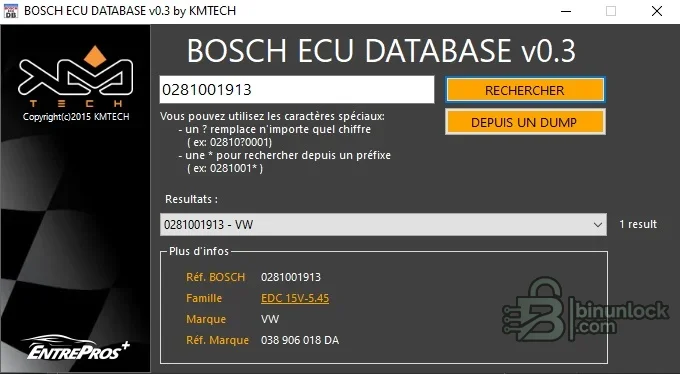
0 281 001 913 corresponds to the compact database form 0281001913. Search both the Bosch number and the vehicle-maker number when investigating a donor unit, because a single Bosch reference may map to several OE-number formats.The supplied screenshot demonstrates an exact result for Bosch
0281001913: family EDC 15V-5.45, brand VW and OE reference 038 906 018 DA. That example explains the fields; it is not a universal compatibility claim for every Volkswagen using EDC15.Search directly from an ECU dump#
The From a dump function reads a selected binary file and scans its printable content for recognizable Bosch-style identifiers. Static inspection confirms that it walks the file bytes, builds printable text sequences and looks for ten-character references beginning with common Bosch prefixes such as0281 and 0261, then sends a detected number to the normal database search.This can help when the ECU label is missing but a full flash read contains an identification string. It is not a checksum tool, map detector or automatic ECU classifier. A dump may contain no plain-text part number, may hold an old number from a previous calibration or may contain several identifiers. Compare every detected value with diagnostic identification and the physical control unit.
Bosch diesel ECU coverage#
The internal snapshot contains extensive Bosch diesel-management references. Representative families verified inside the executable include:- EDC15: EDC15C, EDC15M, EDC15P, EDC15V, EDC15VM and MSA-related variants
- EDC16: EDC16C2, C3, C7, C8, C10, C32, C34, C35, C39, C41, U1, U31, U34 and multiple CP31/CP34/CP36 variants
- EDC17: EDC17C08, C10, C46, C49, C50, C54, C56, C58, C64, C70 and CP01/CP06/CP07/CP09/CP14/CP16/CP20/CP24/CP37/CP42/CP44/CP45/CP50 entries
- Earlier diesel systems: MSA and M-pump designations plus historical records where the family field is blank but Bosch and OE references remain available
The family string often includes a Bosch internal sub-version such as
EDC 16CP31-8.12. Match the entire label where possible; EDC16 or EDC17 alone is far too broad for donor selection.Bosch petrol ECU coverage#
Representative petrol-controller designations in the database include:- Motronic M and MA: numerous M1.x, M2.x, M3.x, M4.x, M5.x, M7.x and MA variants
- Motronic ME: ME1, ME2, ME3, ME7.1/7.3/7.4/7.5, ME7.9, ME9.2, ME9.6 and ME9.7 families
- MED and MEV: MED17-series and MEV records used by selected direct-injection and Valvetronic-era applications
- MP and ML: legacy MP3, MP5, MP7, MP9 and ML-family references
Family labels are database identifiers, not a promise that the utility can read, flash or repair those ECUs. The program only searches its offline mapping records.
Vehicle and equipment brands represented#
The largest verified passenger-car groups in the snapshot include Volkswagen, Mercedes-Benz, BMW, Fiat, Peugeot, Citroën, Audi, Honda, Chrysler, Opel/Vauxhall, Renault, Hyundai, Nissan, Alfa Romeo, Ford, Kia, Lancia, SEAT, Toyota, Škoda, Porsche, Chevrolet, Land Rover, Jaguar, Bentley, Mitsubishi, Mazda, Suzuki, Isuzu, Jeep and Dodge.The database also contains commercial, industrial and agricultural references for brands such as MAN, Scania, Iveco, UD Trucks/Nissan Diesel, Mitsubishi Fuso, Mack, Steyr Fahrzeugtechnik, AGCO Sisu Power, Fendt, Valtra, Case, KHD and others. Brand presence means at least one cross-reference row exists; it does not imply complete model-year coverage.
This database primarily maps part numbers, ECU families and brands. It does not provide a dependable vehicle model/year selector. For exact car, engine or truck coverage, take the returned OE number into the manufacturer parts catalog using the VIN or model/chassis data.
Replacement ECU matching workflow#
Use the database as one step in a controlled donor-selection process:- Photograph the original ECU label and record the complete Bosch, OE, hardware and software identifiers.
- Read diagnostic identification before removal when the controller still communicates.
- Search the full Bosch number and record every returned OE cross-reference.
- Use the vehicle VIN, engine code, model year and transmission type in the manufacturer parts catalog.
- Confirm connector style, housing, power-stage configuration and emissions standard.
- Check whether the replacement number is a supersession, service replacement or merely another application sharing a base unit.
- Plan the authorized immobilizer, coding, calibration-transfer or cloning workflow before purchasing a donor.
- Back up every readable memory area from the original and donor before programming.
A correct part-number relationship does not transfer immobilizer data, VIN, injector coding, variant coding or calibration automatically. Those operations require ECU-specific tools and legitimate access.
How to interpret Bosch and OE numbers#
Bosch references are normally printed with spaces for readability but are stored here as a continuous ten-digit value. Vehicle manufacturers use their own formatting: Volkswagen Group references may contain spaced alphanumeric groups, Mercedes-Benz numbers may include anA prefix, PSA references may be short numeric service numbers or longer engineering references, and Fiat-family numbers often appear as uninterrupted digits.Do not discard leading zeroes. Search results can legitimately show one Bosch number linked to several OE numbers because of supersessions, cross-brand platforms, regional releases or shared hardware. Conversely, similar OE references can point to different Bosch numbers after a hardware or software revision.
Recommended verification sources#
For a current repair decision, cross-check the offline result with:- The physical Bosch and vehicle-manufacturer labels on both original and donor ECUs
- Diagnostic identification read from the vehicle and donor controller
- The vehicle manufacturer's VIN-based electronic parts catalog
- Bosch's current official catalog or Part Finder, which supports part-number search, OE cross-references and active replacement numbers
- Controller-specific service information for coding, programming and immobilizer adaptation
- Hardware and software identification from the intended flashing or cloning tool
The included snapshot dates from a legacy application and cannot contain later Bosch MD1/MG1 releases or every supersession added after its compilation. Online catalog data may also distinguish current service replacements that the offline program cannot know.
System requirements#
- Windows 10 or Windows 11 desktop; an isolated legacy Windows environment can be used for troubleshooting older behavior
- 32-bit x86 application support (WOW64 on 64-bit Windows)
- Microsoft .NET Framework 4.x; the executable references CLR 4.0, Windows Forms, System.Drawing and System.Core
- A current .NET Framework 4.8/4.8.1 installation is suitable for applications targeting the .NET Framework 4 family
- 1 GHz or faster processor and at least 512 MB RAM for the runtime; 2 GB RAM is a practical workshop baseline
- At least 50 MB free for the utility, plus secure storage for ECU dumps and identification reports
- 1024×768 or higher display resolution
- No vehicle interface or internet connection is required for database lookup
- A separate programmer or diagnostic/flashing tool is required for any ECU read, write, coding or adaptation work
The program is a managed 32-bit Windows Forms executable and requests standard user-level execution. It is unsigned. It was inspected statically and not executed during packaging because a genuine source screenshot was supplied. Scan it independently and use it in an isolated workshop environment.
Package contents and integrity#
The cleaned package contains one file, Bosch ECU Database.exe. The source RAR passed a full archive test and exact extraction. The embedded application identity, interface labels and database rows were inspected without launching the program.The rebuilt publication archive is encrypted with hidden filenames, independently tested and extracted again, and the final executable is compared against the pinned clean-payload SHA-256. No pointer file, web shortcut, unrelated installer or nested archive is included.
Limitations and safe-use notes#
- This is a third-party historical database, not an official Bosch diagnostic or parts application
- It cannot read, flash, clone, checksum, repair or code an ECU
- It does not guarantee model, engine, market or model-year compatibility
- A missing result does not prove that a Bosch number is invalid
- A returned cross-reference does not prove plug-and-play interchangeability
- Dump scanning detects printable identifiers only and can return stale or unrelated strings
- Do not overwrite an original ECU dump while researching a replacement
- Use current VIN-based catalogs and authorized security procedures for final installation
Troubleshooting#
- No exact result: remove spaces and punctuation, retain leading zeroes, then try a prefix or one-character wildcard search.
- Too many results: enter more digits and compare the family, brand and OE-reference columns against the physical label.
- Dump search finds nothing: the binary may store identification in another encoding, omit it entirely or require a diagnostic identification read.
- Dump search finds several numbers: treat them as candidates and identify which belongs to the active calibration rather than assuming the first match is correct.
- Application does not open: verify .NET Framework 4.x, unblock only after checking the file identity and try an isolated 32-bit-compatible Windows environment.
- Text is difficult to read: the interface is French; the main actions are Search and From a dump, while the result fields are Bosch reference, family, brand and manufacturer reference.
- Donor ECU still does not work: restore the original configuration and verify hardware, software, calibration, coding and immobilizer compatibility with controller-specific service information.


