
Caterpillar CDVR PC Software is a service application for supported Caterpillar digital voltage regulators used in generator systems. The original interface exposes Configure, Settings, Gain, Protection, Metering and Group work areas together with Get From Unit and EEPROM operations. System configuration includes rated voltage, current, frequency, reactive-power rating, PT and CT ratios, sensing mode and input selection.
A voltage regulator directly influences generator excitation and output. Configuration or live testing must be performed by a qualified generator technician with the machine isolated or operated under a controlled service procedure.
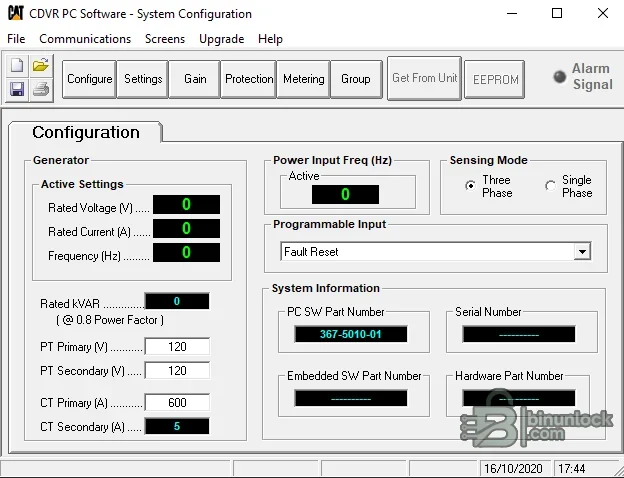
A voltage regulator directly influences generator excitation and output. Configuration or live testing must be performed by a qualified generator technician with the machine isolated or operated under a controlled service procedure.
What this resource is for#
Use the software to retrieve, document and adjust supported CDVR configuration during regulator commissioning, replacement or fault diagnosis. It can help compare nameplate and transformer settings, inspect metering and protection values and preserve configuration before a component is changed.Confirmed functions#
- Retrieve configuration from a connected supported CDVR
- Review rated generator voltage, current, frequency and reactive-power values
- Set or verify PT and CT primary/secondary ratios
- Select sensing mode and supported external-input behavior
- Review gain and regulator settings
- Inspect protection and metering pages
- Work with group parameters and EEPROM functions where supported
- Record regulator and control-board part-number fields
Supported vehicles, controllers and files#
- Designed for Caterpillar digital voltage regulator hardware shown by the CDVR application
- Applicable generator set and alternator combinations depend on Caterpillar service literature and regulator part number
- The UI includes single- and three-phase sensing choices and common fifty/sixty-hertz configuration
- PT, CT, droop, excitation and protection behavior must match the actual generator wiring
- No claim is made that the utility supports unrelated EMCP, IVR or third-party regulator hardware
Package contents#
- Single native Windows CDVR service executable
- Original system-configuration screenshot
- No generator calibration, firmware collection, service cable or Caterpillar SIS entitlement
- Executable has no reliable embedded product-version data and was never launched during preparation
System, hardware and interface requirements#
- Dedicated Windows service laptop; legacy compatibility settings may be required
- Exact Caterpillar CDVR hardware and the correct service communication cable/interface
- Caterpillar service information and generator wiring diagram for the serial number
- Qualified generator technician and controlled access to energized equipment
- Metering instruments, lockout/tagout procedure and stable auxiliary power as specified
Recommended workshop workflow#
- Record generator serial, alternator, regulator and control-panel part numbers
- Apply lockout/tagout and inspect wiring, fuses, grounds and sensing circuits
- Connect using the documented cable and retrieve the full existing configuration
- Compare every rating and PT/CT field against the nameplate and wiring diagram
- Change one parameter group at a time and save a dated backup
- Run only the prescribed commissioning tests, verify output and protection, then document final values
Compatibility limits and responsible use#
- Incorrect PT or CT ratios can make displayed values and control behavior dangerously wrong
- Gain or protection changes can destabilize voltage regulation or remove necessary protection
- Do not connect or disconnect service wiring on energized equipment unless the official procedure explicitly requires it
- The application does not replace generator insulation, grounding or excitation-system tests
- EEPROM operations require a recovery plan and correct hardware identification
Troubleshooting#
- No communication: verify regulator power, service connector pinout, cable and legacy driver
- Readings are scaled incorrectly: compare PT/CT ratios with wiring and nameplate data
- Voltage is unstable: restore baseline settings and inspect sensing, excitation and generator condition
- Protection trips after configuration: review thresholds, delays, frequency and nominal ratings
- EEPROM action fails: do not power-cycle blindly; preserve logs and follow Caterpillar recovery information


